
- Posts: 2510
- Thank you received: 2182
HOW TO USE PICASO, OR NOT COS ITS NAFF (for alan)
- Sarah-Jane Smith
-
 Topic Author
- Offline
- Forum Veteran
-

- Gone
Less
More
02 Nov 2013 00:05 - 02 Nov 2013 00:18 #1
by Sarah-Jane Smith
I wish I was a glow worm, a glow worm's never glum.
Cos how can you be grumpy when the sun shines out your bum?!
HOW TO USE PICASO, OR NOT COS ITS NAFF (for alan) was created by Sarah-Jane Smith
Ok, I am no computer whizz but hope this helps.
In order to view pictures that you have downloaded onto your computer you need a programe that is an image viewer. Most computer operating systems come with one already installed, microsoft picture editor, windows photo gallery, adobe photoshop, coral photo, paintstop pro and picasa etc etc. My personal preference is Microsoft picture editor, just because I find it easier to use. Some ofthe programmes are very good but a bit too technical.
1. So first off, to find out which you are using is pretty easy as is to change it. First find a picture on your computer and right click on it, select properties and you should see something like this (this is on windows vista, dont think it is much different for xp or windows 7- but windows 7 is on upstairs computer and am not going upstairs to check!!!

You can see from the picture above that I am opening my pictures with microsoft office 2010
2. Now if I wanted to change my pictures to open with another picture image viewer than it is easypeasy lemon squeezy and once done will apply to ALL pictures that you open.
click on the "change" and you should then get a box like this-

You can see fromthe above picture that you have 4 options to open it with, on your computer there may be more,there may be less- it depends on what you have installed, for the purpose of this demonstration I am going to show how to change it to Picasa which is what Alan is using.
on clicking change then select picasa, press apply then ok- you will notice now that when you repeat the first step above the pictures is now shown to open in another image viewer ie picasa

In order to view pictures that you have downloaded onto your computer you need a programe that is an image viewer. Most computer operating systems come with one already installed, microsoft picture editor, windows photo gallery, adobe photoshop, coral photo, paintstop pro and picasa etc etc. My personal preference is Microsoft picture editor, just because I find it easier to use. Some ofthe programmes are very good but a bit too technical.
1. So first off, to find out which you are using is pretty easy as is to change it. First find a picture on your computer and right click on it, select properties and you should see something like this (this is on windows vista, dont think it is much different for xp or windows 7- but windows 7 is on upstairs computer and am not going upstairs to check!!!
You can see from the picture above that I am opening my pictures with microsoft office 2010
2. Now if I wanted to change my pictures to open with another picture image viewer than it is easypeasy lemon squeezy and once done will apply to ALL pictures that you open.
click on the "change" and you should then get a box like this-
You can see fromthe above picture that you have 4 options to open it with, on your computer there may be more,there may be less- it depends on what you have installed, for the purpose of this demonstration I am going to show how to change it to Picasa which is what Alan is using.
on clicking change then select picasa, press apply then ok- you will notice now that when you repeat the first step above the pictures is now shown to open in another image viewer ie picasa
I wish I was a glow worm, a glow worm's never glum.
Cos how can you be grumpy when the sun shines out your bum?!
Last edit: 02 Nov 2013 00:18 by Sarah-Jane Smith.
Please Log in or Create an account to join the conversation.
- Sarah-Jane Smith
-
Topic Author
- Offline
- Forum Veteran
-
- Gone
Less
More
- Posts: 2510
- Thank you received: 2182
02 Nov 2013 00:32 - 02 Nov 2013 00:36 #2
by Sarah-Jane Smith
thank you, tho just taken me ages to get second picture to upload with addition of red arrows on grrrr!!
Ok next.
For the purpose of Alan, he is using Picasa- its naff, I don't like it therefore it is naff, I am female therefore am 100% right :lol: and would recommend Alan changes too something else, simples.
Alan, your pictures are not saved to picasa, they are already on your computer somewhere- it is just when you want to view them your computer opens them using the picasa program. You should be able to change it pretty easiliy following the above steps if you should choose to ...if you don't want to change them thats ok, just remember the rest ofthis will be written through gritted teeth whilst cursing you, calling you names and trying to telepathically inject into your head "Sarah is right, she is female,they are always right therefore I shall change it"................no pressure Alan,honest :evil: What we need to do is find where all your pictures are on your computer and there are various ways of doing this.searching for images on a comp but to make it easy am going to do it my way, cos only way I know lol!
To start with lets look at the image from above. you will see the red arrow points to where the picture is located on your comp. All you need to do is then go to that place on your comp and heh presto.

Now this is just one image and for the purpose of this lets go see if we can find where ALL of your pictures are stored when you have put them on the computer from your camera. So lets open Picasa (kicks cat, pulls face :whistle: )
Ok, so the wonderful world of Picasa..... (gritted teeth, you are feeling sleepy.........) looks like this....

Now you will notice the big red arrow pointing to the bar to the side with the grey arrows, you can use these grey arrows to to move up and down to see what folders picasa is looking at for pictures because that is what picasa has done, it has basically searched for all your files that contain pictures and loaded em up for you.
so when i move my arrow down i get these folders showing too-

I wish I was a glow worm, a glow worm's never glum.
Cos how can you be grumpy when the sun shines out your bum?!
Replied by Sarah-Jane Smith on topic HOW TO USE PICASO, OR NOT COS ITS NAFF (for alan)
Garry Pollard wrote: Very well explained Sarah, Thank you
Garry
thank you, tho just taken me ages to get second picture to upload with addition of red arrows on grrrr!!
Ok next.
For the purpose of Alan, he is using Picasa- its naff, I don't like it therefore it is naff, I am female therefore am 100% right :lol: and would recommend Alan changes too something else, simples.
Alan, your pictures are not saved to picasa, they are already on your computer somewhere- it is just when you want to view them your computer opens them using the picasa program. You should be able to change it pretty easiliy following the above steps if you should choose to ...if you don't want to change them thats ok, just remember the rest ofthis will be written through gritted teeth whilst cursing you, calling you names and trying to telepathically inject into your head "Sarah is right, she is female,they are always right therefore I shall change it"................no pressure Alan,honest :evil: What we need to do is find where all your pictures are on your computer and there are various ways of doing this.searching for images on a comp but to make it easy am going to do it my way, cos only way I know lol!
To start with lets look at the image from above. you will see the red arrow points to where the picture is located on your comp. All you need to do is then go to that place on your comp and heh presto.
Now this is just one image and for the purpose of this lets go see if we can find where ALL of your pictures are stored when you have put them on the computer from your camera. So lets open Picasa (kicks cat, pulls face :whistle: )
Ok, so the wonderful world of Picasa..... (gritted teeth, you are feeling sleepy.........) looks like this....
Now you will notice the big red arrow pointing to the bar to the side with the grey arrows, you can use these grey arrows to to move up and down to see what folders picasa is looking at for pictures because that is what picasa has done, it has basically searched for all your files that contain pictures and loaded em up for you.
so when i move my arrow down i get these folders showing too-
I wish I was a glow worm, a glow worm's never glum.
Cos how can you be grumpy when the sun shines out your bum?!
Last edit: 02 Nov 2013 00:36 by Sarah-Jane Smith.
Please Log in or Create an account to join the conversation.
- Sarah-Jane Smith
-
Topic Author
- Offline
- Forum Veteran
-
- Gone
Less
More
- Posts: 2510
- Thank you received: 2182
02 Nov 2013 00:45 #3
by Sarah-Jane Smith
I wish I was a glow worm, a glow worm's never glum.
Cos how can you be grumpy when the sun shines out your bum?!
Replied by Sarah-Jane Smith on topic HOW TO USE PICASO, OR NOT COS ITS NAFF (for alan)
Now scrolly, scrolly, scrolly, look for where your pictures are going and then all you need to do is hoover over the button like this-
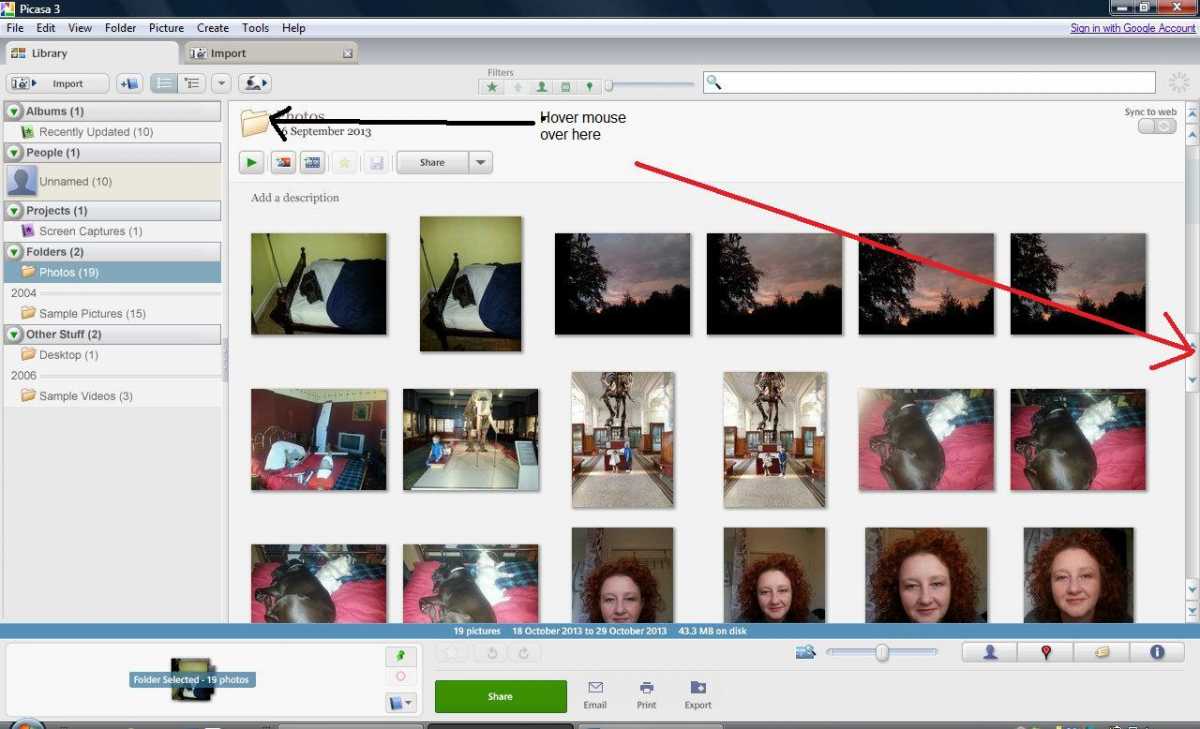
And it tells you in the box where the black arrow points where your particular group of pictures are saved on your computer
another way to do this is to singularly pic a picture and click a picture and do this-
Right click on any picture and choose properties and you will have this show up on your screen
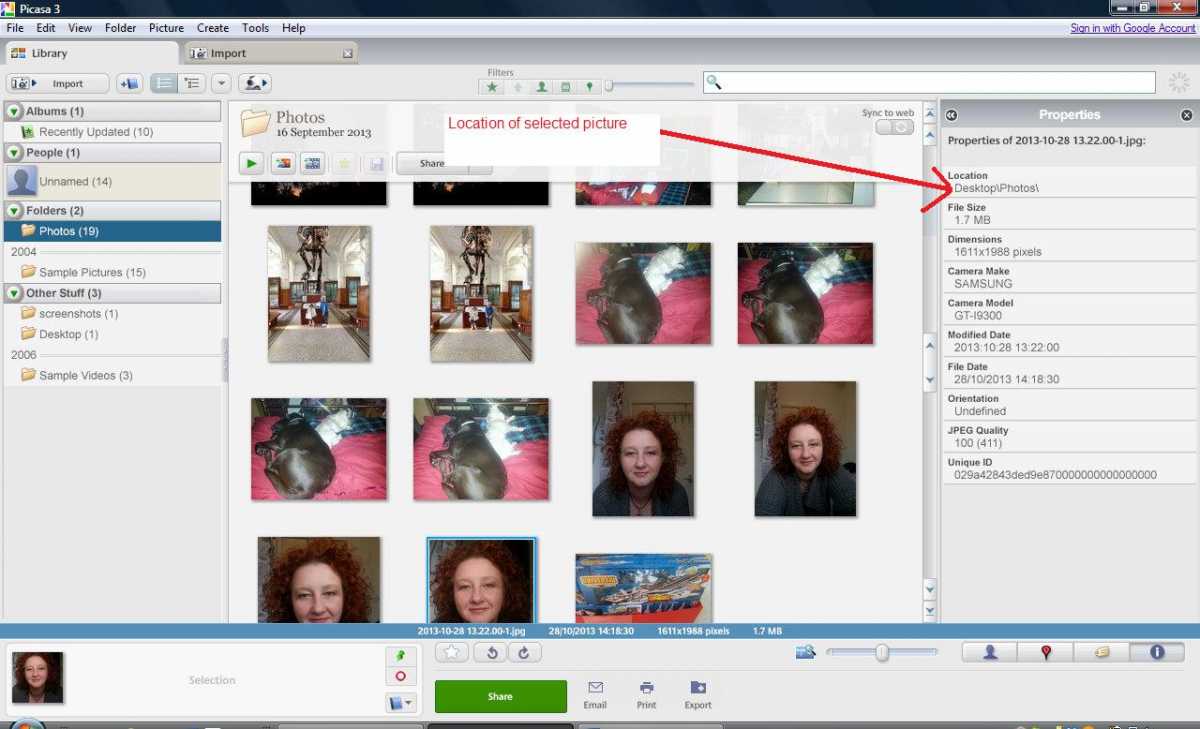
as you can see from my screenshot, the picture downloaded from my phone camera is saved in desktop\photos. The other way to find a picture is to right click on the picture you want to find and select “locate on disk”

after that your screen should show this-

and you can see the picture is saved in desktop\ photos\.\. All you need to do, should you need to use a picture for a forum/ebay is to find the folder where all your picaso pictures are saved. You can find things anytime using the right click, then selecting properties.
However, have I mentioned how much I hate picasa? Here is what I would suggest doing, for the sake of getting all the pictures into the same place for ease of access, lets do some saving and moving of pictures.
And it tells you in the box where the black arrow points where your particular group of pictures are saved on your computer
another way to do this is to singularly pic a picture and click a picture and do this-
Right click on any picture and choose properties and you will have this show up on your screen
as you can see from my screenshot, the picture downloaded from my phone camera is saved in desktop\photos. The other way to find a picture is to right click on the picture you want to find and select “locate on disk”
after that your screen should show this-
and you can see the picture is saved in desktop\ photos\.\. All you need to do, should you need to use a picture for a forum/ebay is to find the folder where all your picaso pictures are saved. You can find things anytime using the right click, then selecting properties.
However, have I mentioned how much I hate picasa? Here is what I would suggest doing, for the sake of getting all the pictures into the same place for ease of access, lets do some saving and moving of pictures.
I wish I was a glow worm, a glow worm's never glum.
Cos how can you be grumpy when the sun shines out your bum?!
Please Log in or Create an account to join the conversation.
- Sarah-Jane Smith
-
Topic Author
- Offline
- Forum Veteran
-
- Gone
Less
More
- Posts: 2510
- Thank you received: 2182
02 Nov 2013 01:17 #4
by Sarah-Jane Smith
I wish I was a glow worm, a glow worm's never glum.
Cos how can you be grumpy when the sun shines out your bum?!
Replied by Sarah-Jane Smith on topic HOW TO USE PICASO, OR NOT COS ITS NAFF (for alan)
So, you have scrolled through the delightful picasa (the pinot gregio is kicking in) finding out where your pictures are stored but you want to have them all in one place so that when you come to post them on a forum or for ebay you can find them easy peasy, I would recommend you move them all into one folder that can then have itsy bitsy sub folders in it for seperating into themes. THEN after doing that change your image viewer to another from the above first thread! :whistle:
So am assuming you are complete novice, so excuse if am teaching you to suck eggs,
Right click on your desktop and make a folder, rename it "photos" or "Alan's oop north memory box", whatever you want to call it
Just in case you dont know how to here is another daft screen shot-

To change the name just right click on the new folder and choose the option rename. Then open the folder up.
then open up the wonderful picasa (hic, burp,second glass of wine!) and minimise it so you have the folder on one side, pis..casa ahem sorry :whistle: cant spell :whistle: , on the other like so.

you dont have to open the folder but am doing it for a reason (of which escapes me at the moment, but see first post the bit that says females are 100% right all the time!)
Now you will see there are two folders showing on the screen shot, "photos" and "sample pictures" Now i want to move both to the new folder so lets start with the "photos" one first. First you need to highlight that particular folder and you do that by clicking on it like so-

There is only one picture in here (this is the laptop, i had to put pictures on the laptop, as there are no pictures on here, for the purpose of picabloodycassa :evil:
So all you need to do now is to "select all" this is done as so-

You will then see the pic of Barney is now highlighted, all you then have to do is left click on the picture and hold it down whilst moving the picture over to the new folder on the left as so, and letting go

And that is all you need to do, do the same for other folders on picanose and you can transfer big piles of pictures over to the new folder. I would then, have i mentioned this already? :whistle: :whistle: :whistle: change the pictures to open in something else.......... No doubt I shall then hear the blinkin screams from Oldham as to "where are all my...... bleep...bleep... pictures now going from my camera!" hehe. But that is another story for another day boys and gals!
So am assuming you are complete novice, so excuse if am teaching you to suck eggs,
Right click on your desktop and make a folder, rename it "photos" or "Alan's oop north memory box", whatever you want to call it
Just in case you dont know how to here is another daft screen shot-
To change the name just right click on the new folder and choose the option rename. Then open the folder up.
then open up the wonderful picasa (hic, burp,second glass of wine!) and minimise it so you have the folder on one side, pis..casa ahem sorry :whistle: cant spell :whistle: , on the other like so.
you dont have to open the folder but am doing it for a reason (of which escapes me at the moment, but see first post the bit that says females are 100% right all the time!)
Now you will see there are two folders showing on the screen shot, "photos" and "sample pictures" Now i want to move both to the new folder so lets start with the "photos" one first. First you need to highlight that particular folder and you do that by clicking on it like so-
There is only one picture in here (this is the laptop, i had to put pictures on the laptop, as there are no pictures on here, for the purpose of picabloodycassa :evil:
So all you need to do now is to "select all" this is done as so-
You will then see the pic of Barney is now highlighted, all you then have to do is left click on the picture and hold it down whilst moving the picture over to the new folder on the left as so, and letting go
And that is all you need to do, do the same for other folders on picanose and you can transfer big piles of pictures over to the new folder. I would then, have i mentioned this already? :whistle: :whistle: :whistle: change the pictures to open in something else.......... No doubt I shall then hear the blinkin screams from Oldham as to "where are all my...... bleep...bleep... pictures now going from my camera!" hehe. But that is another story for another day boys and gals!
I wish I was a glow worm, a glow worm's never glum.
Cos how can you be grumpy when the sun shines out your bum?!
Please Log in or Create an account to join the conversation.
- Sarah-Jane Smith
-
Topic Author
- Offline
- Forum Veteran
-
- Gone
Less
More
- Posts: 2510
- Thank you received: 2182
02 Nov 2013 01:30 #5
by Sarah-Jane Smith
I wish I was a glow worm, a glow worm's never glum.
Cos how can you be grumpy when the sun shines out your bum?!
Replied by Sarah-Jane Smith on topic HOW TO USE PICASO, OR NOT COS ITS NAFF (for alan)
Now this is why I use Microsoft office picture viewer, for me it is so much simplier to use-
This is a folder of pictures as opposed to the one you have on Picasa

You can change the size of the pictures to view them as thumbnails at a glance, then to see one up close to edit it you can double click on one pic and it looks like this-

yeah, he really IS that bloody wussy,nicking the spare bed and getting UNDER the covers!!
Now when I upload pictures to here I just change the size, I have found that my camera takes pretty big pictures of over a 1000 something (dunno what, they are all on my main comp in the bedroom and cba going upstairs! :woohoo: but to upload these on the forum it takes forever or it just wont do it, so I reduce them to 800x600px and the forum seems to like that. Just click on Edit button, then resize and drop down box as so-

And then tis easy to upload, well it would be if I didnt take about 1000 pictures per outing!!!! Now Mr Poyser did mention he changed his all in a batch, but I cant remember now how to do that
This is a folder of pictures as opposed to the one you have on Picasa
You can change the size of the pictures to view them as thumbnails at a glance, then to see one up close to edit it you can double click on one pic and it looks like this-
yeah, he really IS that bloody wussy,nicking the spare bed and getting UNDER the covers!!
Now when I upload pictures to here I just change the size, I have found that my camera takes pretty big pictures of over a 1000 something (dunno what, they are all on my main comp in the bedroom and cba going upstairs! :woohoo: but to upload these on the forum it takes forever or it just wont do it, so I reduce them to 800x600px and the forum seems to like that. Just click on Edit button, then resize and drop down box as so-
And then tis easy to upload, well it would be if I didnt take about 1000 pictures per outing!!!! Now Mr Poyser did mention he changed his all in a batch, but I cant remember now how to do that
I wish I was a glow worm, a glow worm's never glum.
Cos how can you be grumpy when the sun shines out your bum?!
Thanks: alan cantwell
Please Log in or Create an account to join the conversation.
- The Beard
-

- Offline
- Forum Master
-

Less
More
- Posts: 6913
- Thank you received: 2167
02 Nov 2013 02:27 #6
by The Beard
Replied by The Beard on topic HOW TO USE PICASO, OR NOT COS ITS NAFF (for alan)
Sarah you are so clever and have put a lot of effort into this well done.I use Photobucket
Thanks: Sarah-Jane Smith, alan cantwell
Please Log in or Create an account to join the conversation.
- alan cantwell
-

- Offline
- Banned
-

Less
More
- Posts: 1768
- Thank you received: 1918
02 Nov 2013 08:39 - 02 Nov 2013 09:07 #7
by alan cantwell
i have 2 sides
no you dont,
yes i do,
Replied by alan cantwell on topic HOW TO USE PICASO, OR NOT COS ITS NAFF (for alan)
Sarah, many many thanks, this was not on when i went to kip last night, so gawd knows when you did it!!!! i will try and follow, but i could do with printing it out, now then, how do you get this virgin superhub to recognise the wi-fi signal, as a matter of interest, Sarah uses microsoft, Mr Beard uses photobucket, what do the rest of you use? whats the easiest?
as a matter of interest, Sarah uses microsoft, Mr Beard uses photobucket, what do the rest of you use? whats the easiest? i have 2 sides
no you dont,
yes i do,
Last edit: 02 Nov 2013 09:07 by .
Please Log in or Create an account to join the conversation.
- User
-

Less
More
- Thank you received: 0
02 Nov 2013 09:11 #8
by
Replied by on topic HOW TO USE PICASO, OR NOT COS ITS NAFF (for alan)
Very well explained Sarah, thank you. I thought the first post was the whole thing,, never expected a tutorial like this. Well done .
Garry
Garry
Please Log in or Create an account to join the conversation.
- old fart
-

- Offline
- Forum Veteran
-
Less
More
- Posts: 2144
- Thank you received: 705
02 Nov 2013 10:26 #9
by old fart
Hmmm.... I must be female then.

There is nothing like a dream to create the future.
Electrickery is the work of the devil.
Replied by old fart on topic HOW TO USE PICASO, OR NOT COS ITS NAFF (for alan)
Sarah-Jane Smith wrote: females are 100% right all the time!)
Hmmm.... I must be female then.
There is nothing like a dream to create the future.
Electrickery is the work of the devil.
Thanks: Sarah-Jane Smith
Please Log in or Create an account to join the conversation.
- Sarah-Jane Smith
-
Topic Author
- Offline
- Forum Veteran
-
- Gone
Less
More
- Posts: 2510
- Thank you received: 2182
02 Nov 2013 10:27 - 02 Nov 2013 10:28 #10
by Sarah-Jane Smith
Ahh no, now you are confusing an image viewer with an image hosting service.
In both cases the pictures are usually stored first on your computer. With an image viewer you just use that program to view your pictures on your computer. With an image viewer only person who sees the pictures are the ones looking at them on the comp, no one else can see them unless you choose to post them somewhere on the internet.
Thats where an image hosting service comes in, this is usually internet based and you upload your pictures to an interernet web host service and they are then available for anyone else on the internet to see (or not, if you reset the privacy settings on it) However you are not sharing ALL the pictures on your computer, just the ones you choose to upload- so no one is getting access via the net to your personal pics stored on your computer before you worry, just the ones you pick to upload to the internet via a hosting service. Once you have uploaded them you then can view them too, so the image hosting acts as a folder (just like the one we created last night on here on desktop for Alan's pictures to be stored in) and an image viewer. Does that make sense?
The advantage with using an image hosting service is that you on some of them you can upload pictures DIRECTLY from a medium (your camera, your phone, etc) to the folder on the image hosting website as opposed to first saving them onto your computer and THEN uploading them to say photobucket or flker
Me personally, I use flker to save pictuers in for my parents to see online, with living in the caneries they can see them pretty easily. If I took a picture on my phone I could, if I wanted to, directly upload the picture from my phone to flker. However pictures I take with my proper camera do not have that option, so I have to save them to my photo folder on the computer and THEN upload them to flker.
Alan do you mean a wifi printer??
I wish I was a glow worm, a glow worm's never glum.
Cos how can you be grumpy when the sun shines out your bum?!
Replied by Sarah-Jane Smith on topic HOW TO USE PICASO, OR NOT COS ITS NAFF (for alan)
The Beard wrote: Sarah you are so clever and have put a lot of effort into this well done.I use Photobucket
Ahh no, now you are confusing an image viewer with an image hosting service.
In both cases the pictures are usually stored first on your computer. With an image viewer you just use that program to view your pictures on your computer. With an image viewer only person who sees the pictures are the ones looking at them on the comp, no one else can see them unless you choose to post them somewhere on the internet.
Thats where an image hosting service comes in, this is usually internet based and you upload your pictures to an interernet web host service and they are then available for anyone else on the internet to see (or not, if you reset the privacy settings on it) However you are not sharing ALL the pictures on your computer, just the ones you choose to upload- so no one is getting access via the net to your personal pics stored on your computer before you worry, just the ones you pick to upload to the internet via a hosting service. Once you have uploaded them you then can view them too, so the image hosting acts as a folder (just like the one we created last night on here on desktop for Alan's pictures to be stored in) and an image viewer. Does that make sense?
The advantage with using an image hosting service is that you on some of them you can upload pictures DIRECTLY from a medium (your camera, your phone, etc) to the folder on the image hosting website as opposed to first saving them onto your computer and THEN uploading them to say photobucket or flker
Me personally, I use flker to save pictuers in for my parents to see online, with living in the caneries they can see them pretty easily. If I took a picture on my phone I could, if I wanted to, directly upload the picture from my phone to flker. However pictures I take with my proper camera do not have that option, so I have to save them to my photo folder on the computer and THEN upload them to flker.
but i could do with printing it out, now then, how do you get this virgin superhub to recognise the wi-fi signal
Alan do you mean a wifi printer??
I wish I was a glow worm, a glow worm's never glum.
Cos how can you be grumpy when the sun shines out your bum?!
Last edit: 02 Nov 2013 10:28 by Sarah-Jane Smith.
Please Log in or Create an account to join the conversation.
- alan cantwell
-
- Offline
- Banned
-
Less
More
- Posts: 1768
- Thank you received: 1918
02 Nov 2013 11:04 #11
by alan cantwell
i have 2 sides
no you dont,
yes i do,
Replied by alan cantwell on topic HOW TO USE PICASO, OR NOT COS ITS NAFF (for alan)
YUP, its a wi fi printer, 
i have 2 sides
no you dont,
yes i do,
Please Log in or Create an account to join the conversation.
- Eric
-

- Offline
- Moderator
-

Less
More
- Posts: 13726
- Thank you received: 14467
02 Nov 2013 12:28 #12
by Eric
if you are calm and collected when all about you are going berserk - you've missed something important!
Replied by Eric on topic HOW TO USE PICASO, OR NOT COS ITS NAFF (for alan)
To paraphrase a snip from 'Karate Kid' - Rule one, a woman is always right. Rule two, - first learn rule one! [badass]
if you are calm and collected when all about you are going berserk - you've missed something important!
Thanks: Sarah-Jane Smith
Please Log in or Create an account to join the conversation.
- kamco kid
-

- Offline
- Elite Member
-

- has anyone found my marbles?
02 Nov 2013 17:13 #13
by kamco kid
Rich
I NEVER crash, Sometimes I just land quickly in an unexpected manner
Replied by kamco kid on topic HOW TO USE PICASO, OR NOT COS ITS NAFF (for alan)
Nice tutorial Sarah, and great use of screen shots
Rich
I NEVER crash, Sometimes I just land quickly in an unexpected manner
Thanks: Sarah-Jane Smith
Please Log in or Create an account to join the conversation.
- Sarah-Jane Smith
-
Topic Author
- Offline
- Forum Veteran
-
- Gone
Less
More
- Posts: 2510
- Thank you received: 2182
02 Nov 2013 18:41 #14
by Sarah-Jane Smith
I have stupidly volunteered to help my sister behind the bar at her pub for bonfire night so am off in a minute -cos I am stupid!!!!
When I get back will have a look, what make printer is it? Unless some kind person who isnt as stupid as me would like to step in and give you their pearls of wisom
I wish I was a glow worm, a glow worm's never glum.
Cos how can you be grumpy when the sun shines out your bum?!
Replied by Sarah-Jane Smith on topic HOW TO USE PICASO, OR NOT COS ITS NAFF (for alan)
alan cantwell wrote: YUP, its a wi fi printer,
I have stupidly volunteered to help my sister behind the bar at her pub for bonfire night so am off in a minute -cos I am stupid!!!!
When I get back will have a look, what make printer is it? Unless some kind person who isnt as stupid as me would like to step in and give you their pearls of wisom
I wish I was a glow worm, a glow worm's never glum.
Cos how can you be grumpy when the sun shines out your bum?!
Please Log in or Create an account to join the conversation.
- User
-
Less
More
- Thank you received: 0
02 Nov 2013 18:49 #15
by
Replied by on topic HOW TO USE PICASO, OR NOT COS ITS NAFF (for alan)
Count me out please :woohoo: :woohoo: :evil: :evil:
Garry
Garry
Please Log in or Create an account to join the conversation.
Time to create page: 0.976 seconds