
Black 3018 CNC router
- Klipkopwildlife
-
 Topic Author
- Offline
- Administrator
-

- I'm supposed to be retired!
I made Tape emulators using my own design hardware and Sinclair Spectrum computers. You could take a new program to the machine on a Microdrive. I wrote the Machine code myself. It was so successful I took my designs to the UK in 1985. Never got a cent in Royalties! I later saw in a Machine tool magazine there were quite a few machines modified in the UK! Thieving bugger!paul d wrote: Cor Klippy the name cincinatti brings back memories! first cnc mill I used was a cincinatti with moog hydrapoint control with paper tape memory!!
Do it now, you may never get another chance
Please Log in or Create an account to join the conversation.
- Klipkopwildlife
-
Topic Author
- Offline
- Administrator
-
- I'm supposed to be retired!
I unplugged the motor and mounted the laser, plugged it in, and nothing! I could not get it to work using the supplied program. Finally, quite by accident I spotted the problem.

This is the control board without its cover, at the bottom left are 2 white sockets, the laser which has 3 wires, it's a PWM plugs into the 3 way socket. You can see that the shroud is displaced compared to the 2 way one on its left. The 3 way shroud was the other way up, when the laser was plugged in it was getting no power, much like a servo that's plugged in the wrong way round. I pulled the shroud off, put it back the way you see it and bingo, a working laser! The laser power is selectable from within the operating program, a low power setting is available for focusing, although from what I can see the focus seems to change when you put it on full power! tried 1 or 2 sample programs and the laser did what it was supposed to.
Do it now, you may never get another chance
Please Log in or Create an account to join the conversation.
- Klipkopwildlife
-
Topic Author
- Offline
- Administrator
-
- I'm supposed to be retired!
Firstly everything must be switched on, this may sound obvious but you can actually speak to the Arduino (the interface and main computer) without anything switched on except the computer.
So, start ZOC.
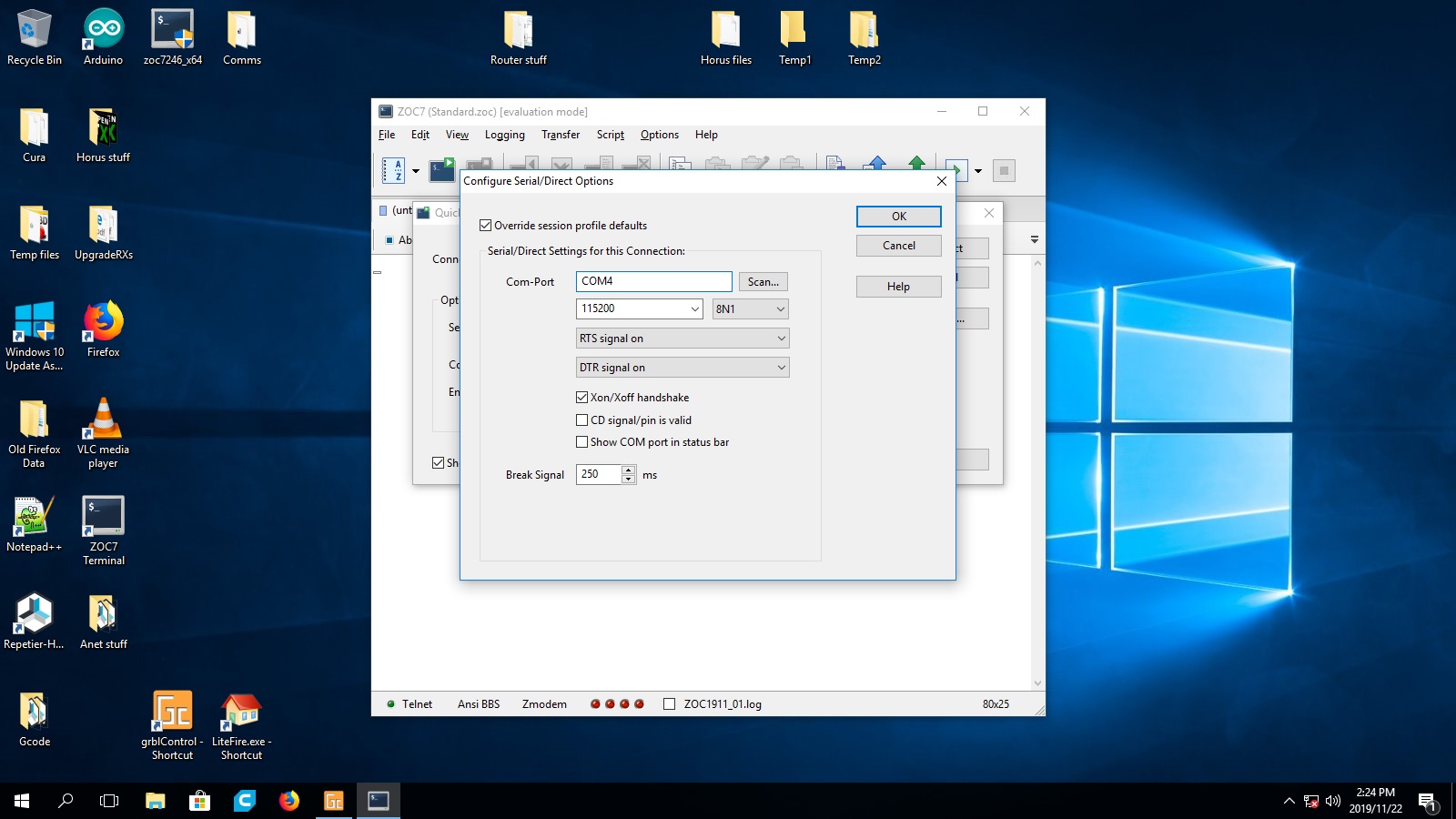
On the top left of the first screen you have a GUI (small screen with a green arrow) click on it, then click on options and you will get the above screen, these settings are the only ones that will work! My machine always connects to COM4, other computers may be different.
Click OK and you should get this.

Type $ for help right? I was stuck for 2 days here!
Do it now, you may never get another chance
Please Log in or Create an account to join the conversation.
- Klipkopwildlife
-
Topic Author
- Offline
- Administrator
-
- I'm supposed to be retired!

The !@#$%^&*() program doesn't echo to the home screen!
I found the rapid setting for X and Y at 5,000mm/minute! Totally unreasonable. I had already disconnected the lead screws and found that my problem didn't go away, reducing the rapids to 1,400/min gave me a reliable rapid (1,500 was a no no) so I came off that a bit and settled on 1,250mm/min for X and Y with and acceleration of 100mm/sec/sec these settings seem to be rock solid.
Now I could put in long distances without fear of the motors baling out, which threw up another problem!
Do it now, you may never get another chance
Please Log in or Create an account to join the conversation.
- crash happy
-

- Offline
- Platinum Member
-

- Oops. did I say that out loud!
- Posts: 1250
- Thank you received: 1203
Please Log in or Create an account to join the conversation.
- Klipkopwildlife
-
Topic Author
- Offline
- Administrator
-
- I'm supposed to be retired!

A common error in mass production is turning the work piece around to finish it. The coupling needs a 5mm hole on one side and an 8mm one on the other. The only correct way to make this is to drill through the stock with a cutter guaranteed not to wander off, then drill to size with a 5mm drill all the way through, then drill halfway with an 8mm drill, ie, all in one setting.
This sorted out my problems in the Y axis and 80% in the X axis, but, the shaft of the stepper motor is slightly bent! But I am now ready to cut balsa!
Do it now, you may never get another chance
Please Log in or Create an account to join the conversation.
- Ralpharr2001
-

- Offline
- Elite Member
-

- Posts: 496
- Thank you received: 1484
I'm currently unsupervised. I know it freaks me out as well, but the possibilities are endless!!
Please Log in or Create an account to join the conversation.
- Quorneng
-

- Offline
- Forum Master
-

- Posts: 9436
- Thank you received: 19043

The two diameters will be in line to the accuracy of the lathe.

Please Log in or Create an account to join the conversation.
- Klipkopwildlife
-
Topic Author
- Offline
- Administrator
-
- I'm supposed to be retired!
Do it now, you may never get another chance
Please Log in or Create an account to join the conversation.
- Klipkopwildlife
-
Topic Author
- Offline
- Administrator
-
- I'm supposed to be retired!
Do it now, you may never get another chance
Please Log in or Create an account to join the conversation.
- Quorneng
-
- Offline
- Forum Master
-
- Posts: 9436
- Thank you received: 19043
My super cheap 'bottom of the heap' Anet A8 has exactly those on its Z axis lead screws. Even so one of them is very slightly out of alignment. :woohoo: )
However the very 'flexibility' built into such a coupler means it is no problem.
Please Log in or Create an account to join the conversation.
- Klipkopwildlife
-
Topic Author
- Offline
- Administrator
-
- I'm supposed to be retired!

My first ClarkY!
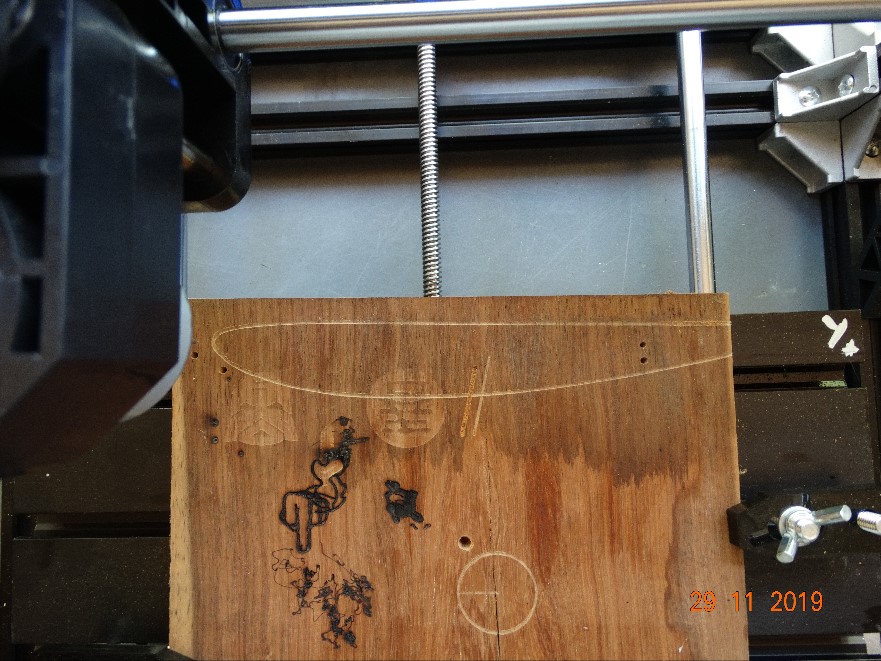
I have a large archive of airfoil coordinates, turning them into a CNC program is proving to be a very time consuming exercise!
Do it now, you may never get another chance
Please Log in or Create an account to join the conversation.
- Klipkopwildlife
-
Topic Author
- Offline
- Administrator
-
- I'm supposed to be retired!


Any ideas?
Do it now, you may never get another chance
Please Log in or Create an account to join the conversation.
- Klipkopwildlife
-
Topic Author
- Offline
- Administrator
-
- I'm supposed to be retired!

Do it now, you may never get another chance
Please Log in or Create an account to join the conversation.
- Quorneng
-
- Offline
- Forum Master
-
- Posts: 9436
- Thank you received: 19043
A classic WW1 biplane wing section that is just 6.5% thick which is why many scale biplane models look 'wrong'.
Please Log in or Create an account to join the conversation.