
- Posts: 757
- Thank you received: 1164
RC software tools
- jon.in.swansea
-
 Topic Author
- Offline
- Elite Member
-

Less
More
19 May 2023 09:39 - 19 May 2023 10:04 #1
by jon.in.swansea
RC software tools was created by jon.in.swansea
There are quite a few tools on the web that make RC scratch build modeller's lives a bit easier. This topic could be a good collection point for links, hints and software.
To start it off there is an initial planning site: www.radiocontrolinfo.com/rc-calculators/...e-design-calculator/ which takes in a limited number of parameters and makes a report of suggested dimensions and areas. It uses imperial units and I like to layout in mm on grid paper so a bit of a hassle...
Then there is a site that helps with designing wing plan forms:
aerotoolbox.com/wing-plot-tool/
Here is an output for a 40" span, 8" root and a taper ratio of 0.67
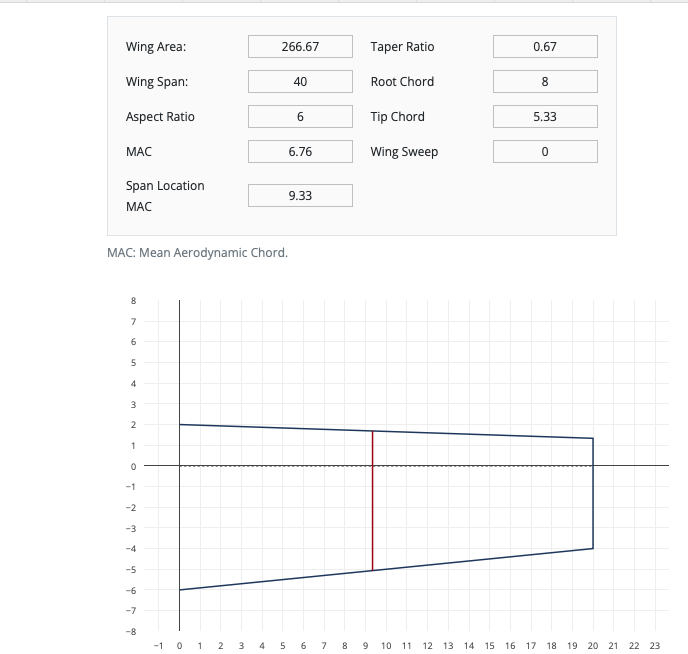
Here is the same but with a taper that is close to what one would get with an eleptical wing.

And taking the area and wanting to initially plan for the other control surfaces the process slowed to a crawl when trying different layouts on sketch paper and doing the manual calculations to get their area.
So a bit of looking around the web there are places that will calculate areas but each had limitations like rounding the area to an integer.
www.mathsisfun.com/geometry/area-polygon-drawing.html

In my day job I used to do coding. Found some python that took a list of X Y coordinates and does the calculation. I tried it and it worked but it needed an interface and some flexibility in terms of the measurement units. Here is what a session looks like that is inputting the coordinates from the above close-to-eleptic wing (sorry about the double spacing):
jon$ python3 polyfind_d.py
Units: A) inches m C) mm [A/B/C]? : A
Coordiantes in decimal inches:
Enter X coordinates in order followed by a blank line
0.0
20.0
20.0
0
Enter Y coordinates in order followed by a blank line
-6
-2.5
0.9
2
X Y= 0.0 -6.0X Y= 20.0 -2.5X Y= 20.0 0.9X Y= 0.0 2.0
input inches output sq inches: 114.0
input inches output m2: 0.07354824
input inches output dm2: 7.35482
Ok - very basic, few bells and whistles but it is going to save me a lot of time. It is 50 lines of python and should be runnable on just about any computer that has a python3 interpreter. I attach a text file. It needs to be renamed to polyfind.py in order to run via the command python3 polyfind.py
Enjoy - Jon
To start it off there is an initial planning site: www.radiocontrolinfo.com/rc-calculators/...e-design-calculator/ which takes in a limited number of parameters and makes a report of suggested dimensions and areas. It uses imperial units and I like to layout in mm on grid paper so a bit of a hassle...
Then there is a site that helps with designing wing plan forms:
aerotoolbox.com/wing-plot-tool/
Here is an output for a 40" span, 8" root and a taper ratio of 0.67
Here is the same but with a taper that is close to what one would get with an eleptical wing.
And taking the area and wanting to initially plan for the other control surfaces the process slowed to a crawl when trying different layouts on sketch paper and doing the manual calculations to get their area.
So a bit of looking around the web there are places that will calculate areas but each had limitations like rounding the area to an integer.
www.mathsisfun.com/geometry/area-polygon-drawing.html
In my day job I used to do coding. Found some python that took a list of X Y coordinates and does the calculation. I tried it and it worked but it needed an interface and some flexibility in terms of the measurement units. Here is what a session looks like that is inputting the coordinates from the above close-to-eleptic wing (sorry about the double spacing):
jon$ python3 polyfind_d.py
Units: A) inches
m C) mm [A/B/C]? : ACoordiantes in decimal inches:
Enter X coordinates in order followed by a blank line
0.0
20.0
20.0
0
Enter Y coordinates in order followed by a blank line
-6
-2.5
0.9
2
X Y= 0.0 -6.0X Y= 20.0 -2.5X Y= 20.0 0.9X Y= 0.0 2.0
input inches output sq inches: 114.0
input inches output m2: 0.07354824
input inches output dm2: 7.35482
Ok - very basic, few bells and whistles but it is going to save me a lot of time. It is 50 lines of python and should be runnable on just about any computer that has a python3 interpreter. I attach a text file. It needs to be renamed to polyfind.py in order to run via the command python3 polyfind.py
This attachment is hidden for guests.
Please log in or register to see it.
Please log in or register to see it.
Enjoy - Jon
Attachments:
Last edit: 19 May 2023 10:04 by jon.in.swansea. Reason: Needed to add some attachments and correct spacing and get web site correct.
Thanks: Klipkopwildlife, Quorneng
Please Log in or Create an account to join the conversation.
- jon.in.swansea
-
Topic Author
- Offline
- Elite Member
-
Less
More
- Posts: 757
- Thank you received: 1164
23 May 2023 15:15 #2
by jon.in.swansea
Replied by jon.in.swansea on topic RC software tools
I thought that with all the folk looking at the site that someone would have an active scratch-build project that the surface area python tool might be useful for. It would be nice to get feedback on it  Even some 'sorry I couldn't get it working'.
and see some additions to the 'cool-software-found'.... come on all you 'lurkers' out there, you must have some sites with useful software tools that would be good to share.....
Even some 'sorry I couldn't get it working'. and see some additions to the 'cool-software-found'.... come on all you 'lurkers' out there, you must have some sites with useful software tools that would be good to share.....
Thanks: Klipkopwildlife
Please Log in or Create an account to join the conversation.
- Quorneng
-

- Offline
- Forum Master
-

Less
More
- Posts: 10058
- Thank you received: 19043
23 May 2023 16:50 #3
by Quorneng
Replied by Quorneng on topic RC software tools
jon
I made no comment on your post as I mostly build scale so for me the wing plan form is already fixed.
All I have to do is to decide on the span I want.
Google provides the full size wing area so its just a scaling job to work out what my model wing area will be.
I made no comment on your post as I mostly build scale so for me the wing plan form is already fixed.
All I have to do is to decide on the span I want.
Google provides the full size wing area so its just a scaling job to work out what my model wing area will be.
Thanks: Klipkopwildlife, jon.in.swansea
Please Log in or Create an account to join the conversation.
- THE BLACKBIRD
-

- Offline
- Forum Master
-
Less
More
- Posts: 6781
- Thank you received: 10722
23 May 2023 18:11 #4
by THE BLACKBIRD
Replied by THE BLACKBIRD on topic RC software tools
Jon i dont do computers, sometimes i wish i did
Thanks: Klipkopwildlife, jon.in.swansea
Please Log in or Create an account to join the conversation.
- Eric
-

- Offline
- Moderator
-

Less
More
- Posts: 15406
- Thank you received: 14305
23 May 2023 18:47 #5
by Eric
if you are calm and collected when all about you are going berserk - you've missed something important!
Replied by Eric on topic RC software tools
I also saw it, Jon, but as I don't have a printer, it is pretty irrelevent to me, so didn't comment.
if you are calm and collected when all about you are going berserk - you've missed something important!
Thanks: Klipkopwildlife
Please Log in or Create an account to join the conversation.
- jon.in.swansea
-
Topic Author
- Offline
- Elite Member
-
Less
More
- Posts: 757
- Thank you received: 1164
24 May 2023 07:32 - 24 May 2023 07:37 #6
by jon.in.swansea
Replied by jon.in.swansea on topic RC software tools
I would use this area tool for a foam skin over ribs scratch build. And to mock-up tail surfaces to match a known wing area if I was re-using a wing in a new fuselage.
Last night I used it to look at how to get a 16% aileron on a tapered trailing edge to understand trade-offs for the hinge line of the aileron. And in using it I evolved it a bit further to echo additional information to save a bit more fiddling with a hand calculator.

Here is some of the chatter in the revised tool for a hinge line roughly parallel with the trailing edge....
python3 polyfind_f.py
Units:A) inches m C) mm [A/B/C]? : C
Coordinates in mm:
Enter X coordinates (in order one per line) followed by a blank line
302
508
508
302
Enter Y coordinates (in order one per line) followed by a blank line
-100
-63.5
-24
-60
X mm Y mm Xinch Yinch
302.00 -100.00 11.890 -3.937
508.00 -63.50 20.000 -2.500
508.00 -24.00 20.000 -0.945
302.00 -60.00 11.890 -2.362
input mm output sq inches: 12.692
input mm output sq ft: 0.088
input mm output m2: 0.0082
input mm output dm2: 0.819
Here is the script. Rename it to polyfind.py and run via python3 polyfind.py
Last night I used it to look at how to get a 16% aileron on a tapered trailing edge to understand trade-offs for the hinge line of the aileron. And in using it I evolved it a bit further to echo additional information to save a bit more fiddling with a hand calculator.
Here is some of the chatter in the revised tool for a hinge line roughly parallel with the trailing edge....
python3 polyfind_f.py
Units:A) inches
m C) mm [A/B/C]? : CCoordinates in mm:
Enter X coordinates (in order one per line) followed by a blank line
302
508
508
302
Enter Y coordinates (in order one per line) followed by a blank line
-100
-63.5
-24
-60
X mm Y mm Xinch Yinch
302.00 -100.00 11.890 -3.937
508.00 -63.50 20.000 -2.500
508.00 -24.00 20.000 -0.945
302.00 -60.00 11.890 -2.362
input mm output sq inches: 12.692
input mm output sq ft: 0.088
input mm output m2: 0.0082
input mm output dm2: 0.819
Here is the script. Rename it to polyfind.py and run via python3 polyfind.py
This attachment is hidden for guests.
Please log in or register to see it.
Please log in or register to see it.
Attachments:
Last edit: 24 May 2023 07:37 by jon.in.swansea. Reason: Correct spacing on the listing.
Thanks: Klipkopwildlife
Please Log in or Create an account to join the conversation.
- Klipkopwildlife
-

- Offline
- Administrator
-

- I'm supposed to be retired!
24 May 2023 08:45 #7
by Klipkopwildlife
Do it now, you may never get another chance
Replied by Klipkopwildlife on topic RC software tools
Love what you're doing here Jon, I will find time to do something with it.
Do it now, you may never get another chance
Thanks: jon.in.swansea
Please Log in or Create an account to join the conversation.
- jon.in.swansea
-
Topic Author
- Offline
- Elite Member
-
Less
More
- Posts: 757
- Thank you received: 1164
24 May 2023 11:39 #8
by jon.in.swansea
Replied by jon.in.swansea on topic RC software tools
And I will be happy to help for who have 'teething problems'. Something working for me does not equal the beastie working for others on a different machine or operating system. What makes sense to the 'author' of software can be 'clear as mud' to others who try to use stuff (all that shouting at computers I hear in the next room).
Thanks: Klipkopwildlife
Please Log in or Create an account to join the conversation.
- admin
-

- Offline
- Administrator
-
- Make it count!
24 May 2023 19:52 #9
by admin
"most people give up just as they're about to succeed" Napoleon Hill
"luck is when preparation meets opportunity" Oprah Winfrey
Replied by admin on topic RC software tools
As a software developer it may be surprising to learn i am shocking at Maths.
If you tell me an input and an expected output. I can make it happen.
With that said though, There's no reason this type of thing couldn't be turned into an interactive web page.
If you tell me an input and an expected output. I can make it happen.
With that said though, There's no reason this type of thing couldn't be turned into an interactive web page.
"most people give up just as they're about to succeed" Napoleon Hill
"luck is when preparation meets opportunity" Oprah Winfrey
Thanks: Klipkopwildlife, Quorneng, jon.in.swansea
Please Log in or Create an account to join the conversation.
- admin
-
- Offline
- Administrator
-
- Make it count!
24 May 2023 19:57 #10
by admin
"most people give up just as they're about to succeed" Napoleon Hill
"luck is when preparation meets opportunity" Oprah Winfrey
Replied by admin on topic RC software tools
How cool would it be to have an interactive page to show you different wing designs in a 3D space and even use physics engines to simulate things like air flow and stress points using something like Three.js
"most people give up just as they're about to succeed" Napoleon Hill
"luck is when preparation meets opportunity" Oprah Winfrey
Thanks: Klipkopwildlife
Please Log in or Create an account to join the conversation.
- Klipkopwildlife
-
- Offline
- Administrator
-
- I'm supposed to be retired!
25 May 2023 08:49 #11
by Klipkopwildlife
Do it now, you may never get another chance
Replied by Klipkopwildlife on topic RC software tools
I've been looking for a Python emulator to use but can only find online versions. Any ideas? Online won't work for me owing to the very irregular availability of WiFi.

Do it now, you may never get another chance
Please Log in or Create an account to join the conversation.
- jon.in.swansea
-
Topic Author
- Offline
- Elite Member
-
Less
More
- Posts: 757
- Thank you received: 1164
25 May 2023 10:50 #12
by jon.in.swansea
Replied by jon.in.swansea on topic RC software tools
One of the reasons to upload the source was so that others could build on it and make it better. If someone was motivated to turn it into an interactive tool on the site that would be great.
AND one of my issues with web-based tools like the one I referenced in the initial post - where you put in a few high level measurements and it returned a report on various areas and fuselage measurements was that it only reported in imperial units. I don't know how to look at the underlying source to see how the sausage is made so as to create a variant. Perhaps it is not a black-box?
My point is that sometimes it is useful to find out the embedded rules within these tools so we can add our own experience to them or to decide that the rules are rubbish. Goodness there are folk in Aeromodellers who have a wealth of knowledge although they might not be minded to do the coding themselves.
AND one of my issues with web-based tools like the one I referenced in the initial post - where you put in a few high level measurements and it returned a report on various areas and fuselage measurements was that it only reported in imperial units. I don't know how to look at the underlying source to see how the sausage is made so as to create a variant. Perhaps it is not a black-box?
My point is that sometimes it is useful to find out the embedded rules within these tools so we can add our own experience to them or to decide that the rules are rubbish. Goodness there are folk in Aeromodellers who have a wealth of knowledge although they might not be minded to do the coding themselves.
Thanks: Klipkopwildlife
Please Log in or Create an account to join the conversation.
- jon.in.swansea
-
Topic Author
- Offline
- Elite Member
-
Less
More
- Posts: 757
- Thank you received: 1164
25 May 2023 11:19 #13
by jon.in.swansea
Replied by jon.in.swansea on topic RC software tools
Python can live on your machine. There are downloadable installers available on the following web site:
www.python.org/downloads/windows/
Alternatively go into the Microsoft Store and search for Python3. I see a V3.10 and V3.11 available.
If you just type in "python3" in Powershell and it does not find it on the computer then it will start the install for you. It is a 40MB package.
You can then open up a DOS command prompt or use Powershell. Change folders to where the polyfind.py is located and you should be able to run it via the command python3 polyfind.py
I just tried it and it seems to be working fine.
www.python.org/downloads/windows/
Alternatively go into the Microsoft Store and search for Python3. I see a V3.10 and V3.11 available.
If you just type in "python3" in Powershell and it does not find it on the computer then it will start the install for you. It is a 40MB package.
You can then open up a DOS command prompt or use Powershell. Change folders to where the polyfind.py is located and you should be able to run it via the command python3 polyfind.py
I just tried it and it seems to be working fine.
Thanks: Klipkopwildlife, Quorneng
Please Log in or Create an account to join the conversation.
- Klipkopwildlife
-
- Offline
- Administrator
-
- I'm supposed to be retired!
25 May 2023 14:12 #14
by Klipkopwildlife
Do it now, you may never get another chance
Replied by Klipkopwildlife on topic RC software tools
Awesome, thanks Jon.
Do it now, you may never get another chance
Thanks: jon.in.swansea
Please Log in or Create an account to join the conversation.
Time to create page: 0.329 seconds