
- Posts: 766
- Thank you received: 1192
freeCAD and fuselage creation
- jon.in.swansea
-
 Topic Author
- Offline
- Elite Member
-

Less
More
19 Feb 2022 20:36 #1
by jon.in.swansea
freeCAD and fuselage creation was created by jon.in.swansea
I have been intrigued by the blue dragon that Simon created and I am starting a new project to take the ideas and proportions and up my freeCAD skills beyond the smallish parts that get created for evolving models as well as my printing of that great consumable of NOOBS - props.
Here are a couple of montages to get the project going. I hope that my searching out of new-to-me and perhaps new-to-you CAD facilities will save you a few head-bashes-on-brick-walls.....

And having explored some 3D printing options, I turned my attention to getting the aft of a fuselage to flow. This design differs from the Dragon in that it will have a 'keel' that the boom is going to run along at the base of the fuselage. I found in my Franken-pod that a boom can take much of the stress in nose-on crashes and hold the printed parts in place. So this second montage explores the PART workbench primitive circle and ellipse entities.

The thing about freeCAD is that there are lots of options and the risk-reward of going off-piste can be considerable. I found it much faster to work with the ellipse and circle objects than trying to sketch-and-constrain drawn shapes in the SKETCHER workbench.
Of course the path is not straight but there were some emerging patterns of CAD task sequencing, some really strange 'lofts' and lots of incremental saving of files that I want to include in the next montage..... -Jon
Here are a couple of montages to get the project going. I hope that my searching out of new-to-me and perhaps new-to-you CAD facilities will save you a few head-bashes-on-brick-walls.....
And having explored some 3D printing options, I turned my attention to getting the aft of a fuselage to flow. This design differs from the Dragon in that it will have a 'keel' that the boom is going to run along at the base of the fuselage. I found in my Franken-pod that a boom can take much of the stress in nose-on crashes and hold the printed parts in place. So this second montage explores the PART workbench primitive circle and ellipse entities.
The thing about freeCAD is that there are lots of options and the risk-reward of going off-piste can be considerable. I found it much faster to work with the ellipse and circle objects than trying to sketch-and-constrain drawn shapes in the SKETCHER workbench.
Of course the path is not straight but there were some emerging patterns of CAD task sequencing, some really strange 'lofts' and lots of incremental saving of files that I want to include in the next montage..... -Jon
Please Log in or Create an account to join the conversation.
- Quorneng
-

- Offline
- Forum Master
-

Less
More
- Posts: 9436
- Thank you received: 19043
19 Feb 2022 22:30 #2
by Quorneng
Replied by Quorneng on topic freeCAD and fuselage creation
jon
That rear fuselage certainly looks like quite a complex shape.
I must say I 'chickened out' and made my fuselage circular rather than oval as it makes creating the shapes rather simpler.
The lower half of the elliptical rear fuselage is just a single sketch rotated round 180 degrees.

The upper half uses the same outer profile but a different internal shape.

As they use the same profile and x axis it was simple to fuse them together for an exact match.
With the pylon base element added it was printed vertically. It just fitted the height limit of the printer.

I cant remember what infill I used but I would use this one now. Its called 'Gyroid' and is very good for irregular shapes.
I took over 6 hours to print.
As I said I was impressed that I managed to print and assemble the complete fuselage but not with how long it all to programme and print! :woohoo:
Do keep us informed as you proceed.
That rear fuselage certainly looks like quite a complex shape.
I must say I 'chickened out' and made my fuselage circular rather than oval as it makes creating the shapes rather simpler.
The lower half of the elliptical rear fuselage is just a single sketch rotated round 180 degrees.
The upper half uses the same outer profile but a different internal shape.
As they use the same profile and x axis it was simple to fuse them together for an exact match.
With the pylon base element added it was printed vertically. It just fitted the height limit of the printer.
I cant remember what infill I used but I would use this one now. Its called 'Gyroid' and is very good for irregular shapes.
I took over 6 hours to print.
As I said I was impressed that I managed to print and assemble the complete fuselage but not with how long it all to programme and print! :woohoo:
Do keep us informed as you proceed.
Thanks: jon.in.swansea
Please Log in or Create an account to join the conversation.
- jon.in.swansea
-
Topic Author
- Offline
- Elite Member
-
Less
More
- Posts: 766
- Thank you received: 1192
20 Feb 2022 14:40 #3
by jon.in.swansea
Replied by jon.in.swansea on topic freeCAD and fuselage creation
Here is a montage of the next steps in the project. I had the aft portion of the fuselage and separately a pylon created from ellipse primitives that had been lofted and then given a thickness. To create an opening between the pylon and fuselage I created a shorter and slightly smaller pylon shape and subtracted it from the fuselage. I could then lower the main hollow pylon to join with the fuselage.

Before I started on the fiddly bits I made a 'union' of the pylon and fuselage and test printed it at 50% to see what printing issues arose. The print orientation was with the fuselage pointing upwards. The small contact area I thought might be handled with the standard printing supports offered by the Prusa slicer software - but I could see a wobble developing.

The next posting I will go into the wing and motor platforms as well as internal bracing and supports for a servo and the boom.
I took a different path from Simon on freeCAD in this project in my exploration on non-sketcher approaches. I am also using rather thinner sections (with a few ribs added) - whether that will prove strong enough will become apparent when this gets taken to the field (but the park is currently waterlogged).
Before I started on the fiddly bits I made a 'union' of the pylon and fuselage and test printed it at 50% to see what printing issues arose. The print orientation was with the fuselage pointing upwards. The small contact area I thought might be handled with the standard printing supports offered by the Prusa slicer software - but I could see a wobble developing.
The next posting I will go into the wing and motor platforms as well as internal bracing and supports for a servo and the boom.
I took a different path from Simon on freeCAD in this project in my exploration on non-sketcher approaches. I am also using rather thinner sections (with a few ribs added) - whether that will prove strong enough will become apparent when this gets taken to the field (but the park is currently waterlogged).
Thanks: Klipkopwildlife, Quorneng
Please Log in or Create an account to join the conversation.
- jon.in.swansea
-
Topic Author
- Offline
- Elite Member
-
Less
More
- Posts: 766
- Thank you received: 1192
20 Feb 2022 15:45 #4
by jon.in.swansea
Replied by jon.in.swansea on topic freeCAD and fuselage creation
While the front of the fuselage is printing I collected some images of the transition from the simple aft portion of the fuselage and pylon to a working design with internal supports, cut-outs, a wing platform and motor mount.

The whole beastie was 1.5mm taller than my 180mm build-volume. Not bad. I scalled it and then did a 15 hour print run.
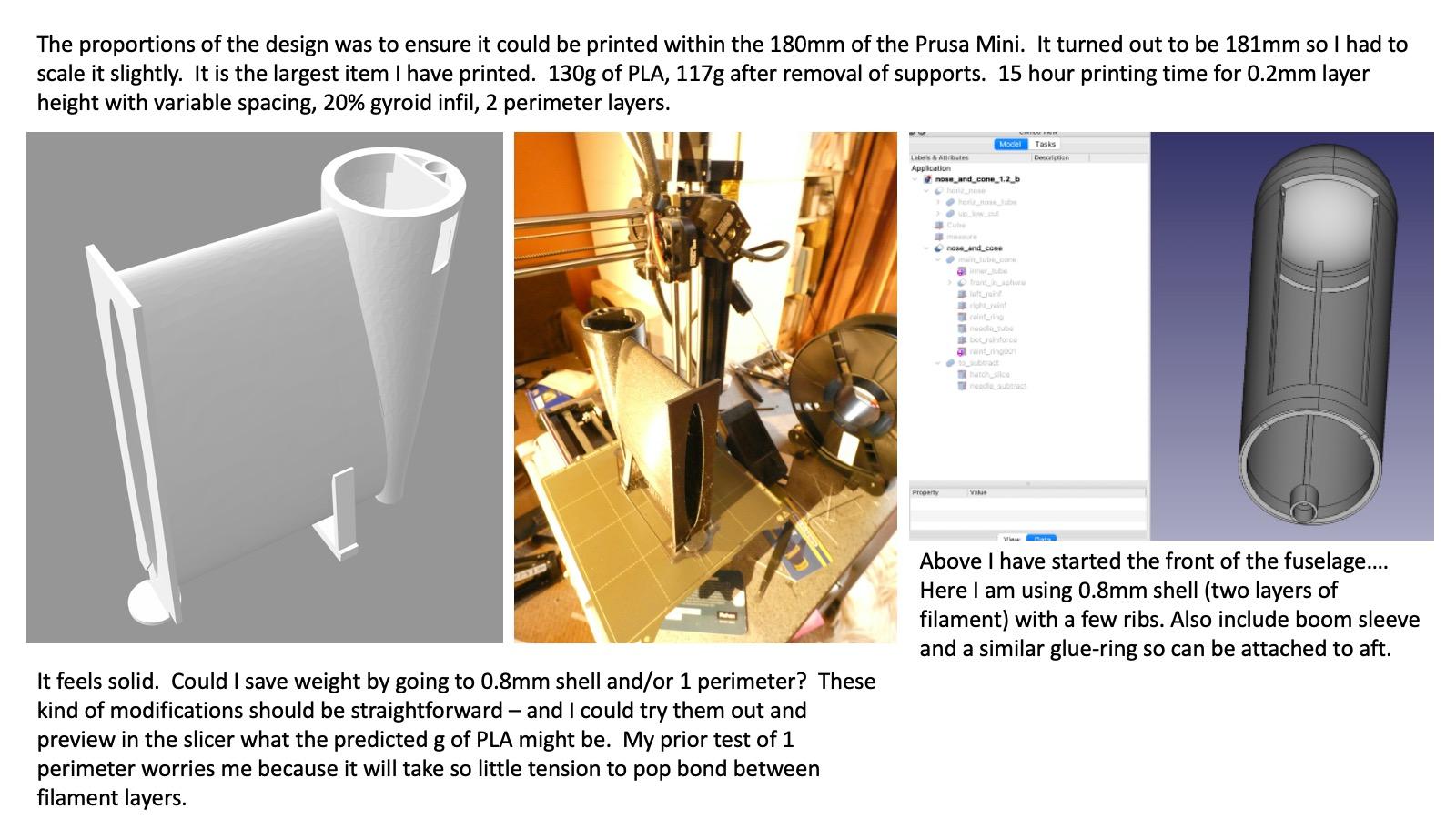
I then took callipers to the print and use that to tweak the dimensions of the front portion of the fuselage. Again that is just shy of the 180mm build volume. This should allow me to do one epoxy join. What I have not decided is whether to print a cross-laminate strap from nose to mid-aft section to further tie the beastie together.
The whole beastie was 1.5mm taller than my 180mm build-volume. Not bad. I scalled it and then did a 15 hour print run.
I then took callipers to the print and use that to tweak the dimensions of the front portion of the fuselage. Again that is just shy of the 180mm build volume. This should allow me to do one epoxy join. What I have not decided is whether to print a cross-laminate strap from nose to mid-aft section to further tie the beastie together.
Thanks: Klipkopwildlife
Please Log in or Create an account to join the conversation.
- Quorneng
-
- Offline
- Forum Master
-
Less
More
- Posts: 9436
- Thank you received: 19043
20 Feb 2022 15:58 #5
by Quorneng
Replied by Quorneng on topic freeCAD and fuselage creation
jon
Neat to place the pylon like that into the fuselage but I think you may be asking a lot to print it all at once like that. Could it be printed the other way up?
I suppose it depends on how it is to be used but internal support (infill) makes a huge difference to both strength and handling resistance for relatively small weight gain. In general I have found a thinner wall with internal fill is stronger than the same weight used with a single but thicker skin.
Neat to place the pylon like that into the fuselage but I think you may be asking a lot to print it all at once like that. Could it be printed the other way up?
I suppose it depends on how it is to be used but internal support (infill) makes a huge difference to both strength and handling resistance for relatively small weight gain. In general I have found a thinner wall with internal fill is stronger than the same weight used with a single but thicker skin.
Thanks: Klipkopwildlife, jon.in.swansea
Please Log in or Create an account to join the conversation.
- jon.in.swansea
-
Topic Author
- Offline
- Elite Member
-
Less
More
- Posts: 766
- Thank you received: 1192
20 Feb 2022 17:14 #6
by jon.in.swansea
Replied by jon.in.swansea on topic freeCAD and fuselage creation
Is a 'thin skin' equivalent to 1 filament layer at each face or 2 layers? With one layer at the face I would most likely want to glue on an outer strap to get cross-lamination to help with tension stresses.
The wonderful thing about CAD and 3D printing is that one can try out lots of different options. Ok there is the printing time issue and filament is not free....
I know klippy does not much like pusher designs. They do seem to fly differently and one must remember to launch them differently. The thing that keeps me going back to them is the MUD that keeps getting into my motor when landing (or crashing) a tractor rig into sodden ground.
And even if a prop saver works 2 out of 3 times there is still the overhead of replacement props to consider. I remember your video of a ground launch without wheels - that would be a nice option. Of course I could attach wheels but the park grass is hardly uniform and likely to catch all but the largest of wheels
There was a period in August where the ground was wonderfully dry and I could do a dozen flights and only have to lightly brush off blades of grass. Wishful thinking for that in February. -Jon
The wonderful thing about CAD and 3D printing is that one can try out lots of different options. Ok there is the printing time issue and filament is not free....
I know klippy does not much like pusher designs. They do seem to fly differently and one must remember to launch them differently. The thing that keeps me going back to them is the MUD that keeps getting into my motor when landing (or crashing) a tractor rig into sodden ground.
And even if a prop saver works 2 out of 3 times there is still the overhead of replacement props to consider. I remember your video of a ground launch without wheels - that would be a nice option. Of course I could attach wheels but the park grass is hardly uniform and likely to catch all but the largest of wheels
There was a period in August where the ground was wonderfully dry and I could do a dozen flights and only have to lightly brush off blades of grass. Wishful thinking for that in February. -Jon
Thanks: Klipkopwildlife
Please Log in or Create an account to join the conversation.
- jon.in.swansea
-
Topic Author
- Offline
- Elite Member
-
Less
More
- Posts: 766
- Thank you received: 1192
20 Feb 2022 17:34 #7
by jon.in.swansea
Replied by jon.in.swansea on topic freeCAD and fuselage creation
One of the nice things about using in-built entities in freeCAD is that the files are quite small. The aft portion of the fuselage is 1.8M and the front portion is only 88Kb. I have not seen anyone do it but I am going to try attaching these freeCAD files to this post. I did try to name the entities in the CAD files but others will likely find them a bit opaque. freeCAD creates a hierarchy of entities as bodies are joined and subtracted so it might take some looking at the entity tree to begin to understand the contents.
It would be great if other folk might take these and tweak them and find improvements. Those who have printers with slightly larger build volumes could scale the beastie up for larger wings etc.
I see there are limits on file endings. I will attempt to compress them in order to upload.... if you uncompress them they need to be renamed to have a .FCStd ending
Here is the main fuselage....
And the front section....
I hope this works. If not perhaps the administrators of the site might suggest other ways of sharing CAD models?
It would be great if other folk might take these and tweak them and find improvements. Those who have printers with slightly larger build volumes could scale the beastie up for larger wings etc.
I see there are limits on file endings. I will attempt to compress them in order to upload.... if you uncompress them they need to be renamed to have a .FCStd ending
Here is the main fuselage....
This attachment is hidden for guests.
Please log in or register to see it.
Please log in or register to see it.
And the front section....
This attachment is hidden for guests.
Please log in or register to see it.
Please log in or register to see it.
I hope this works. If not perhaps the administrators of the site might suggest other ways of sharing CAD models?
Please Log in or Create an account to join the conversation.
- Quorneng
-
- Offline
- Forum Master
-
Less
More
- Posts: 9436
- Thank you received: 19043
20 Feb 2022 22:00 #8
by Quorneng
Replied by Quorneng on topic freeCAD and fuselage creation
jon
Takes a bit of doing but the Rear Fuselage ZIP can be extracted and loaded in FreeCAD.
It makes a reasonable attempt at displaying the file.

but there are a few superfluous lines which does not bode well.
The FCStd file does transfer to my slicer, CURA.
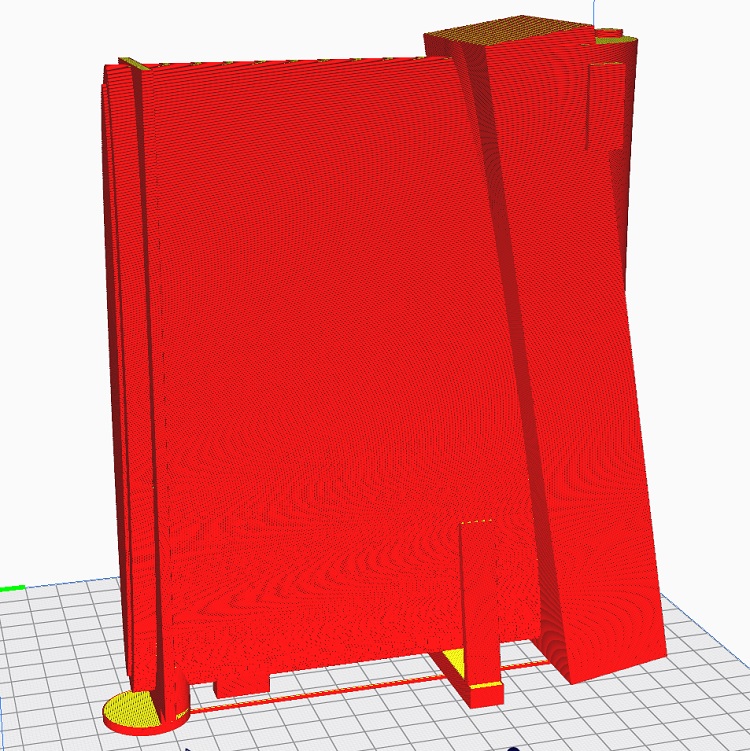
But CURA finds two extra shapes, a big long box and a small bit on the end of the tapered fuselage.
It also shows quite a few of additional surfaces, I guess from the individual fuselage sections. I know that CURA does not recognise FreeCAD 'cut out' surfaces.
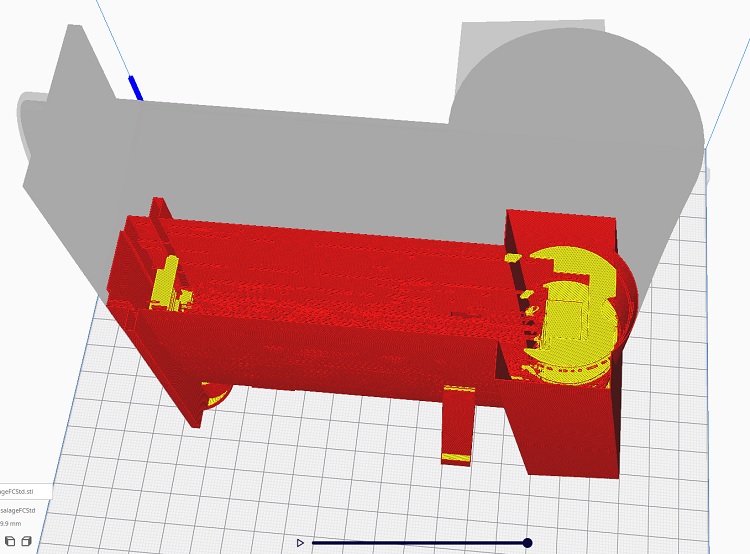
Transferring CAD files is always tricky as not only do the donor and recipient CAD systems have to be at exactly the same version but the actual processes in 'saving' a file can be dependent on the version of the computer's operating system.
This is one of the reason that stl files are used for transfer as most of the time they are in a universal format but it does of course limit what can be done with them.
Nevertheless its very interesting.
Takes a bit of doing but the Rear Fuselage ZIP can be extracted and loaded in FreeCAD.
It makes a reasonable attempt at displaying the file.
but there are a few superfluous lines which does not bode well.
The FCStd file does transfer to my slicer, CURA.
But CURA finds two extra shapes, a big long box and a small bit on the end of the tapered fuselage.
It also shows quite a few of additional surfaces, I guess from the individual fuselage sections. I know that CURA does not recognise FreeCAD 'cut out' surfaces.
Transferring CAD files is always tricky as not only do the donor and recipient CAD systems have to be at exactly the same version but the actual processes in 'saving' a file can be dependent on the version of the computer's operating system.
This is one of the reason that stl files are used for transfer as most of the time they are in a universal format but it does of course limit what can be done with them.
Nevertheless its very interesting.
Thanks: Klipkopwildlife, jon.in.swansea
Please Log in or Create an account to join the conversation.
- jon.in.swansea
-
Topic Author
- Offline
- Elite Member
-
Less
More
- Posts: 766
- Thank you received: 1192
21 Feb 2022 07:37 #9
by jon.in.swansea
Replied by jon.in.swansea on topic freeCAD and fuselage creation
Good to hear that the freeCAD file can be read into another freeCAD.
The extra lines were, essentially, construction lines to make up the ellipse bodies which I later shifted around a bit. I should make them invisible.
The angled block was to subtract from the pylon. Interesting that it showed up in Cura but not in the freeCAD view. I exported the 'fuselage_pylong_wing' and 'brace' to STL within freeCAD so the slicer should have no knowledge of any of the subtractive bodies and construction lines. It sounds like you were importing the freeCAD file within Cura (but I might have read that wrong). The Prusa slicer can't read *.FCStd files.
I don't think that the site will take an STL file as they are quite large. But that might be worth trying. -Jon
The extra lines were, essentially, construction lines to make up the ellipse bodies which I later shifted around a bit. I should make them invisible.
The angled block was to subtract from the pylon. Interesting that it showed up in Cura but not in the freeCAD view. I exported the 'fuselage_pylong_wing' and 'brace' to STL within freeCAD so the slicer should have no knowledge of any of the subtractive bodies and construction lines. It sounds like you were importing the freeCAD file within Cura (but I might have read that wrong). The Prusa slicer can't read *.FCStd files.
I don't think that the site will take an STL file as they are quite large. But that might be worth trying. -Jon
Thanks: Klipkopwildlife
Please Log in or Create an account to join the conversation.
- jon.in.swansea
-
Topic Author
- Offline
- Elite Member
-
Less
More
- Posts: 766
- Thank you received: 1192
21 Feb 2022 08:22 #10
by jon.in.swansea
Replied by jon.in.swansea on topic freeCAD and fuselage creation
Good feedback on the forum that thin shelled 3D prints are less robust.
Last night the front portion of the fuselage finished printing. It was only 28g after cleaning off the supports! Although a shorter test section seemed to be rather rigid, at full length it proved to be less stiff and I could imagine it suffering in a rough(ish) landing.
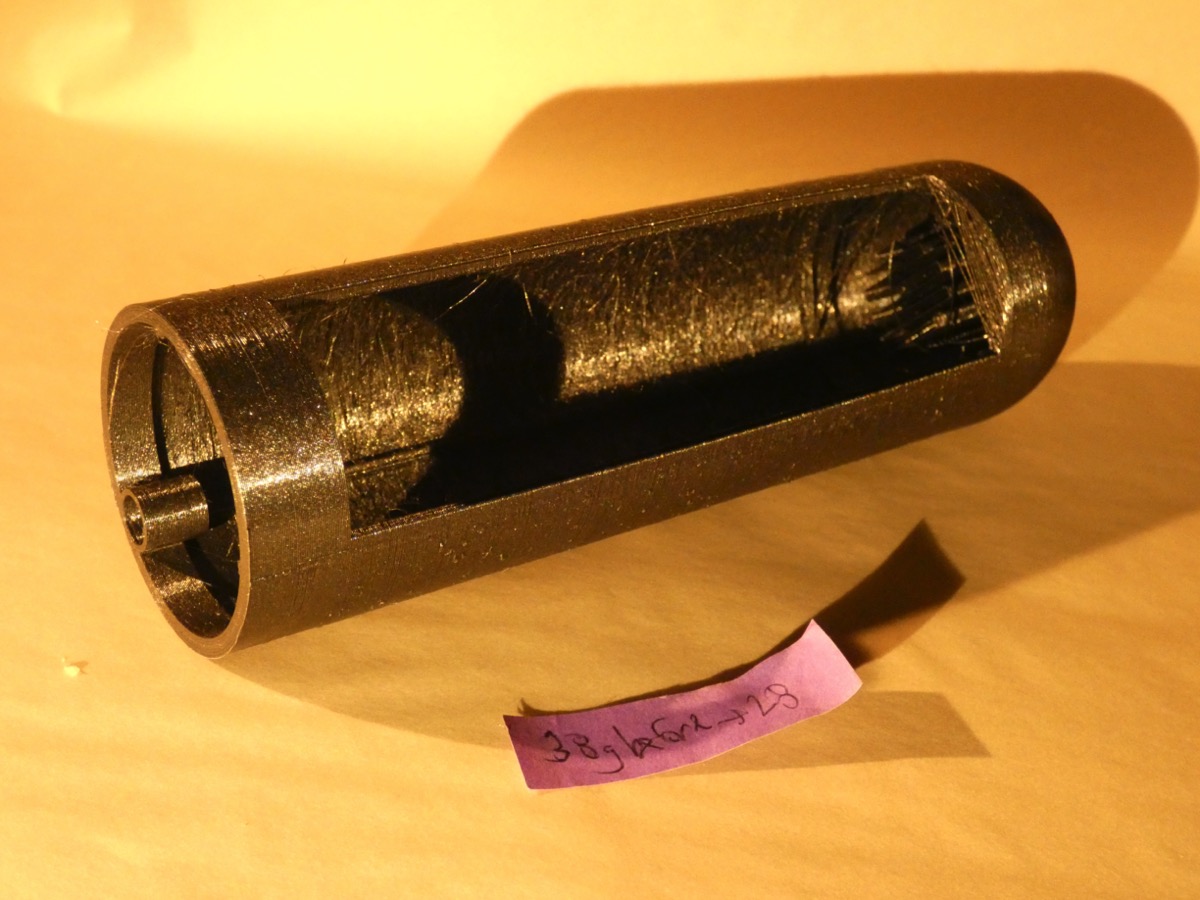
I went back to my short 1.2mm test version of the front fuselage (white in the image) and revised it to have a 3mm thick body and removed the redundant inside bracing. I printed that out (black in the image). It was much more robust in feel but the weight went up from ~13g to 22g.

The reduction in complexity and the improved structure convinced me to revise the full size version. It is now printing out with a 3mm shell, 2 perimeters, 15% gyroid infil. It will use ~69g but ~35% of that is supports so that should get it down to ~45g.
I sized the fuselage for a 1500mAhr 3 cell. The aft fuselage feels nicely robust but at 120g and with a stiffer ~45g front section it is going to push the weight up to a point that will tax my motor/prop. Much to think about in terms of save printing time and weight.
I have 850mAhr 3 cells that I use when I don't need so much front ballast and those would easily fit with a smaller diameter fuselage that would save ~65g. The pylon is essentially the same dimension as the wing cord but after a test mount of the wing I suspect if I could reduce the fore-aft dimension of the pylon (but keep the wing platform matched to the wing cord). Of course I could also make up another ARMIN wing with a shorter cord and a more span to go with this heavier body.
Much to think about.... -Jon
Last night the front portion of the fuselage finished printing. It was only 28g after cleaning off the supports! Although a shorter test section seemed to be rather rigid, at full length it proved to be less stiff and I could imagine it suffering in a rough(ish) landing.
I went back to my short 1.2mm test version of the front fuselage (white in the image) and revised it to have a 3mm thick body and removed the redundant inside bracing. I printed that out (black in the image). It was much more robust in feel but the weight went up from ~13g to 22g.
The reduction in complexity and the improved structure convinced me to revise the full size version. It is now printing out with a 3mm shell, 2 perimeters, 15% gyroid infil. It will use ~69g but ~35% of that is supports so that should get it down to ~45g.
I sized the fuselage for a 1500mAhr 3 cell. The aft fuselage feels nicely robust but at 120g and with a stiffer ~45g front section it is going to push the weight up to a point that will tax my motor/prop. Much to think about in terms of save printing time and weight.
I have 850mAhr 3 cells that I use when I don't need so much front ballast and those would easily fit with a smaller diameter fuselage that would save ~65g. The pylon is essentially the same dimension as the wing cord but after a test mount of the wing I suspect if I could reduce the fore-aft dimension of the pylon (but keep the wing platform matched to the wing cord). Of course I could also make up another ARMIN wing with a shorter cord and a more span to go with this heavier body.
Much to think about.... -Jon
Thanks: Klipkopwildlife
Please Log in or Create an account to join the conversation.
- paul d
-
- Offline
- Forum Veteran
-

Less
More
- Posts: 2074
- Thank you received: 2292
21 Feb 2022 08:49 #11
by paul d
balsa is best.
Replied by paul d on topic freeCAD and fuselage creation
What is the print medium? Friend of mine just got himself a printer and printed a couple of test pieces using ( I think?) ABS, I was impressed with the surface finish and the rigidity.
balsa is best.
Thanks: Klipkopwildlife
Please Log in or Create an account to join the conversation.
- jon.in.swansea
-
Topic Author
- Offline
- Elite Member
-
Less
More
- Posts: 766
- Thank you received: 1192
21 Feb 2022 11:10 #12
by jon.in.swansea
Replied by jon.in.swansea on topic freeCAD and fuselage creation
I print with PLA. I don't have an enclosure that helps with printing ABS. I use a variety of brands, Eryone PLA White and Galaxy black work well as do any of the Prusa PLAs. I tend to print slightly warmer than the on-the-box temperature. It might be that my Prusa thermistor is off a bit but the recommended temperature gives a poor print for me. -Jon
Thanks: Klipkopwildlife
Please Log in or Create an account to join the conversation.
- Quorneng
-
- Offline
- Forum Master
-
Less
More
- Posts: 9436
- Thank you received: 19043
21 Feb 2022 13:11 - 21 Feb 2022 13:13 #13
by Quorneng
Replied by Quorneng on topic freeCAD and fuselage creation
jon
With printed parts weight is always an issue and with complete bits of an airframe the problem is even worse. Given the benefit that you can always print a replacement I tended to go for lighter rather than stronger and just print another slightly stronger if it broke.
Unfortunately I never weighed my fully assembled printed pod and pylon but these are all the components shown on the printer bed.
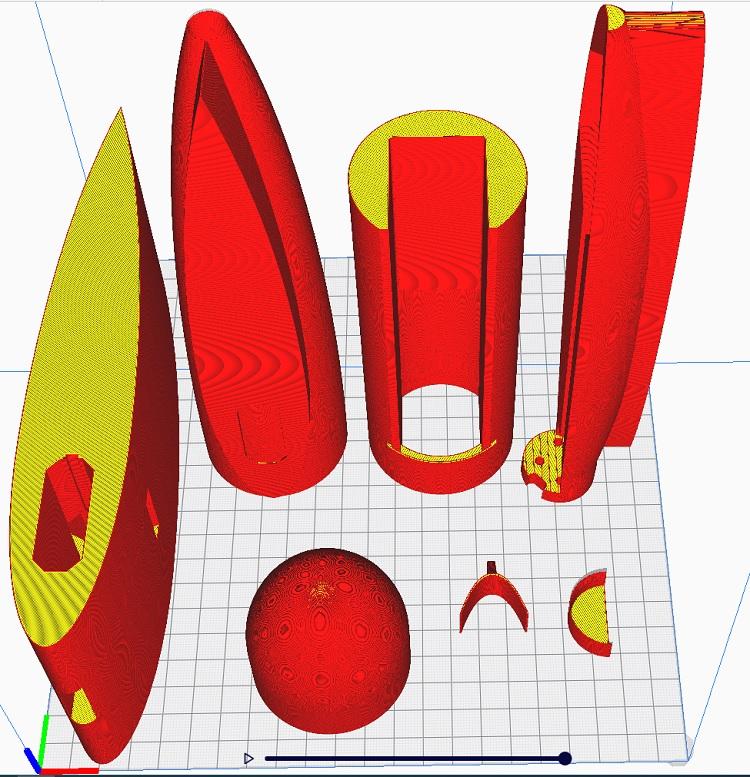
With a single 0.4 mm wall and the infill I think I used CURA shows a total of 140g with no support. Actually the orientation of the prints meant only one required just a tiny bit of support. In my experience parts actually come out just a shade under the CURA estimate. All printed in PLA.
I suspect my fuselage is also a bit bigger than yours as the battery compartment holds a 3000 mAh 3s and the pylon is tall enough to give clearance over the boom for a 10" prop.
So far the only true crash damage to the printed parts, from a nose down hard landing, resulted in the battery compartment snapping off. :woohoo:
Not reprinted but simply glued back on with a wide printed 'bandage' also glued over the break.

The smaller ring on the left was over the original battery/fuselage glue joint which did not fail in the crash.
With printed parts weight is always an issue and with complete bits of an airframe the problem is even worse. Given the benefit that you can always print a replacement I tended to go for lighter rather than stronger and just print another slightly stronger if it broke.
Unfortunately I never weighed my fully assembled printed pod and pylon but these are all the components shown on the printer bed.
With a single 0.4 mm wall and the infill I think I used CURA shows a total of 140g with no support. Actually the orientation of the prints meant only one required just a tiny bit of support. In my experience parts actually come out just a shade under the CURA estimate. All printed in PLA.
I suspect my fuselage is also a bit bigger than yours as the battery compartment holds a 3000 mAh 3s and the pylon is tall enough to give clearance over the boom for a 10" prop.
So far the only true crash damage to the printed parts, from a nose down hard landing, resulted in the battery compartment snapping off. :woohoo:
Not reprinted but simply glued back on with a wide printed 'bandage' also glued over the break.
The smaller ring on the left was over the original battery/fuselage glue joint which did not fail in the crash.
Last edit: 21 Feb 2022 13:13 by Quorneng.
Thanks: Klipkopwildlife, jon.in.swansea
Please Log in or Create an account to join the conversation.
- jon.in.swansea
-
Topic Author
- Offline
- Elite Member
-
Less
More
- Posts: 766
- Thank you received: 1192
22 Feb 2022 12:25 #14
by jon.in.swansea
Replied by jon.in.swansea on topic freeCAD and fuselage creation
Each time I see more images of the dragon I get more ideas. I decided to make a variant of the pylon and aft fuselage with a 3mm shell, dispense with the various reinforcing ribs and see if I could remove some of the bulk from the pylon. This was an interesting dive into freeCAD and the world of 'lofts'.
I learned a lot. I did not capture all of the steps but I saved ~8 iterations as I made the changes.
Is anyone interested in me making up another montage of the process?
Is anyone interested in the CAD files?
Is there a place on the site where one might upload and document model files?
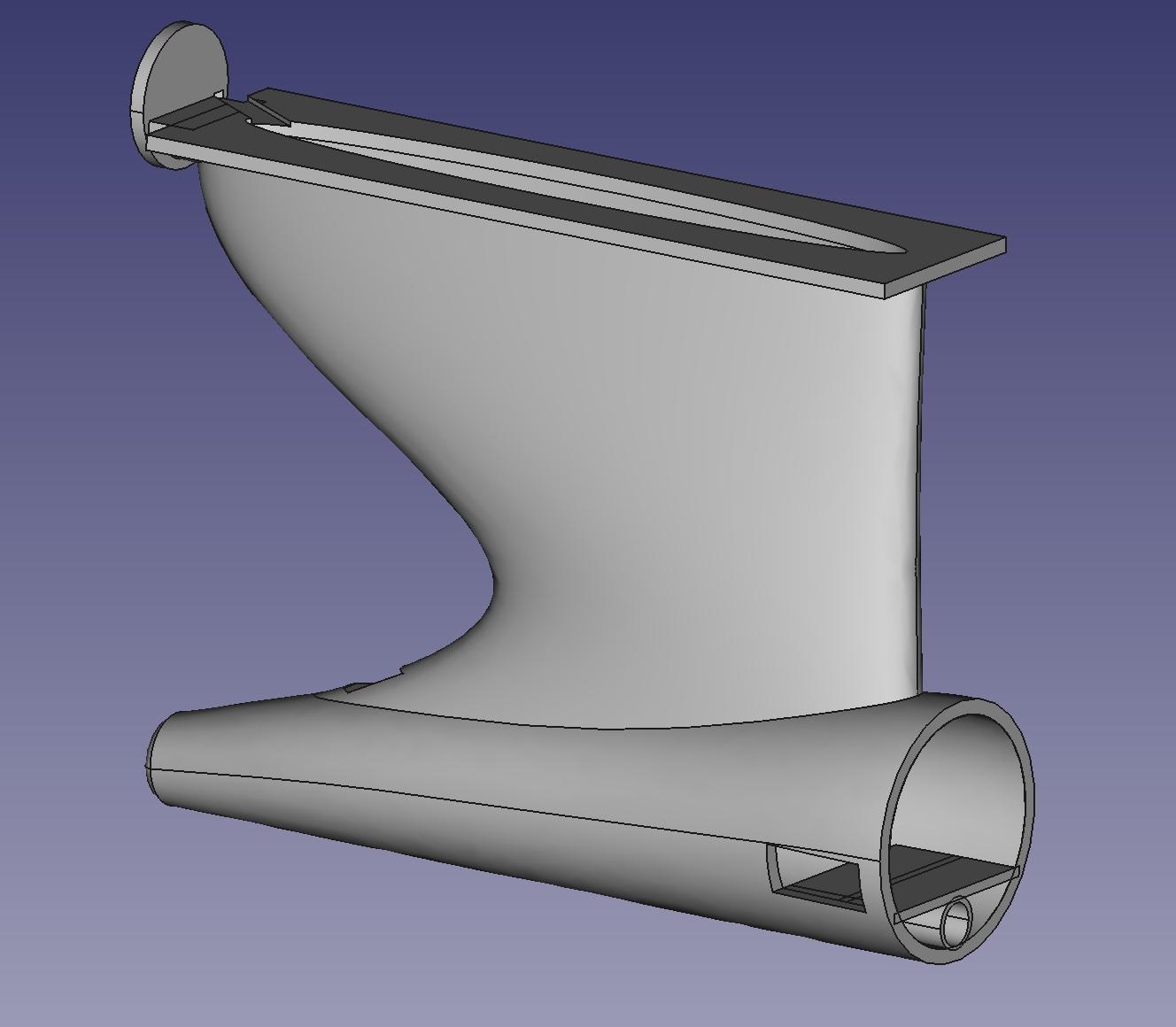
I must say I am chuffed with the results. And with a single perimeter, 15% gyroid fill the beastie with supports comes in at 92g and 5 hours less printing time. Subtract the supports and it should be ~80g which is the same as my 850mAh 3cell! -Jon

I learned a lot. I did not capture all of the steps but I saved ~8 iterations as I made the changes.
Is anyone interested in me making up another montage of the process?
Is anyone interested in the CAD files?
Is there a place on the site where one might upload and document model files?
I must say I am chuffed with the results. And with a single perimeter, 15% gyroid fill the beastie with supports comes in at 92g and 5 hours less printing time. Subtract the supports and it should be ~80g which is the same as my 850mAh 3cell! -Jon
Thanks: Klipkopwildlife
Please Log in or Create an account to join the conversation.
- Quorneng
-
- Offline
- Forum Master
-
Less
More
- Posts: 9436
- Thank you received: 19043
22 Feb 2022 14:42 #15
by Quorneng
Replied by Quorneng on topic freeCAD and fuselage creation
jon
That is indeed impressive and with a 3mm shell should be plenty strong enough.
I suspect you may have to 'beef up' the way the motor bulkhead attaches to the pylon to resist the load created from even a gentle landing with the relatively heavy motor 'cantilevered' out the back.
Never explored "lofting" much as it appears my CURA slicer does not support the results of the FreeCAD process or at least I have not yet found a way to do it.
I also get a bit nervous at a 10+ hour print. Very frustrating if anything goes wrong.
Your comparison between the pylon weight and the battery rather highlights the printing problem.
I wonder what proportion the battery weight will be of the plane's flying weight?
That is indeed impressive and with a 3mm shell should be plenty strong enough.
I suspect you may have to 'beef up' the way the motor bulkhead attaches to the pylon to resist the load created from even a gentle landing with the relatively heavy motor 'cantilevered' out the back.
Never explored "lofting" much as it appears my CURA slicer does not support the results of the FreeCAD process or at least I have not yet found a way to do it.
I also get a bit nervous at a 10+ hour print. Very frustrating if anything goes wrong.
Your comparison between the pylon weight and the battery rather highlights the printing problem.
I wonder what proportion the battery weight will be of the plane's flying weight?
Thanks: Klipkopwildlife, jon.in.swansea
Please Log in or Create an account to join the conversation.
Time to create page: 1.242 seconds