
So - You want to learn to fly?
- Klipkopwildlife
-

- Offline
- Administrator
-

- I'm supposed to be retired!
Out of the packet you can't guarantee anything.
Supplying just power to the servo will do nothing, for best results plug into the receiver and power up with everything neutral, some Transmitters have a socket where you can plug in servos for testing.
The receiver won't do anything if it's not getting a signal, unless its 'Fail safe' has been programmed.
On the Breeze wing, if the left hand arm is pointing North, in the wing it goes West then South into the aileron. It's a nice slide fit into the aileron.
Nothing wrong with Robart style hinges as long as you don't get Cyano on the moving part when fitting them.
Do it now, you may never get another chance
Please Log in or Create an account to join the conversation.
- Eric
-
 Topic Author
- Offline
- Moderator
-

- Posts: 13726
- Thank you received: 14467
The short upright bit on the left connects to the servo pushrod, and the short horizontal bit on the right goes into the control surface.
Just to clarify what Klippy put, power up the transmitter AND receiver, with all the sticks in the sprung-centre position, and manually put the throttle (ratchet) stick central as well, then check ALL the trimmers are set to zero - not fully over to one end! All the servos SHOULD go to centre position. Check they follow the stick movements first, t make sure you have a radio connection - then you cn lightly put the arms on, to check everything works!
A servo will only move (apart from a brief power-on twitch) when told to by the transmitter.
If nothing happens, either you have a plug in backwards - or the batteries are flat - or the wrong memory has been selected, or the receiver hasn't 'bound' to the transmitter - see the manual.
-
Just for fun, can anyone identify the part-built model on the bench, from the fin and rudder unsanded outline?
if you are calm and collected when all about you are going berserk - you've missed something important!
Please Log in or Create an account to join the conversation.
- Quorneng
-

- Offline
- Forum Master
-

- Posts: 9436
- Thank you received: 19043
When installing a servo it is important to ensure the servo has been set to 1.5ms position. This is where the servo will run to with the Tx stick in mid position. The servo arm than has to be unscrewed and re fixed to the position that gives the travel required.
A servo is likely to be at the mid position out of the box but if it isn't and you continue to set up the linkage the control surface will then not rest in the aerodynamic mid position when everything is powered up. You then have to reset the servo arm position and the linkage. Best to make sure the servo is at the mid position.
Please Log in or Create an account to join the conversation.
- Magpie
-

- Offline
- Elite Member
-

- Posts: 587
- Thank you received: 1048
I've bought a second hand Raspberry Pi for £20 which is what I'm using for this. Its a bit jerky & the screen size isn't right but at least its up & running & I'll be able to program it to control the servos which will enable me to check them & the flaps at an early stage before getting a transmitter & receiver which I'll probably not be doing till next year.
Please Log in or Create an account to join the conversation.
- Klipkopwildlife
-
- Offline
- Administrator
-
- I'm supposed to be retired!
Do it now, you may never get another chance
Please Log in or Create an account to join the conversation.
- Eric
-
Topic Author
- Offline
- Moderator
-
- Posts: 13726
- Thank you received: 14467

It would have been simpler to get a 'servo tester' off e-bay, they only cost a couple of quid!
They have three switched positions, one just puts the sero to centre, one sweeps it from end to end, constantly, and the third sets the servo to follow a 'pot' that you can turn with a knob, to see that the servo tracks correctly.
if you are calm and collected when all about you are going berserk - you've missed something important!
Please Log in or Create an account to join the conversation.
- Quorneng
-
- Offline
- Forum Master
-
- Posts: 9436
- Thank you received: 19043
I use one all the time with a spare 20A ESC and very old 2s LiPo permanently available on my bench to test all the servos and motor(s) during a build..
Please Log in or Create an account to join the conversation.
- Magpie
-
- Offline
- Elite Member
-
- Posts: 587
- Thank you received: 1048
It means I can customise them to suit my requirements at the time plus I get the added fun of reprogramming them!
I've got the first one up & running & some code in to start connecting & using it
The biggest problem is having two keyboards on my desk & getting confused.
Please Log in or Create an account to join the conversation.
- Klipkopwildlife
-
- Offline
- Administrator
-
- I'm supposed to be retired!

Do it now, you may never get another chance
Please Log in or Create an account to join the conversation.
- Magpie
-
- Offline
- Elite Member
-
- Posts: 587
- Thank you received: 1048
There is a known problem in that the simple pulse width modulation commands in the Raspberry cause "jitter", it makes the servo sound like a bee in a bottle. So they have now got a package that controls it quietly which I have got working but with a couple of glitches.
When the program starts there is an initial arm movement which could cause damage if it drove an aileron to 0 or 180, beyond its desired range. So I have set it so the initial movement is to 90, the centre of travel.
I still don't fully understand the order in which Python executes its commands, this package seems to be floating around which is why I have yet to get the servo to stay where it is at start up.
The positions 0 & 180 should correspond to pulse widths of 1ms & 2ms but to get it to move from 0 to 180 degrees I have to define minimum & maximum widths of 0.5ms & 2.5ms. Obviously there's some non-linearity there.
The servo rotor has 21 teeth so it can only be adjusted in steps of 17 degrees. Presumably the trim controls on the transmitter can be adjusted to get everything centralised!
Please Log in or Create an account to join the conversation.
- Klipkopwildlife
-
- Offline
- Administrator
-
- I'm supposed to be retired!
Do it now, you may never get another chance
Please Log in or Create an account to join the conversation.
- Flytilbroke
-

- Away
- Platinum Member
-

- Not Tired, long retired "Bob"
- Posts: 1601
- Thank you received: 1987
Surely the price of servo testers make them worth getting anyway. Although the final setting is best done using the transmitter of choice.
Have a nice Day, unless I don't like you.
Please Log in or Create an account to join the conversation.
- Magpie
-
- Offline
- Elite Member
-
- Posts: 587
- Thank you received: 1048
There was no data sheet supplied with them, ones on the web vary both in dimensions & the amount of information given. I know the shaft has 21 teeth because I counted them.
When the arm is fitted it has a 14 deg offset from the long side of the servo so that gives a usable rotation of +/- 76 deg which should be enough especially as at 0 or 180 the push-rod would be fouling the shaft.
I haven't compared all the four I have.
I'll certainly be buying one of the boxes at some stage but at the moment using the Raspberry Pi gives me a lot of information.
Please Log in or Create an account to join the conversation.
- Quorneng
-
- Offline
- Forum Master
-
- Posts: 9436
- Thank you received: 19043
I am not quite sure what you mean by "14 deg offset from the long side of the servo". Surely where the arm is placed on the servo shaft spline it entirely up to you and depends on the orientation of the servo iin the airframe,
Unless you have a specific 180 degree travel servo most will only travel just about 90 degrees full travel on a servo tester which gives a +/-125% signal. A bit less from a transmitter which gives +/-100% signal. The extra 25% is available using the transmitter "trim" controls.
A very standard 9g servo on auto full travel using a servo tester.
Please Log in or Create an account to join the conversation.
- Magpie
-
- Offline
- Elite Member
-
- Posts: 587
- Thank you received: 1048
At great expense I have set up a demo, but my funds didn't stretch to a video!
My aim was to get the arm perpendicular in the middle position so after commanding the servo to move to 0 deg I fitted the arm as close to horizontal as it would fit,
photo prog 0

Commanding the servo to go to 180 deg resulted in the arm moving as shown in photo prog 180.

Programming the servo to go to 90 deg resultd in a move to photo prog 90.
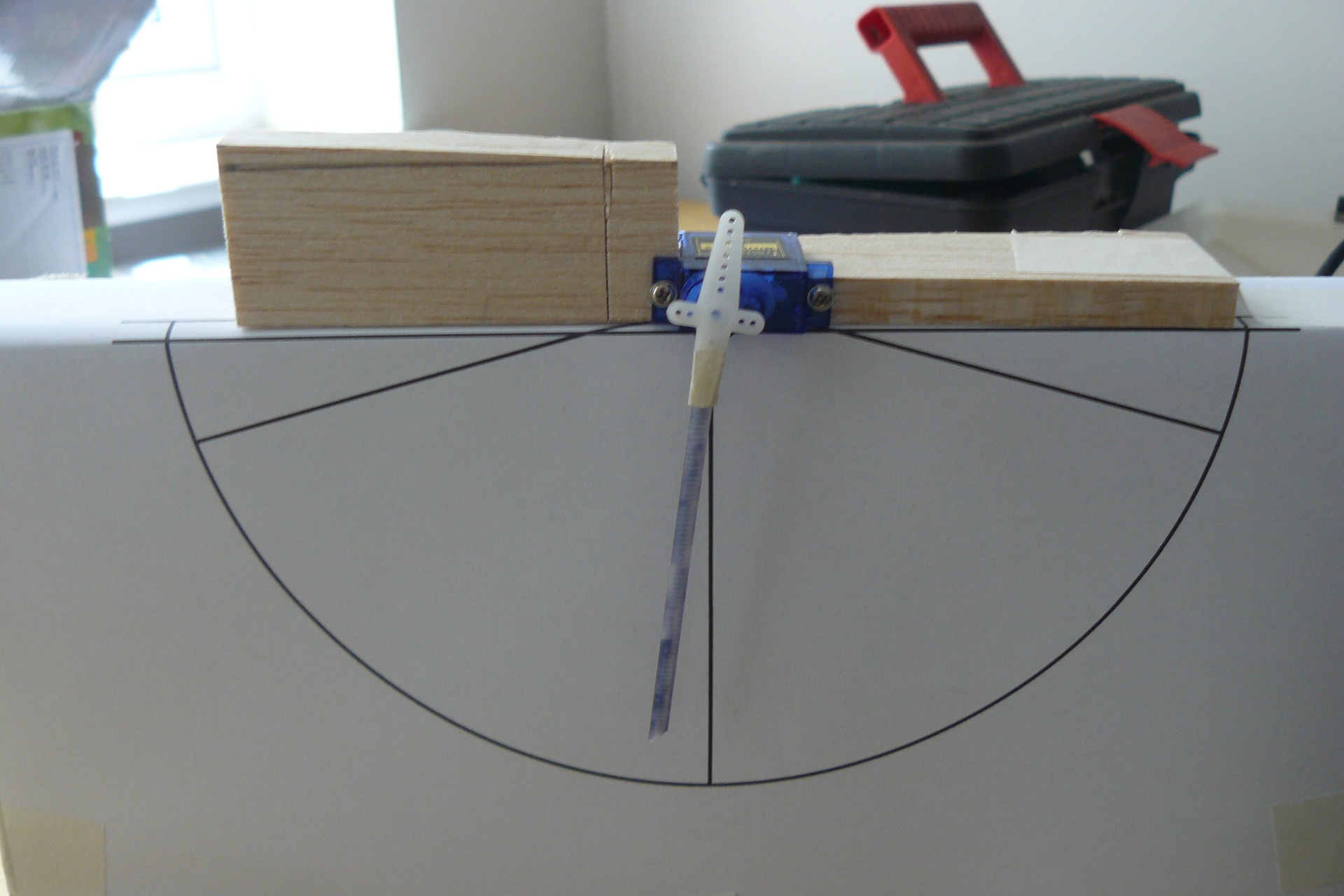
To get the arm to move to the vertical/perpendicular position I had to increment it to 97 deg, photo prog 97.

So that means the transmitter would be trimmed to set zero with the arm in this position and the available movement would be +/- 87 deg.
Please Log in or Create an account to join the conversation.