
- Posts: 766
- Thank you received: 1192
3D printing Widgets
- jon.in.swansea
-

- Offline
- Elite Member
-

Less
More
07 Aug 2025 15:49 #166
by jon.in.swansea
Replied by jon.in.swansea on topic 3D printing Widgets
About extruded an object that is not fully constrained. I have done that many many times.
Lots of times I create CAD models that do not use a sketch at all - just a number of solid bodies that I do boolean actions on.
I set their positions, perhaps rotate them, merge some of them together for the solid, merge others that I want to subtract
from the main solid and then do a boolean cut. It depends on the nature of the thing I want to create.
I probably could create your mounting bracket purely out of solid bodies - rectangles, cylinders and extruded primitive objects. For this I tend mostly to work in the PART Workbench.
For example, one block for the main body. You made your motor mount as two printed objects, I would probably just make one thicker body that I would punch holes through and then place the nut holders on the other face and subtract them. Here is a rough word description of the steps I am imagining.
Make one cylinder of the correct diameter and a bit taller than the main body. I would then copy and paste the cylinder and then alter the copied cylinder's X Y Z to put each in place, I would then fuse all the cylinders into a single body and then click on the main body and then on the fused body and do a boolean cut.
I would create one hexagon from the primitives and then extrude it to the nut thickness. I would then cut and paste that hexagonal
extrusion and then edit their positions to get them to line up on the bottom face of the main body with the previously created holes.
I would then fuse all of the hexagon extrusions into one body and do another boolean cut of that from the main body.
No sketches, no constraints. It would rely on editing the position information or right clicking on an item and doing a transform. Transforms are nice in that you can pre-set the nominal distance of the transform as well as the nominal angle of rotations.
Lots of times I create CAD models that do not use a sketch at all - just a number of solid bodies that I do boolean actions on.
I set their positions, perhaps rotate them, merge some of them together for the solid, merge others that I want to subtract
from the main solid and then do a boolean cut. It depends on the nature of the thing I want to create.
I probably could create your mounting bracket purely out of solid bodies - rectangles, cylinders and extruded primitive objects. For this I tend mostly to work in the PART Workbench.
For example, one block for the main body. You made your motor mount as two printed objects, I would probably just make one thicker body that I would punch holes through and then place the nut holders on the other face and subtract them. Here is a rough word description of the steps I am imagining.
Make one cylinder of the correct diameter and a bit taller than the main body. I would then copy and paste the cylinder and then alter the copied cylinder's X Y Z to put each in place, I would then fuse all the cylinders into a single body and then click on the main body and then on the fused body and do a boolean cut.
I would create one hexagon from the primitives and then extrude it to the nut thickness. I would then cut and paste that hexagonal
extrusion and then edit their positions to get them to line up on the bottom face of the main body with the previously created holes.
I would then fuse all of the hexagon extrusions into one body and do another boolean cut of that from the main body.
No sketches, no constraints. It would rely on editing the position information or right clicking on an item and doing a transform. Transforms are nice in that you can pre-set the nominal distance of the transform as well as the nominal angle of rotations.
Thanks: Klipkopwildlife
Please Log in or Create an account to join the conversation.
- Magpie
-

- Offline
- Elite Member
-
Less
More
- Posts: 587
- Thank you received: 1048
07 Aug 2025 15:50 - 07 Aug 2025 15:51 #167
by Magpie
Replied by Magpie on topic 3D printing Widgets
I've downloaded Ultimaker Cura answered all the questions opened an account & downloaded one of my STL files.
It has put it in a little fish tank & says 0 hours 12 minutes.
So what do I do next?
I've pressed Queue & obviously I need to pretend I've got a printer.
What does anyone suggest?
It has put it in a little fish tank & says 0 hours 12 minutes.
So what do I do next?
I've pressed Queue & obviously I need to pretend I've got a printer.
What does anyone suggest?
Last edit: 07 Aug 2025 15:51 by Magpie.
Thanks: Klipkopwildlife
Please Log in or Create an account to join the conversation.
- Quorneng
-

- Offline
- Forum Master
-

Less
More
- Posts: 9436
- Thank you received: 19043
07 Aug 2025 22:17 #168
by Quorneng
Replied by Quorneng on topic 3D printing Widgets
Magpie
What is displayed on the borders of the screen is under your control - if you can find how to change it.
"In a little fish tank." It represents the maximum physical size of an object that can be printed.
You can use the mouse wheel to get a closer view. Hold the mouse wheel down and move the mouse to alter the view angle.
There are several icons on the left of the CURA screen that allow you to reposition and rotate the object. The "scale" function allows you to make the object print physically bigger or smaller.
Depending on the nature of the object it is important that its orientation is appropriate for printing and that one surface is sitting directly on the bed (Z at 0 mm)
The parameters on the right of the CURA screen control the "how and what" of printing each layer, like the number of top and bottom layers and the type of infill between them. Set the infill to 100% and it will be printed solid.
There should be a default set of parameters included with CURA that will at least show what is happening at each layer.
Once you start actually printing things you will find out that learning Free Cad is only half the process!
For a really complex object buying a stl file that works on your version of CURA with print parameters values given becomes quite an attractive proposition!
I hope this helps.
What is displayed on the borders of the screen is under your control - if you can find how to change it.
"In a little fish tank." It represents the maximum physical size of an object that can be printed.
You can use the mouse wheel to get a closer view. Hold the mouse wheel down and move the mouse to alter the view angle.
There are several icons on the left of the CURA screen that allow you to reposition and rotate the object. The "scale" function allows you to make the object print physically bigger or smaller.
Depending on the nature of the object it is important that its orientation is appropriate for printing and that one surface is sitting directly on the bed (Z at 0 mm)
The parameters on the right of the CURA screen control the "how and what" of printing each layer, like the number of top and bottom layers and the type of infill between them. Set the infill to 100% and it will be printed solid.
There should be a default set of parameters included with CURA that will at least show what is happening at each layer.
Once you start actually printing things you will find out that learning Free Cad is only half the process!
For a really complex object buying a stl file that works on your version of CURA with print parameters values given becomes quite an attractive proposition!
I hope this helps.
Thanks: Klipkopwildlife
Please Log in or Create an account to join the conversation.
- Magpie
-
- Offline
- Elite Member
-
Less
More
- Posts: 587
- Thank you received: 1048
08 Aug 2025 08:04 #169
by Magpie
Replied by Magpie on topic 3D printing Widgets
It seems the strength & weakness of FreeCAD is there is more than one way to do things.
Having spent a lifetime of doing a drawing & then making it I find it easier than manipulating shapes which others with more experience of 3D CAD probably find quicker & easier.
Mostly in my previous life, I used AutoCAD to draw electric circuit diagrams, not much call for 3D.
I doubt whether I'll be making enough parts to justify buying a machine so could J, Q & Klippy post what machines they have.
Having said that there is a Monoprice MP Select Mini 3D Printer on Ebay for £60 including delivery.
Get thee behind me Satan!
Having spent a lifetime of doing a drawing & then making it I find it easier than manipulating shapes which others with more experience of 3D CAD probably find quicker & easier.
Mostly in my previous life, I used AutoCAD to draw electric circuit diagrams, not much call for 3D.
I doubt whether I'll be making enough parts to justify buying a machine so could J, Q & Klippy post what machines they have.
Having said that there is a Monoprice MP Select Mini 3D Printer on Ebay for £60 including delivery.
Get thee behind me Satan!
Thanks: Klipkopwildlife, jon.in.swansea
Please Log in or Create an account to join the conversation.
- jon.in.swansea
-
- Offline
- Elite Member
-
Less
More
- Posts: 766
- Thank you received: 1192
08 Aug 2025 09:52 #170
by jon.in.swansea
Replied by jon.in.swansea on topic 3D printing Widgets
It is indeed great joy to be able to have an idea and eventually hold the beastie in your hands. And in the holding there come more ideas about 'the next iteration'.
And 3D printers are probably more akin to pets than tools - they like you to talk to them, they like feeding, they can eat time.
Before you invest in a 3D printer a 3rd party doing the printing might be a step along the way....
And I just did a preview of the back mount - that was showing holes rather than hex cut-outs. So that one is not yet ready for printing.
And 3D printers are probably more akin to pets than tools - they like you to talk to them, they like feeding, they can eat time.
Before you invest in a 3D printer a 3rd party doing the printing might be a step along the way....
And I just did a preview of the back mount - that was showing holes rather than hex cut-outs. So that one is not yet ready for printing.
Thanks: Klipkopwildlife
Please Log in or Create an account to join the conversation.
- Magpie
-
- Offline
- Elite Member
-
Less
More
- Posts: 587
- Thank you received: 1048
08 Aug 2025 10:11 #171
by Magpie
Replied by Magpie on topic 3D printing Widgets
The back mount does just have holes.
The hexagons are in the front mount.
I managed to get a printer & STL file working yesterday on Ultimaker but this morning I've logged on & can see my profile but cannot find where to select a machine or load a file.
The hexagons are in the front mount.
I managed to get a printer & STL file working yesterday on Ultimaker but this morning I've logged on & can see my profile but cannot find where to select a machine or load a file.
Thanks: Klipkopwildlife
Please Log in or Create an account to join the conversation.
- jon.in.swansea
-
- Offline
- Elite Member
-
Less
More
- Posts: 766
- Thank you received: 1192
08 Aug 2025 10:31 #172
by jon.in.swansea
Replied by jon.in.swansea on topic 3D printing Widgets
Indeed this lots-of-different-ways to do stuff is a good summary of FreeCAD.
I for example tend to spend most of my time in the Part Workbench because that is where I first started. I find 'Part Design' to be a bit more frustrating. Some sketches I can do and others end up with faults that I can't figure out. The 'many possible approaches' nature of FreeCAD allows me to believe that after hitting the wall there just might be alternatives.
In a past-life I was an Architect so although I would draw in 2D my mind was always thinking in 3D. Architectural CAD tools were rather more expensive than I could manage at the time so I remain a pencil on paper and lots of sketches person. So the whole AutoCAD thing slipped by me.
With something like FreeCAD my natural inclination to 3D thinking could be expressed and I could go from an idea to holding the beastie in a matter of hours rather than wait months for a building idea to become solid out on site.
I still sketch my CAD ideas out on paper - but they tend to be 3D sketche views. And because I think in terms of solids that works for me. And others like Tony and MagPi have a natural mode that seems to prefer 2D and extrude in order to get from idea to the thing we can attach to our models.
I for example tend to spend most of my time in the Part Workbench because that is where I first started. I find 'Part Design' to be a bit more frustrating. Some sketches I can do and others end up with faults that I can't figure out. The 'many possible approaches' nature of FreeCAD allows me to believe that after hitting the wall there just might be alternatives.
In a past-life I was an Architect so although I would draw in 2D my mind was always thinking in 3D. Architectural CAD tools were rather more expensive than I could manage at the time so I remain a pencil on paper and lots of sketches person. So the whole AutoCAD thing slipped by me.
With something like FreeCAD my natural inclination to 3D thinking could be expressed and I could go from an idea to holding the beastie in a matter of hours rather than wait months for a building idea to become solid out on site.
I still sketch my CAD ideas out on paper - but they tend to be 3D sketche views. And because I think in terms of solids that works for me. And others like Tony and MagPi have a natural mode that seems to prefer 2D and extrude in order to get from idea to the thing we can attach to our models.
Thanks: Klipkopwildlife
Please Log in or Create an account to join the conversation.
- jon.in.swansea
-
- Offline
- Elite Member
-
Less
More
- Posts: 766
- Thank you received: 1192
08 Aug 2025 13:05 #173
by jon.in.swansea
Replied by jon.in.swansea on topic 3D printing Widgets
I got files from MagPi and thought it might be useful to show some of the steps in converting that to a printable object.
I am using a different 'slicer' but the general workflow will be similar.
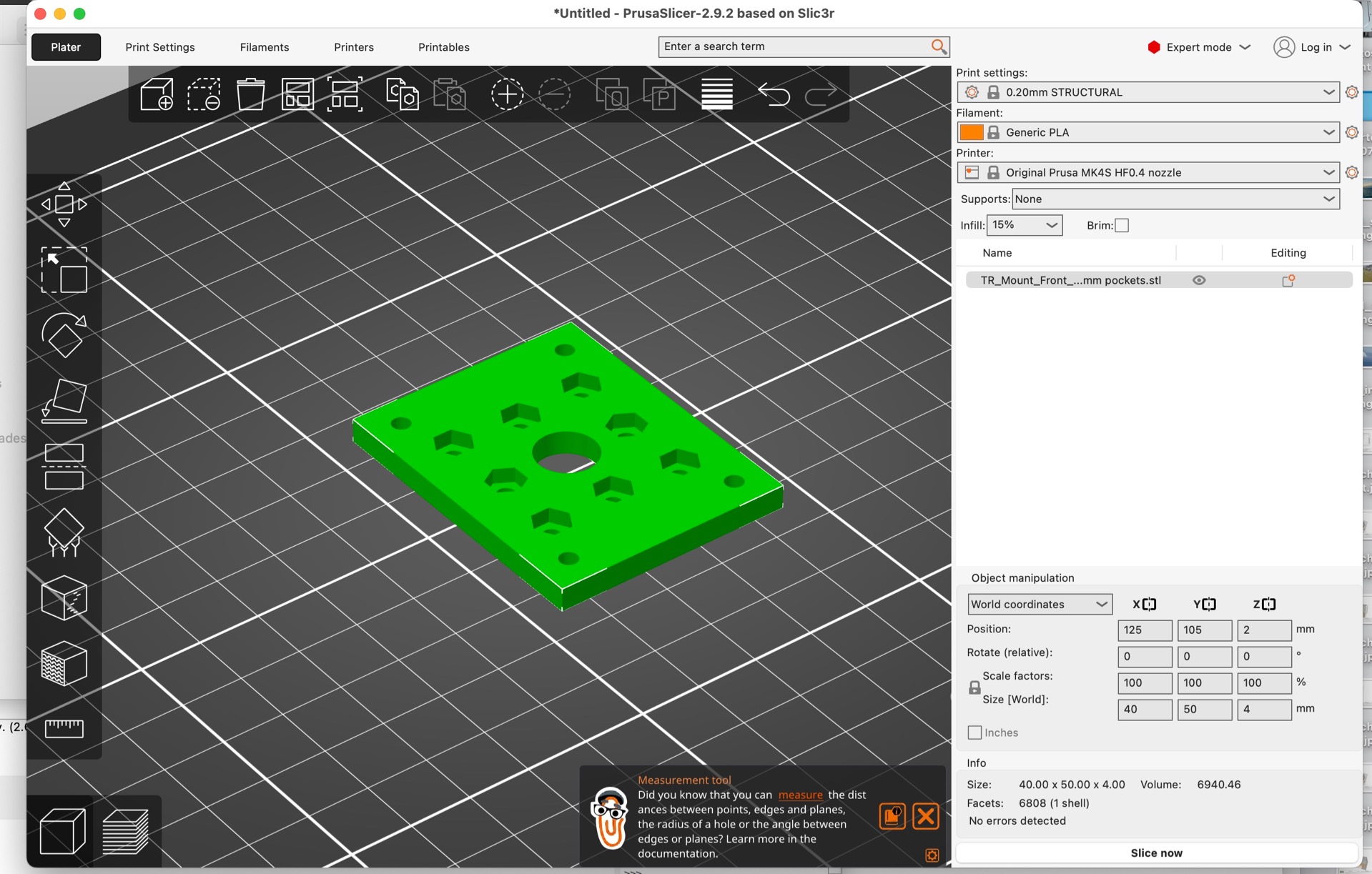
Here is the initial import of the STL file. In this case the hex retainers are facing up. This is the correct printing orientation as it makes for a cleaner print. If the object was flipped over then the printer would struggle to print cleanly the bottom facing hex retainers.
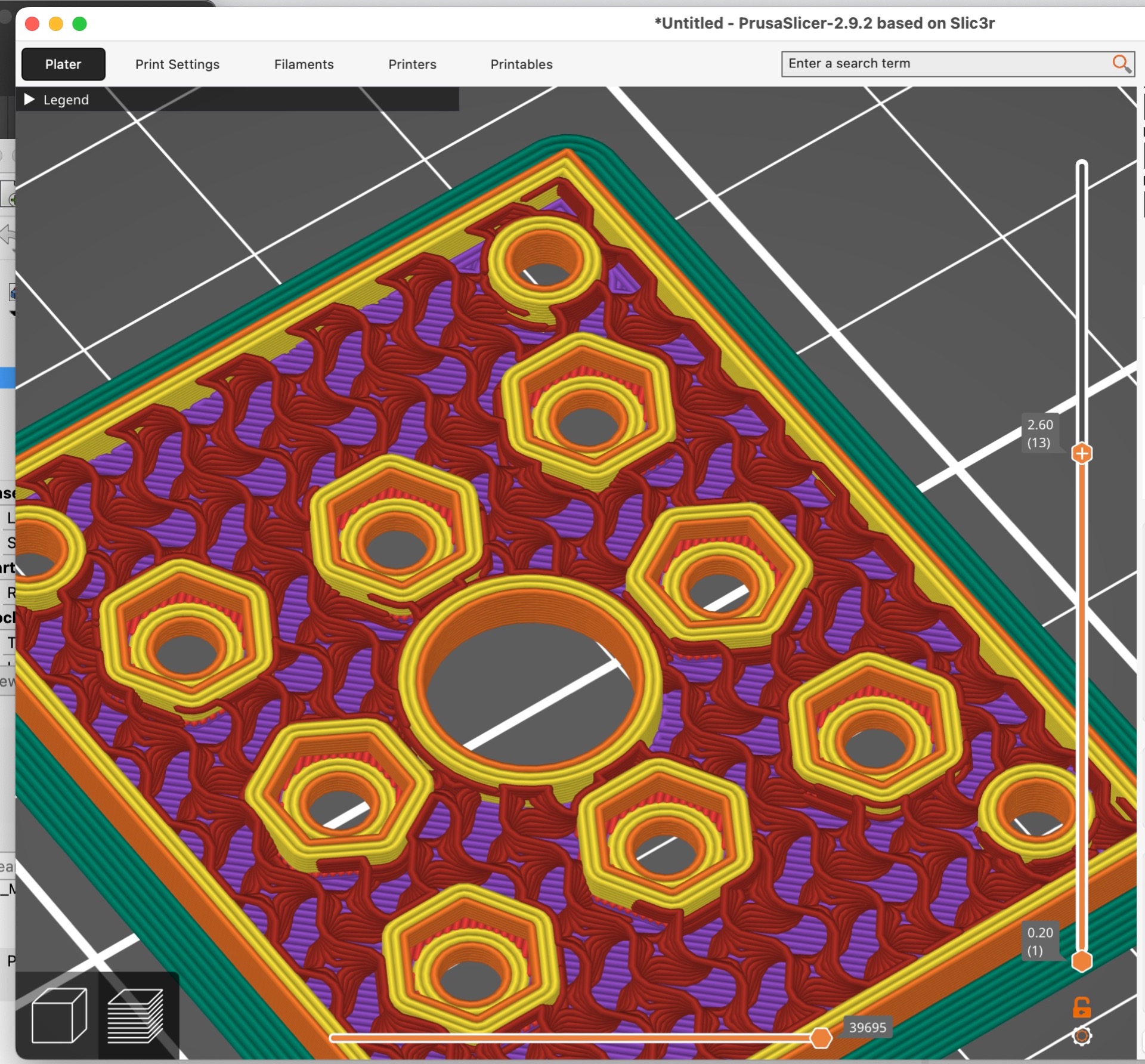
Here is the preview of what will be printed (looking from the outside). The table in the upper left is an estimate of the time needed for each phase.

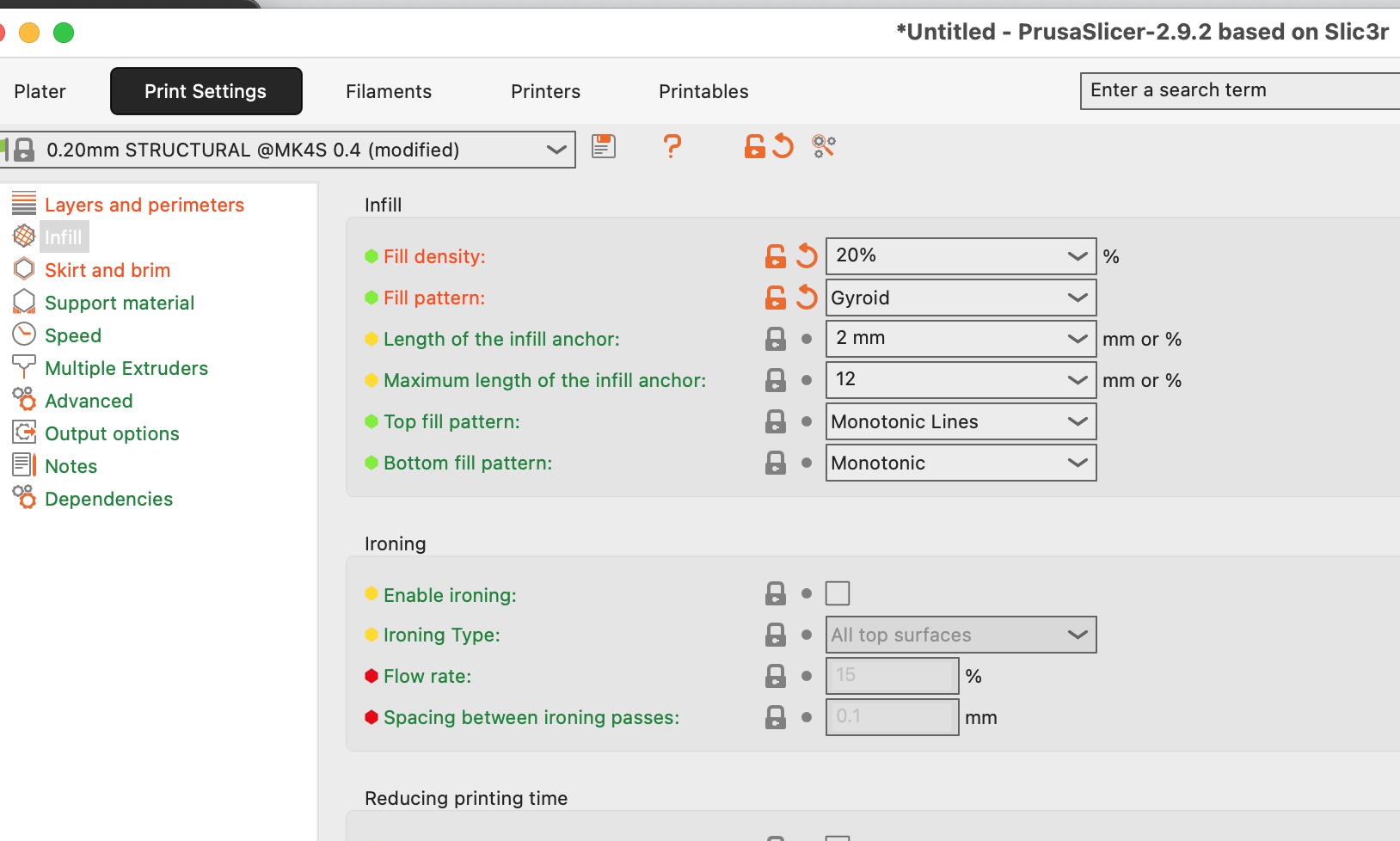
From experience I set the 'layers' - three perimeters to ensure that there is strength around the holes and the edges of the mounting place. I chose 4 layers on the bottom and the top so as to spread the stresses.

As to infil - my go-to for good all-around strength is a 'gyroid' infil. I looked at two different densities 20% and 30%. Easy enough to print one of each and then see which works best. We are looking at roughly a half hour of print time and 9g of filament. Spending time on the preview is worth it - you might spot something much faster than having to wait for the physical thing to emerge in the printer only to find an ARGH.

The last choice is what to print it with - I would choose PETG rather than PLA because it has a higher melt temperature and thus heat from the motor will be less likely to warp it. Note that the bolts holding the motor will transfer heat and this limits that risk.
I am using a different 'slicer' but the general workflow will be similar.
Here is the initial import of the STL file. In this case the hex retainers are facing up. This is the correct printing orientation as it makes for a cleaner print. If the object was flipped over then the printer would struggle to print cleanly the bottom facing hex retainers.
Here is the preview of what will be printed (looking from the outside). The table in the upper left is an estimate of the time needed for each phase.
From experience I set the 'layers' - three perimeters to ensure that there is strength around the holes and the edges of the mounting place. I chose 4 layers on the bottom and the top so as to spread the stresses.
As to infil - my go-to for good all-around strength is a 'gyroid' infil. I looked at two different densities 20% and 30%. Easy enough to print one of each and then see which works best. We are looking at roughly a half hour of print time and 9g of filament. Spending time on the preview is worth it - you might spot something much faster than having to wait for the physical thing to emerge in the printer only to find an ARGH.
The last choice is what to print it with - I would choose PETG rather than PLA because it has a higher melt temperature and thus heat from the motor will be less likely to warp it. Note that the bolts holding the motor will transfer heat and this limits that risk.
Thanks: Klipkopwildlife
Please Log in or Create an account to join the conversation.
- Magpie
-
- Offline
- Elite Member
-
Less
More
- Posts: 587
- Thank you received: 1048
08 Aug 2025 17:22 #174
by Magpie
Replied by Magpie on topic 3D printing Widgets
I've never been able to resist temptation - I've bought that Monoprice printer, £60. There was a V2 for £90 in total and it had a bent corner.
Thanks: Klipkopwildlife
Please Log in or Create an account to join the conversation.
- jon.in.swansea
-
- Offline
- Elite Member
-
Less
More
- Posts: 766
- Thank you received: 1192
08 Aug 2025 17:28 #175
by jon.in.swansea
Replied by jon.in.swansea on topic 3D printing Widgets
Well there goes your spare time for the near future....
Do you still want me to print out the motor plates or do you want to do that on your new beastie? Or you could do both and compare....
Do you still want me to print out the motor plates or do you want to do that on your new beastie? Or you could do both and compare....
Thanks: Klipkopwildlife
Please Log in or Create an account to join the conversation.
- Magpie
-
- Offline
- Elite Member
-
Less
More
- Posts: 587
- Thank you received: 1048
08 Aug 2025 18:17 #176
by Magpie
Replied by Magpie on topic 3D printing Widgets
It'll be a couple of weeks by time I get a result it so if you still do one I can compare.
Thanks: Klipkopwildlife
Please Log in or Create an account to join the conversation.
- jon.in.swansea
-
- Offline
- Elite Member
-
Less
More
- Posts: 766
- Thank you received: 1192
09 Aug 2025 08:55 #177
by jon.in.swansea
Replied by jon.in.swansea on topic 3D printing Widgets
Ok, I will see about getting something on the printer....
Thanks: Klipkopwildlife
Please Log in or Create an account to join the conversation.
- jon.in.swansea
-
- Offline
- Elite Member
-
Less
More
- Posts: 766
- Thank you received: 1192
09 Aug 2025 11:49 #178
by jon.in.swansea
Replied by jon.in.swansea on topic 3D printing Widgets
Two pairs of prints of the motor mounts have now been posted to you. One set with 20% infil, 3 perimeter layers, 4 top layers and 4 bottom layers. The other with 30% infil. The thiner part is essentially solid in both cases. No issues with the PETG that I could see during the printing process.
PETG should be generally resistant to heat from a motor - both the air passing by the motor as well as coming from along the mounting bolts. And worth some tests. I would begin with the one with 20% fill and run a motor with the kind of speed variations and flight length that might happen out in the field. Check if the mounting loosens up every now and then. Also check if residual heat might be a problem after you land - that is what has happened to me. Fine until landing and then it started to warp from the motor heat creeping along the bolts.
Enjoy and welcome to the strange little community of folk who print RC model parts....
PETG should be generally resistant to heat from a motor - both the air passing by the motor as well as coming from along the mounting bolts. And worth some tests. I would begin with the one with 20% fill and run a motor with the kind of speed variations and flight length that might happen out in the field. Check if the mounting loosens up every now and then. Also check if residual heat might be a problem after you land - that is what has happened to me. Fine until landing and then it started to warp from the motor heat creeping along the bolts.
Enjoy and welcome to the strange little community of folk who print RC model parts....
Thanks: Klipkopwildlife
Please Log in or Create an account to join the conversation.
- Magpie
-
- Offline
- Elite Member
-
Less
More
- Posts: 587
- Thank you received: 1048
09 Aug 2025 12:53 #179
by Magpie
Replied by Magpie on topic 3D printing Widgets
Thanks for doing them.
I wondered about sandwiching a layer of foil underneath the mounting plate. You may not want loose ends flapping about in a model but on my test rig it wouldn't be a problem, I could wrap them around the arm & glue them down.
I hadn't noticed any heating of the arm but the motor isn't running continuously as in a model.
I wondered about sandwiching a layer of foil underneath the mounting plate. You may not want loose ends flapping about in a model but on my test rig it wouldn't be a problem, I could wrap them around the arm & glue them down.
I hadn't noticed any heating of the arm but the motor isn't running continuously as in a model.
Thanks: Klipkopwildlife, Flytilbroke
Please Log in or Create an account to join the conversation.
- Quorneng
-
- Offline
- Forum Master
-
Less
More
- Posts: 9436
- Thank you received: 19043
09 Aug 2025 13:44 #180
by Quorneng
Replied by Quorneng on topic 3D printing Widgets
Magpie
Just something I discovered with my hex nut retainers. Make sure there is adequate material thickness under the hut. Too thin and under high loads the nut will simply "pull through" well before the back plate itself fails in any way. The hexagon bit of the back plate is there to stop the nut rotating but does not make the nut itself any more secure particularly if heat being transferred to it.
Which bring up another point. Yes PLA in particular will start to soften at say 80 C but the temperature inside the motor will be quite a bit higher and is likely to weaken the power of the magnets. The motor will still run fine but it will no longer produce quite the same the power as it did. The result is perfectly natural tendency to make for the loss by running at full power for longer which only adds to the heat problems.
Good motor cooling proportional to its power is rather more important than many realise.
Just something I discovered with my hex nut retainers. Make sure there is adequate material thickness under the hut. Too thin and under high loads the nut will simply "pull through" well before the back plate itself fails in any way. The hexagon bit of the back plate is there to stop the nut rotating but does not make the nut itself any more secure particularly if heat being transferred to it.
Which bring up another point. Yes PLA in particular will start to soften at say 80 C but the temperature inside the motor will be quite a bit higher and is likely to weaken the power of the magnets. The motor will still run fine but it will no longer produce quite the same the power as it did. The result is perfectly natural tendency to make for the loss by running at full power for longer which only adds to the heat problems.
Good motor cooling proportional to its power is rather more important than many realise.
Thanks: jon.in.swansea
Please Log in or Create an account to join the conversation.
Time to create page: 1.893 seconds