
3D printing Widgets
- Klipkopwildlife
-
 Topic Author
- Offline
- Administrator
-

- I'm supposed to be retired!
Second, I note that they recommend bed leveling cold, fine but it's better if you then do a pre-heat, 190C Extruder and 60C Bed. Then switch off and immediately do the bed leveling, I found these things out the hard way!

Do it now, you may never get another chance
Please Log in or Create an account to join the conversation.
- Magpie
-

- Offline
- Elite Member
-

- Posts: 587
- Thank you received: 1048
I haven't had a chance to look at the videos & I haven't got any filament yet so only just powered up the printer.
On NC machines you had to reference the axes or Set Zero so that's the first question when I press the start button.
They use the term "Levelling", & what I've read so far is just setting the height above the bed, nothing about getting the axis movements parallel with the bed.
On the FreeCAD front it seems as if you can't easily modify one part to make another. It seems as if you have to erase some folders or even start again. I haven't managed to copy & paste (carbon copy) hole layouts from the sketch in one part to the sketch in another.
Please Log in or Create an account to join the conversation.
- Quorneng
-

- Offline
- Forum Master
-

- Posts: 9436
- Thank you received: 19043
In FreeCad you most certainly can modify an existing part to create a new one. In FreeCad any changes you make are not kept anywhere until you "Save" them. A simple "Save" will overwrite the original file with the modifications but using the "Save as" option means you can save the modified file under a new name. This way the file you started with will not be modified in any way.
If I am trying a modification to just improve how a part prints I frequently use "Save as" and use the sme file name but add a suffix like x at the end of the file name. That way I still have the original unmodified file in case the modification doesn't work! By doing this it is quite possible to leave a "trail" of files but its down to you to remember what each modification was intended to do. Once you are happy with the changes it is good practise to do some "housekeeping" and remove any early versions of the file that you no longer need.
I hope this helps.
Please Log in or Create an account to join the conversation.
- Magpie
-
- Offline
- Elite Member
-
- Posts: 587
- Thank you received: 1048
I have just edited a sketch of one of the faces which has five circles in it which gives five holes. I have added an ellipse, the sketch is full constrained, but FC doesn't generate an elliptical hole. Why?
I use the method you describe for saving earlier versions so you can backtrack.
I also clean up afterwards, its like the email inbox, if you don't you cannot see the wood for the trees.
Please Log in or Create an account to join the conversation.
- Magpie
-
- Offline
- Elite Member
-
- Posts: 587
- Thank you received: 1048
Please Log in or Create an account to join the conversation.
- jon.in.swansea
-

- Offline
- Elite Member
-
- Posts: 766
- Thank you received: 1192
I know some folk hate YouTube. Lots of so-called-experts who drive tools at full speed and do magic stuff so fast normal mortals have not a change to keep up.
There is an exception I make for one site: https://www.youtube.com/@MangoJellySolutions
This guy knows FreeCAD and somehow maintains empathy for those who have not gotten a grip with the beastie. He does scores of tutorials that focus on one or two things. He does not speed. He says what he is doing and often why. He often starts with a discussion of the nature of the object he wants to create, what he might start with and then the steps he would use to adapt it and uses that to select the CAD functions. He does tend to stick with the 'Part Design' more than I would but that might fit others quite well.
When I am about to use some part of freeCAD for the first time, or I am considering the design of an object I will often go looking for a tutorial that covers that topic.
I keep a list of those training videos that I have looked at and what the topic was and usually some notes about what I learned. I keep going back to that rather than blunder around in the dark.
Please Log in or Create an account to join the conversation.
- Klipkopwildlife
-
Topic Author
- Offline
- Administrator
-
- I'm supposed to be retired!
Do it now, you may never get another chance
Please Log in or Create an account to join the conversation.
- Magpie
-
- Offline
- Elite Member
-
- Posts: 587
- Thank you received: 1048
Once there there is a Move button which takes you to a screen which has a Home button which puts the machine into the usual homing routine.
There are X,Y,Z indicators on the screen which turn from green to red after homing.
However the actual home position on Z varies depending on where it started from. There are scales which give the absolute position, I think Heidenhain use them.
There are the usual buttons for jogging the axes but their function depends on whether you've homed or not & they are not just simple, X,Y,Z moves, they seem to move two axes at a time & not in the expected direction.
There is nothing in the manual.apart from one button which moves the Z-axis up.
I'm going to have to write it down!
Please Log in or Create an account to join the conversation.
- Magpie
-
- Offline
- Elite Member
-
- Posts: 587
- Thank you received: 1048
I homed it about 60mm above the bed & started a program from there. It started to print the bottom layer at that height.
When a print finishes the head will be well above the bed. It cannot just return to the start height as it will hit the part.
That means you will have to clear the bed & reposition the Z-axis.
When homing it moves X & Y a few centimetres but only a very tiny amount in Z.
Please Log in or Create an account to join the conversation.
- Klipkopwildlife
-
Topic Author
- Offline
- Administrator
-
- I'm supposed to be retired!
Do it now, you may never get another chance
Please Log in or Create an account to join the conversation.
- Klipkopwildlife
-
Topic Author
- Offline
- Administrator
-
- I'm supposed to be retired!
Do it now, you may never get another chance
Please Log in or Create an account to join the conversation.
- Magpie
-
- Offline
- Elite Member
-
- Posts: 587
- Thank you received: 1048
The seller just said he couldn't remember, the joys of online shopping.
I also ordered two rolls of filament from somewhere else, according to Ebay they were posted on Sunday! & delivered yesterday by Royal Mail who don't recognise the tracking number.
We'll see what tomorrow brings!
A mate is a postie, I'll send him a text.
I'm still struggling with FreeCAD.
Working with a sketch & Pad there's no problem but using the revolver tool & trying to use different hole sizes in the sketch just makes every hole the same diameter & ignores any additions.
I'll message you with my email, I just love spreadsheets!
Please Log in or Create an account to join the conversation.
- Magpie
-
- Offline
- Elite Member
-
- Posts: 587
- Thank you received: 1048
I went on Royal Mail Tracking & it said it was delivered to an address about 200 yards away on a different road.
So I went round there, a neighbour said they had moved out tuesday/wednesday. There was a bag in the porch but nobody answered the door.
So how do I get it? Legally of course.
Please Log in or Create an account to join the conversation.
- Quorneng
-
- Offline
- Forum Master
-
- Posts: 9436
- Thank you received: 19043
I think you may be expecting more than the "Revolve" tool actually does or are you trying to do something else?
Whatever 2D sketch you have displayed "Revolve" simply tries to make a solid object by rotating it around the chosen primary axis. It follows that the sketch must not cross the selected revolve axis. Really only good for making circular or part circular objects.
This is the sketch for the wheel of my Fokker V25.

Using the Revolve icon gives this solid representation when rotated 360 degrees around the vertical axis.
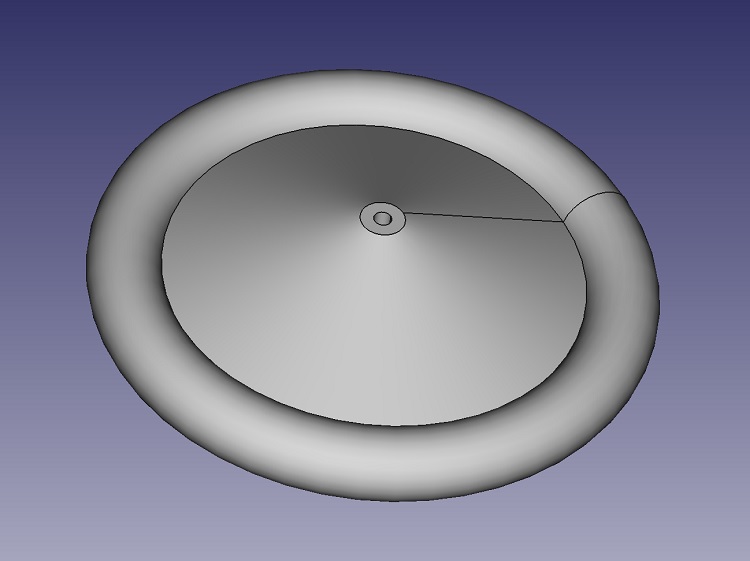
As the sketch itself crosses the Y axis FreeCad gives an error message if the horizontal rotate axis is selected.
I would expect that once Home Z is set on your printer then that will be the nozzle starting height automatically selected above the bed for any future print. When a particular print is finished the printer returns to a Home X & Y but leaves Z height alone to ensure it cannot hit the print on the bed.
Does your printer has automatic bed levelling adjustment? If not then you have to adjust the bed height at each corner so that the nozzle maintains exactly the same distance above the bed over the full range of X and Y.
Certainly on my A8 this is a tedious and entirely manual operation. With the nozzle set at Z home adjustment of the bed is made to ensure a piece of printer paper just slides between the nozzle and bed when positioned anywhere over the bed. This bed gap is important as if the first layer does not stick uniformly to the bed it is quite likely the print will fail.
Hope this helps.
Please Log in or Create an account to join the conversation.
- Klipkopwildlife
-
Topic Author
- Offline
- Administrator
-
- I'm supposed to be retired!
Do it now, you may never get another chance
Please Log in or Create an account to join the conversation.