
- Posts: 587
- Thank you received: 1048
3D printing Widgets
- Magpie
-

- Offline
- Elite Member
-

Less
More
19 Aug 2025 09:18 #226
by Magpie
Replied by Magpie on topic 3D printing Widgets
I don't quite understand.
What & where is the boot loader?
Is it in the printer & decides to do with the files on the disk?
By programmed do you mean that is what it will do? I don't know of any way to alter it.
I've got an 8GB SD card formated to FAT32 with 4096 byte allocation.
I've only got flash.bin & ui.bin on the card.
Both as recommended by Monoprice.
Firmware.bin was from the downloads for V2, PID24166.
I only downloaded that to look for clues, I haven't tried to use it.
What & where is the boot loader?
Is it in the printer & decides to do with the files on the disk?
By programmed do you mean that is what it will do? I don't know of any way to alter it.
I've got an 8GB SD card formated to FAT32 with 4096 byte allocation.
I've only got flash.bin & ui.bin on the card.
Both as recommended by Monoprice.
Firmware.bin was from the downloads for V2, PID24166.
I only downloaded that to look for clues, I haven't tried to use it.
Thanks: Klipkopwildlife
Please Log in or Create an account to join the conversation.
- Klipkopwildlife
-
 Topic Author
- Offline
- Administrator
-

- I'm supposed to be retired!
19 Aug 2025 10:33 #227
by Klipkopwildlife
Do it now, you may never get another chance
Replied by Klipkopwildlife on topic 3D printing Widgets
The boot loader is a permanent file on the main board that is run on start up, if it doesn't find a relevant file it proceeds to the resident (upgradeable) firmware. In the past some boards were shipped without a bootloader and needed to have an Arduino connected to load the firmware, luckily I've never had to do this so I can't help but there's lots about it on the Internet.
Have you tried changing the new file names to uppercase and trying again?
Have you tried changing the new file names to uppercase and trying again?
Do it now, you may never get another chance
Please Log in or Create an account to join the conversation.
- Magpie
-
- Offline
- Elite Member
-
Less
More
- Posts: 587
- Thank you received: 1048
19 Aug 2025 11:13 #228
by Magpie
Replied by Magpie on topic 3D printing Widgets
I'd tried upper case & have just tried it again, it makes no difference.
I've read elsewhere that the card needs to be less than 2GB, which are unobtainable.
Whatever happened to good old autoexec.bat?
I've requested a return & got a refund.
There is a Malyan M200 on ebay - no returns.

So it looks like Amazon.
I've read elsewhere that the card needs to be less than 2GB, which are unobtainable.
Whatever happened to good old autoexec.bat?
I've requested a return & got a refund.
There is a Malyan M200 on ebay - no returns.
So it looks like Amazon.
Thanks: Klipkopwildlife
Please Log in or Create an account to join the conversation.
- Magpie
-
- Offline
- Elite Member
-
Less
More
- Posts: 587
- Thank you received: 1048
20 Aug 2025 12:08 - 20 Aug 2025 12:13 #229
by Magpie
Replied by Magpie on topic 3D printing Widgets
I got the Malyan M200 from Amazon, it only cost £1 for next day delivery so it came this morning via Royal Mail. It was our regular postie so didn't get lost.
Its the same machine as the Monoprice V2 which they don't sell any more.
The bed seemed level so I put some masking tape on it & some filament in & set the Cat program away.
The Cura I downloaded from the internet is version 5.10.2 the version with the printer is 15.04.06
Which should I install?
Its the same machine as the Monoprice V2 which they don't sell any more.
The bed seemed level so I put some masking tape on it & some filament in & set the Cat program away.
The Cura I downloaded from the internet is version 5.10.2 the version with the printer is 15.04.06
Which should I install?
Last edit: 20 Aug 2025 12:13 by Magpie.
Thanks: Klipkopwildlife, jon.in.swansea
Please Log in or Create an account to join the conversation.
- Klipkopwildlife
-
Topic Author
- Offline
- Administrator
-
- I'm supposed to be retired!
20 Aug 2025 12:16 #230
by Klipkopwildlife
Do it now, you may never get another chance
Replied by Klipkopwildlife on topic 3D printing Widgets
They changed the numbering system 5.10.2 is the latest version, enjoy
Do it now, you may never get another chance
Please Log in or Create an account to join the conversation.
- Magpie
-
- Offline
- Elite Member
-
Less
More
- Posts: 587
- Thank you received: 1048
20 Aug 2025 14:56 - 20 Aug 2025 15:00 #231
by Magpie
Replied by Magpie on topic 3D printing Widgets
Like the dates BC - that always confuses me.
It printed out the Cat OK so I set it away on a noseplate.
It laid down three layers as a raft which had me nearly panicking but now is doing the the job proper.
I see there's an option for adhesion. What is recommended, on or off
I'm just using the default settings & PLA. I'll look at PETG & Jon & Klippy's fine tuning next.
FreeCad is still battling me, it's saying "Wire is not closed". I've looked at all the nodes & they look alright.
It printed out the Cat OK so I set it away on a noseplate.
It laid down three layers as a raft which had me nearly panicking but now is doing the the job proper.
I see there's an option for adhesion. What is recommended, on or off
I'm just using the default settings & PLA. I'll look at PETG & Jon & Klippy's fine tuning next.
FreeCad is still battling me, it's saying "Wire is not closed". I've looked at all the nodes & they look alright.
Last edit: 20 Aug 2025 15:00 by Magpie.
Thanks: Klipkopwildlife
Please Log in or Create an account to join the conversation.
- Quorneng
-

- Offline
- Forum Master
-

Less
More
- Posts: 9436
- Thank you received: 19043
20 Aug 2025 17:28 - 20 Aug 2025 17:29 #232
by Quorneng
Replied by Quorneng on topic 3D printing Widgets
The use of Build Plate Adhesion depends on the shape and area of the part in contact with the bed.
For many shapes that has a substantial flat surface printed on the bed, like a nose plate, then adhesion can be switched off.
There are 3 types of adhesion pattern, Brim, Raft and Skirt. Each type is appropriate for different circumstances so it might need some trial and error to find which best suits a particular circumstance.
How close the nozzle is to the bed when printing the first layer can make a difference to how well the part sticks to the bed.
You can successfully print very tall objects that have a very small base.
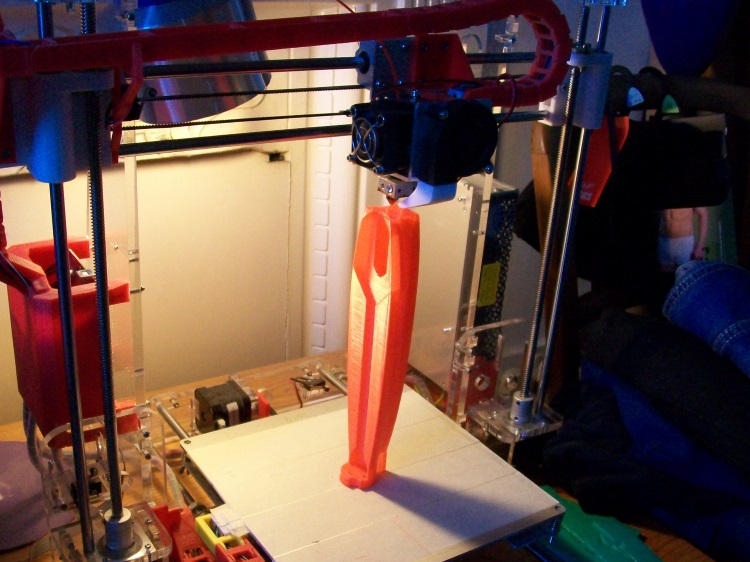
But you do have to be sure that first layer will stick well!

For many shapes that has a substantial flat surface printed on the bed, like a nose plate, then adhesion can be switched off.
There are 3 types of adhesion pattern, Brim, Raft and Skirt. Each type is appropriate for different circumstances so it might need some trial and error to find which best suits a particular circumstance.
How close the nozzle is to the bed when printing the first layer can make a difference to how well the part sticks to the bed.
You can successfully print very tall objects that have a very small base.
But you do have to be sure that first layer will stick well!
Last edit: 20 Aug 2025 17:29 by Quorneng.
Thanks: Klipkopwildlife
Please Log in or Create an account to join the conversation.
- jon.in.swansea
-

- Offline
- Elite Member
-
Less
More
- Posts: 766
- Thank you received: 1192
21 Aug 2025 09:00 - 21 Aug 2025 09:01 #233
by jon.in.swansea
Replied by jon.in.swansea on topic 3D printing Widgets
Ah the wire-not-closed message. At some point in creating the sketch there is at least one additional vertex in the sketch that is confusing it. It usually happens when editing a sketch that leaves orphaned points. Happened to me a couple of times.
Typically what is happening is that you have what you think is one edge with an intermediate point but it is really one
short line that goes from the left to the middle point and one long that goes the whole length of the edge skipping out the middle point. You need
to delete the shorter line and that intermediate point. Rather difficult to put into words. The MangoJelly site I mentioned in an earlier post has a short
video on that.
Typically what is happening is that you have what you think is one edge with an intermediate point but it is really one
short line that goes from the left to the middle point and one long that goes the whole length of the edge skipping out the middle point. You need
to delete the shorter line and that intermediate point. Rather difficult to put into words. The MangoJelly site I mentioned in an earlier post has a short
video on that.
Last edit: 21 Aug 2025 09:01 by jon.in.swansea.
Thanks: Klipkopwildlife
Please Log in or Create an account to join the conversation.
- Klipkopwildlife
-
Topic Author
- Offline
- Administrator
-
- I'm supposed to be retired!
21 Aug 2025 09:39 #234
by Klipkopwildlife
Do it now, you may never get another chance
Replied by Klipkopwildlife on topic 3D printing Widgets
Skirt doesn't improve adhesion, just clears the nozzle, a waste of time.
Raft just uses lots of filament, I can't see any point to it.
Brim is the one I use all the time, normally 3mm wide and only one layer, Smart brim unless the object is really tall but then you would also reduce the acceleration.
I'm told that Hair spray works to improve sticktion, if I'm having problems (it's usually apparent in the first few layers) then I use a bespoke tube of sticky, always a bugger to get off though. Never had any luck with masking tape, I find the masking tape pulls up allowing the first layers to warp, often so far that the nozzle knocks the part off the bed!
For ABS I use the hottest Bed temperature I can get and treat the bed with a very thin slurry of ABS junk dissolved in Acetone.
If you have persistent problems wash the bed in soapy water (that's never worked for me). Cleaning the bed with 90%+ Alcohol before every print almost always works for me with the occasional cleanup with an Acetone damped cloth.
NEVER use Lacquer Thinners!
Raft just uses lots of filament, I can't see any point to it.
Brim is the one I use all the time, normally 3mm wide and only one layer, Smart brim unless the object is really tall but then you would also reduce the acceleration.
I'm told that Hair spray works to improve sticktion, if I'm having problems (it's usually apparent in the first few layers) then I use a bespoke tube of sticky, always a bugger to get off though. Never had any luck with masking tape, I find the masking tape pulls up allowing the first layers to warp, often so far that the nozzle knocks the part off the bed!
For ABS I use the hottest Bed temperature I can get and treat the bed with a very thin slurry of ABS junk dissolved in Acetone.
If you have persistent problems wash the bed in soapy water (that's never worked for me). Cleaning the bed with 90%+ Alcohol before every print almost always works for me with the occasional cleanup with an Acetone damped cloth.
NEVER use Lacquer Thinners!
Do it now, you may never get another chance
Please Log in or Create an account to join the conversation.
- Magpie
-
- Offline
- Elite Member
-
Less
More
- Posts: 587
- Thank you received: 1048
21 Aug 2025 10:01 #235
by Magpie
Replied by Magpie on topic 3D printing Widgets
So all the lines in a sketch have to all join up to make a loop with no branch lines.
I understand that but the problem is finding the branch. I go through the elements on the left & hide/show them or delete them but it takes some finding, if at all.
There is a Validate Sketch button which is supposed to highlight the problem vertex but it doesn't seem to work.
On the hole problem front the hole button applies the declared diameter to all the holes in the sketch no matter what diameter is drawn which seems crazy to me.
I have got a noseplate drawing (using the Pad button) with holes in it. I have added hexagons & used the Pocket button but it is ignoring the depth dimension & putting no bottom in the pocket.
So I went back to the test rig which had working holes & pockets, deleted the old perimeter lines & added the new ones but it still shows the old plate & the new lines as just lines.
So I have created a new sketch & starting from scratch.
I understand that but the problem is finding the branch. I go through the elements on the left & hide/show them or delete them but it takes some finding, if at all.
There is a Validate Sketch button which is supposed to highlight the problem vertex but it doesn't seem to work.
On the hole problem front the hole button applies the declared diameter to all the holes in the sketch no matter what diameter is drawn which seems crazy to me.
I have got a noseplate drawing (using the Pad button) with holes in it. I have added hexagons & used the Pocket button but it is ignoring the depth dimension & putting no bottom in the pocket.
So I went back to the test rig which had working holes & pockets, deleted the old perimeter lines & added the new ones but it still shows the old plate & the new lines as just lines.
So I have created a new sketch & starting from scratch.
Thanks: Klipkopwildlife
Please Log in or Create an account to join the conversation.
- Quorneng
-
- Offline
- Forum Master
-
Less
More
- Posts: 9436
- Thank you received: 19043
21 Aug 2025 16:39 - 21 Aug 2025 16:40 #236
by Quorneng
Replied by Quorneng on topic 3D printing Widgets
If the perimeter lines around a hexagon are blue then they are "construction" lines created by using the "draw a multisided shape" icon. They cannot be created by normal FreeCad drawing tools and are ignored when printing in CURA.
A selection of multisided figures with blue construction lines created by the Icon in the "Part Design" workbench.

A selection of multisided figures with blue construction lines created by the Icon in the "Part Design" workbench.
Last edit: 21 Aug 2025 16:40 by Quorneng.
Thanks: Klipkopwildlife
Please Log in or Create an account to join the conversation.
- Magpie
-
- Offline
- Elite Member
-
Less
More
- Posts: 587
- Thank you received: 1048
21 Aug 2025 20:48 - 21 Aug 2025 20:52 #237
by Magpie

I have turned the adhesion off in Cura & for the squat parts I'm trying to print at the moment its not a problem.
I've also got to grips with Constraints & all my lines are green.
Apart from the ellipse in the base of the Cowl all the holes & pockets are showing OK on the 3D views on FreeCad but when Cura picks up the STL they have disappeared & are not printed.
The Faceplate in the photo was done using the Pad tool, the holes & ellipse are there but no hexagon nut pockets.
The Cowl was done using the Revolution tool, the section was rotated resulting in a hole in the middle.
The holes done using the Tool button were on the 3D image in Freecad but weren't shown in Cura or printed.
Replied by Magpie on topic 3D printing Widgets
I have turned the adhesion off in Cura & for the squat parts I'm trying to print at the moment its not a problem.
I've also got to grips with Constraints & all my lines are green.
Apart from the ellipse in the base of the Cowl all the holes & pockets are showing OK on the 3D views on FreeCad but when Cura picks up the STL they have disappeared & are not printed.
The Faceplate in the photo was done using the Pad tool, the holes & ellipse are there but no hexagon nut pockets.
The Cowl was done using the Revolution tool, the section was rotated resulting in a hole in the middle.
The holes done using the Tool button were on the 3D image in Freecad but weren't shown in Cura or printed.
Last edit: 21 Aug 2025 20:52 by Magpie.
Thanks: Klipkopwildlife
Please Log in or Create an account to join the conversation.
- Quorneng
-
- Offline
- Forum Master
-
Less
More
- Posts: 9436
- Thank you received: 19043
22 Aug 2025 10:20 - 22 Aug 2025 10:21 #238
by Quorneng
Replied by Quorneng on topic 3D printing Widgets
There is an issue with CURA - it ignores "Pockets" created in Free Cad!
Thus to create a hexagon pocket you have to first "pad" the outline with just holes but only to the thickness of the material under the pocket.
Then select the top surface of the padded object, redraw the outline but now with hexagons centered exactly over the holes and then "pad" to the thickness you want the hexagon holes to be.
It thus becomes a two stage process.

A bit long winded but I have found no other way!
Thus to create a hexagon pocket you have to first "pad" the outline with just holes but only to the thickness of the material under the pocket.
Then select the top surface of the padded object, redraw the outline but now with hexagons centered exactly over the holes and then "pad" to the thickness you want the hexagon holes to be.
It thus becomes a two stage process.
A bit long winded but I have found no other way!
Last edit: 22 Aug 2025 10:21 by Quorneng.
Thanks: Klipkopwildlife
Please Log in or Create an account to join the conversation.
- Klipkopwildlife
-
Topic Author
- Offline
- Administrator
-
- I'm supposed to be retired!
22 Aug 2025 17:53 #239
by Klipkopwildlife
Do it now, you may never get another chance
Replied by Klipkopwildlife on topic 3D printing Widgets
Noting that Cura is now up to 5.10.2 I thought I'd get 5.10.1 to look for an upgrade, nothing! So I looked for 5.10.2, okay, plenty of instances, oops, the download fails, 3 different computers, 2 different sources, any ideas?
Do it now, you may never get another chance
Please Log in or Create an account to join the conversation.
- Dragonfly
- User
-

Less
More
- Thank you received: 0
22 Aug 2025 19:41 #240
by Dragonfly
Replied by Dragonfly on topic 3D printing Widgets
Try here Klippy Ive just downloaded it and it installs OK, takes a while to finish installing but works fine as far as installing goes
github.com/Ultimaker/Cura/releases/tag/5.10.2
github.com/Ultimaker/Cura/releases/tag/5.10.2
Please Log in or Create an account to join the conversation.
Time to create page: 1.047 seconds