
- Posts: 587
- Thank you received: 1048
3D printing Widgets
- Magpie
-

- Offline
- Elite Member
-

Less
More
23 Aug 2025 07:59 #241
by Magpie
Replied by Magpie on topic 3D printing Widgets
I downloaded it from Ultimaker
ultimaker.com/software/ultimaker-cura/#downloads
ultimaker.com/software/ultimaker-cura/#downloads
Thanks: Klipkopwildlife
Please Log in or Create an account to join the conversation.
- Magpie
-
- Offline
- Elite Member
-
Less
More
- Posts: 587
- Thank you received: 1048
23 Aug 2025 08:18 #242
by Magpie
Replied by Magpie on topic 3D printing Widgets
Quorneng
I tried double padding yesterday but kept ending up with "Wire not closed" message. However I kept being interrupted because of the Broadband update so I'll have another go today - after I've put in the additional electric socket it needs.
Jon in S
Did you use Q's technique?
I also started getting invalid file messages after exporting from the bottom of the tree so I'm now going through my stuff & taking one file at a time.
I tried double padding yesterday but kept ending up with "Wire not closed" message. However I kept being interrupted because of the Broadband update so I'll have another go today - after I've put in the additional electric socket it needs.
Jon in S
Did you use Q's technique?
I also started getting invalid file messages after exporting from the bottom of the tree so I'm now going through my stuff & taking one file at a time.
Please Log in or Create an account to join the conversation.
- Magpie
-
- Offline
- Elite Member
-
Less
More
- Posts: 587
- Thank you received: 1048
23 Aug 2025 08:58 #243
by Magpie
Replied by Magpie on topic 3D printing Widgets
I drew a square section sleeve on Freecad & padded it to 65mm long.
Exporting it to STL, Cura likes it & slices it.
I added a hole on one of the sides. Freecad shows the hole.
Clicking on the top of the tree in Freecad & "Select all" it exports ok & is read by Cura but doesn't show the hole in Cura.
Clicking on the bottom of the tree it exports a file "sleeve exp-bodysketch001.stl" but Cura gives message saying "failed to load corrupt inaccessable or didn't contain a model.
Exporting it to STL, Cura likes it & slices it.
I added a hole on one of the sides. Freecad shows the hole.
This attachment is hidden for guests.
Please log in or register to see it.
Please log in or register to see it.
Clicking on the top of the tree in Freecad & "Select all" it exports ok & is read by Cura but doesn't show the hole in Cura.
Clicking on the bottom of the tree it exports a file "sleeve exp-bodysketch001.stl" but Cura gives message saying "failed to load corrupt inaccessable or didn't contain a model.
Thanks: Klipkopwildlife
Please Log in or Create an account to join the conversation.
- Quorneng
-

- Offline
- Forum Master
-

Less
More
- Posts: 9436
- Thank you received: 19043
23 Aug 2025 18:46 - 23 Aug 2025 18:47 #244
by Quorneng
Replied by Quorneng on topic 3D printing Widgets
I fear if you add a hole using Free Cad to a already generated 3D structure then CURA will ignore it!
It is how Free Cad generates the hole that trips up CURA.
CURA is only happy with holes if they are generated from a 2 dimensional Free Cad "sketch". It can take some thought to arrange for 2 dimensional sketches to give all the shape required.
In the case of your sleeve I would sketch and pad the side with the hole in it then select one end face of the padded side and sketch the other 3 faces and pad them to 65mm long. In Free Cad It would look the same but as the face with a hole is generated from a sketch it would be acceptable to CURA.
For my own satisfaction here is a "sleeve with a hole in one face" in CURA.

Of course it would be better to rotate it 90 degrees and print it vertically!
Free Cad does have limitations but then it is free!
It is how Free Cad generates the hole that trips up CURA.
CURA is only happy with holes if they are generated from a 2 dimensional Free Cad "sketch". It can take some thought to arrange for 2 dimensional sketches to give all the shape required.
In the case of your sleeve I would sketch and pad the side with the hole in it then select one end face of the padded side and sketch the other 3 faces and pad them to 65mm long. In Free Cad It would look the same but as the face with a hole is generated from a sketch it would be acceptable to CURA.
For my own satisfaction here is a "sleeve with a hole in one face" in CURA.
Of course it would be better to rotate it 90 degrees and print it vertically!
Free Cad does have limitations but then it is free!
Last edit: 23 Aug 2025 18:47 by Quorneng.
Thanks: Klipkopwildlife
Please Log in or Create an account to join the conversation.
- jon.in.swansea
-

- Offline
- Elite Member
-
Less
More
- Posts: 766
- Thank you received: 1192
24 Aug 2025 08:47 #245
by jon.in.swansea
Replied by jon.in.swansea on topic 3D printing Widgets
About "Do I use Q's technique..."
I use the Prusa slicer (since I have Prusa printers) and it happily takes STL files generated in FreeCAD. They preview correctly and print correctly. Ages ago I did try Cura but I didn't find my printer models in it's list of known printers at the time and I do not remember if I ever managed to get Cura working.
Yesterday I created a sketch of a stand for a small computer monitor in FreeCAD, extruded it and it printed fine. There was a 6mm hole for a brace in the sketch and that showed up ok in the extrusion and in the STL and in the print. What I did not have was a hex nut holder so do not have an exact match to the problem discussed.
Some weeks ago I did take one of MagPi's STL files with an earlier version of hex nut holder STL and FreeCAD file and that printed just fine via the Prusa slicer. What I preview a STL via various visualisation tools is what I see in the Prusa slicer preview and in the final print. This Cura what you see is not what you get is a puzzle.
I tend to stick with the "Part" workbench and build up my designs by manipulating solid bodies. Some prints are done without any sketches or constraint worries. I have not tried a hex holder via that method. I could explore that, keep notes and send the resulting FreeCAD and STL file for others to try.
I use the Prusa slicer (since I have Prusa printers) and it happily takes STL files generated in FreeCAD. They preview correctly and print correctly. Ages ago I did try Cura but I didn't find my printer models in it's list of known printers at the time and I do not remember if I ever managed to get Cura working.
Yesterday I created a sketch of a stand for a small computer monitor in FreeCAD, extruded it and it printed fine. There was a 6mm hole for a brace in the sketch and that showed up ok in the extrusion and in the STL and in the print. What I did not have was a hex nut holder so do not have an exact match to the problem discussed.
Some weeks ago I did take one of MagPi's STL files with an earlier version of hex nut holder STL and FreeCAD file and that printed just fine via the Prusa slicer. What I preview a STL via various visualisation tools is what I see in the Prusa slicer preview and in the final print. This Cura what you see is not what you get is a puzzle.
I tend to stick with the "Part" workbench and build up my designs by manipulating solid bodies. Some prints are done without any sketches or constraint worries. I have not tried a hex holder via that method. I could explore that, keep notes and send the resulting FreeCAD and STL file for others to try.
Thanks: Klipkopwildlife
Please Log in or Create an account to join the conversation.
- Magpie
-
- Offline
- Elite Member
-
Less
More
- Posts: 587
- Thank you received: 1048
24 Aug 2025 20:36 #246
by Magpie
Replied by Magpie on topic 3D printing Widgets
Having tried everything I could think of to defeat the FreeCad/Cura thing, this morning I downloaded Prusa & after signing my life away & having to look up what most of the questions meant I loaded an STL file from Freecad only to find I was getting the same problems & error messages.
So I went back to Freecad & Cura & must have done something different, I think I know what, & lo & behold my sleeve design with cut-outs worked perfectly right through to producing a gcode file which the printer started to print perfectly.
However after about half an hour I noticed the smell was getting stronger & when I looked the machine had stopped moving.
I pressed "Pause" but it just sat there with "Pause Wait" on the screen so I had to switch it off. There had been an accumulation of molten filament & I think it had stopped the machine, even from moving away which it does in pause.
It was doing a slice on a vertical leg which it had already done several times so it didn't look like a fault in the program.
I managed to move it away from the part , all the axes would move normally but it wouldn't feed any more filament so I retracted what was in. The end was swollen like the bulb on a spring onion.
So I fed some new filament in, it went so far but didn't come out of the nozzle so I retracted it & noted how much had went in. It showed that the blockage was at the fitting on the top of the carriage, about 6cm above the nozzle.
So I'll have to get on to Amazon in the morning to return it.
So I went back to Freecad & Cura & must have done something different, I think I know what, & lo & behold my sleeve design with cut-outs worked perfectly right through to producing a gcode file which the printer started to print perfectly.
However after about half an hour I noticed the smell was getting stronger & when I looked the machine had stopped moving.
I pressed "Pause" but it just sat there with "Pause Wait" on the screen so I had to switch it off. There had been an accumulation of molten filament & I think it had stopped the machine, even from moving away which it does in pause.
It was doing a slice on a vertical leg which it had already done several times so it didn't look like a fault in the program.
I managed to move it away from the part , all the axes would move normally but it wouldn't feed any more filament so I retracted what was in. The end was swollen like the bulb on a spring onion.
So I fed some new filament in, it went so far but didn't come out of the nozzle so I retracted it & noted how much had went in. It showed that the blockage was at the fitting on the top of the carriage, about 6cm above the nozzle.
So I'll have to get on to Amazon in the morning to return it.
Thanks: Klipkopwildlife
Please Log in or Create an account to join the conversation.
- jon.in.swansea
-
- Offline
- Elite Member
-
Less
More
- Posts: 766
- Thank you received: 1192
25 Aug 2025 07:08 #247
by jon.in.swansea
Replied by jon.in.swansea on topic 3D printing Widgets
So keep us in suspense about "I think I know what"... ??
Filament feed problems sometimes happen. A feed glitch is not necessarily a indication that the printer is broken. The 'bulb at the end' is a classic. I used to have to partially take apart the extruder to sort such glitches. It might take a couple of cups of tea to sort. Have not had to do it recently (touch wood) but a scary the first time.
Before you go and attempt to return a machine for a feed issue do a bit of searching about clearing filament clogs. Sometimes it is known as needing a 'cold pull'.
Filament feed problems sometimes happen. A feed glitch is not necessarily a indication that the printer is broken. The 'bulb at the end' is a classic. I used to have to partially take apart the extruder to sort such glitches. It might take a couple of cups of tea to sort. Have not had to do it recently (touch wood) but a scary the first time.
Before you go and attempt to return a machine for a feed issue do a bit of searching about clearing filament clogs. Sometimes it is known as needing a 'cold pull'.
Thanks: Klipkopwildlife
Please Log in or Create an account to join the conversation.
- Magpie
-
- Offline
- Elite Member
-
Less
More
- Posts: 587
- Thank you received: 1048
25 Aug 2025 08:18 #248
by Magpie
Replied by Magpie on topic 3D printing Widgets
Hunting around on the internet about printing holes in the side I came across one site (of course I cannot find it again) which said something like "Mesh" wasn't loaded by default in Freecad so I went into the Mesh Workbench & got a pop-up, again which I cannot find now, & set the maximum to 0.1
Whether this is relevant I don't know.
Up till then I thought I'd tried everything but now:
I have been using "Select All" & couldn't get the hexagons to display on Cura. I have just tried it & it is still the same.
However if I just click "Body" with nothing else blue-ed & then export it, it will show the hexagons in Cura both in prepare & after sliceing.
I now have to clean up all the hair I've torn out over the past 2 or 3 weeks.
On the filament feed front I've only had the printer a few days so I resisted the temptation to pull it apart.
I've had another go at feeding the filament through & you can see it in the tubing just above the carriage block but it won't go any further. I assume by a cold pull you mean pulling it out from the extruder nozzle, but there is no filament at the nozzle.
I had made several parts with no problems & it was about half an hour into the sleeve when it all stopped, I only went and looked at it because the smell was increasing. There are no signs of any problems on the previous parts or on the Sleeve before it failed.
All the axes move, the filament feeder works & the temprature control is OK, it doesn't overheat.
Its all packed up now but as it was on my wife's Amazon account I've got to wait till she arises to initiate the return.
Whether this is relevant I don't know.
Up till then I thought I'd tried everything but now:
I have been using "Select All" & couldn't get the hexagons to display on Cura. I have just tried it & it is still the same.
However if I just click "Body" with nothing else blue-ed & then export it, it will show the hexagons in Cura both in prepare & after sliceing.
I now have to clean up all the hair I've torn out over the past 2 or 3 weeks.
On the filament feed front I've only had the printer a few days so I resisted the temptation to pull it apart.
I've had another go at feeding the filament through & you can see it in the tubing just above the carriage block but it won't go any further. I assume by a cold pull you mean pulling it out from the extruder nozzle, but there is no filament at the nozzle.
I had made several parts with no problems & it was about half an hour into the sleeve when it all stopped, I only went and looked at it because the smell was increasing. There are no signs of any problems on the previous parts or on the Sleeve before it failed.
All the axes move, the filament feeder works & the temprature control is OK, it doesn't overheat.
Its all packed up now but as it was on my wife's Amazon account I've got to wait till she arises to initiate the return.
Thanks: Klipkopwildlife
Please Log in or Create an account to join the conversation.
- jon.in.swansea
-
- Offline
- Elite Member
-
Less
More
- Posts: 766
- Thank you received: 1192
25 Aug 2025 10:51 #249
by jon.in.swansea
Replied by jon.in.swansea on topic 3D printing Widgets
How about a photo looking at the top of the extruder? Might be helpful in giving better comments on issues....
Thanks: Klipkopwildlife
Please Log in or Create an account to join the conversation.
- Magpie
-
- Offline
- Elite Member
-
Less
More
- Posts: 587
- Thank you received: 1048
25 Aug 2025 11:55 #250
by Magpie
Replied by Magpie on topic 3D printing Widgets
This is the old machine that I "returned" to Ebay but its essentially the same animal except this one has an inductive height sensor next to the nozzle - which cannot be seen on the photo.
The filament can be seen feeding through the white tube to the blue fitting but won't go any further down towards the nozzle.

The filament can be seen feeding through the white tube to the blue fitting but won't go any further down towards the nozzle.
Thanks: Klipkopwildlife
Please Log in or Create an account to join the conversation.
- Magpie
-
- Offline
- Elite Member
-
Less
More
- Posts: 587
- Thank you received: 1048
25 Aug 2025 11:59 #251
by Magpie
Replied by Magpie on topic 3D printing Widgets
This is the top end which works fine

Thanks: Klipkopwildlife
Please Log in or Create an account to join the conversation.
- Quorneng
-
- Offline
- Forum Master
-
Less
More
- Posts: 9436
- Thank you received: 19043
25 Aug 2025 14:31 #252
by Quorneng
Replied by Quorneng on topic 3D printing Widgets
If the feed to nozzle is anything like my Anet A8 inserting filament is an issue.
The nozzle assembly has a short tube of high temperature PTFE fixed to just big enough diameter to take the filament. The feed mechanism output is just above it so in an ideal world manually feeding the filament should enter this tube but the filament has natural curvature so as it leaves the feeder it does not line up with the nozzle tube.
I always try to manually bend the filament so about 40mm is truly straight and shear the end of the filament at an acute angle to improve the chances the filament will enter the tube.

The nozzle feed mechanism may be completely different on your machine.
Of course to actually manually feed the filament through the nozzle it has to be at the temperature for the type of filament (190C) for PLA.
The nozzle assembly has a short tube of high temperature PTFE fixed to just big enough diameter to take the filament. The feed mechanism output is just above it so in an ideal world manually feeding the filament should enter this tube but the filament has natural curvature so as it leaves the feeder it does not line up with the nozzle tube.
I always try to manually bend the filament so about 40mm is truly straight and shear the end of the filament at an acute angle to improve the chances the filament will enter the tube.
The nozzle feed mechanism may be completely different on your machine.
Of course to actually manually feed the filament through the nozzle it has to be at the temperature for the type of filament (190C) for PLA.
Thanks: Klipkopwildlife
Please Log in or Create an account to join the conversation.
- Magpie
-
- Offline
- Elite Member
-
Less
More
- Posts: 587
- Thank you received: 1048
25 Aug 2025 18:33 - 25 Aug 2025 18:37 #253
by Magpie
Replied by Magpie on topic 3D printing Widgets
Oh Ye of little faith..................
I knew I'd had the nozzle heated up when I tried to feed the filament both yesterday & this morning but when someone puts a doubt in my mind; I wouldn't have slept tonight so I got it out of the box & tried again.
Of course it still wouldn't feed, so at least I can sleep tonight.
And I'd cut the end as recommended.
The temperature on the reel of filament is 190 to 220, the default value in Cura is 200 so its within that.
I knew I'd had the nozzle heated up when I tried to feed the filament both yesterday & this morning but when someone puts a doubt in my mind; I wouldn't have slept tonight so I got it out of the box & tried again.
Of course it still wouldn't feed, so at least I can sleep tonight.
And I'd cut the end as recommended.
The temperature on the reel of filament is 190 to 220, the default value in Cura is 200 so its within that.
Last edit: 25 Aug 2025 18:37 by Magpie.
Thanks: Klipkopwildlife
Please Log in or Create an account to join the conversation.
- Quorneng
-
- Offline
- Forum Master
-
Less
More
- Posts: 9436
- Thank you received: 19043
26 Aug 2025 00:32 #254
by Quorneng
Replied by Quorneng on topic 3D printing Widgets
If it still wont feed you will have to disassemble the head to see why the filament will not enter the nozzle.
Its what I had to do several times all very tedious until I worked out the direction the filament had to go to line up accurately to enter the nozzle tube.
Its what I had to do several times all very tedious until I worked out the direction the filament had to go to line up accurately to enter the nozzle tube.
Thanks: Klipkopwildlife
Please Log in or Create an account to join the conversation.
- Magpie
-
- Offline
- Elite Member
-
Less
More
- Posts: 587
- Thank you received: 1048
26 Aug 2025 12:04 - 26 Aug 2025 12:15 #255
by Magpie
Replied by Magpie on topic 3D printing Widgets
I found a video on YouTube about changing the nozzle on my machine so I had a go at the old non-working Monoprice machine which was made by Malyan & is the same....
On the Malyan machine which I returned I couldn't get the filament to feed past the brass fitting on the top of the carriage.
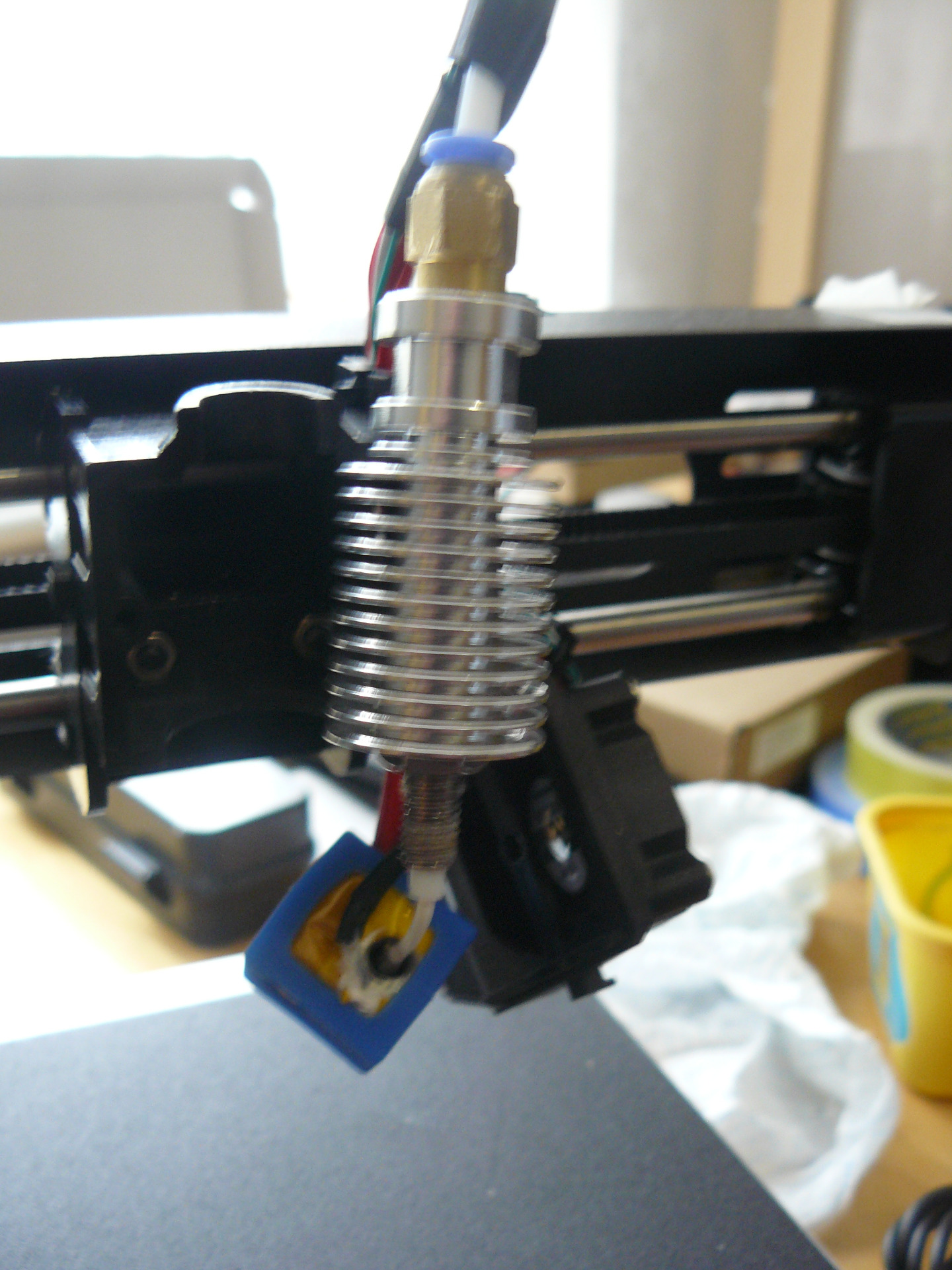
When I opened up the carriage block & took the heated nozzle block off I could see a white tube which I wrongly assumed to be a continuation of the feed tube. But it isn't.
Its a separate piece of tubing which goes from the top of the nozzle to the brass fitting.
So there are two gaps to bridge with the filament, one from the end of the feed tube to the top of the carriage block tube & another from the bottom of the carriage block tube to the nozzle.
It was at the former that I couldn't get the filament to feed past.
Normally the end of the carriage tube wouldn't be sticking out like this on the photo, it must have got pushed out when I was feeding filament though.
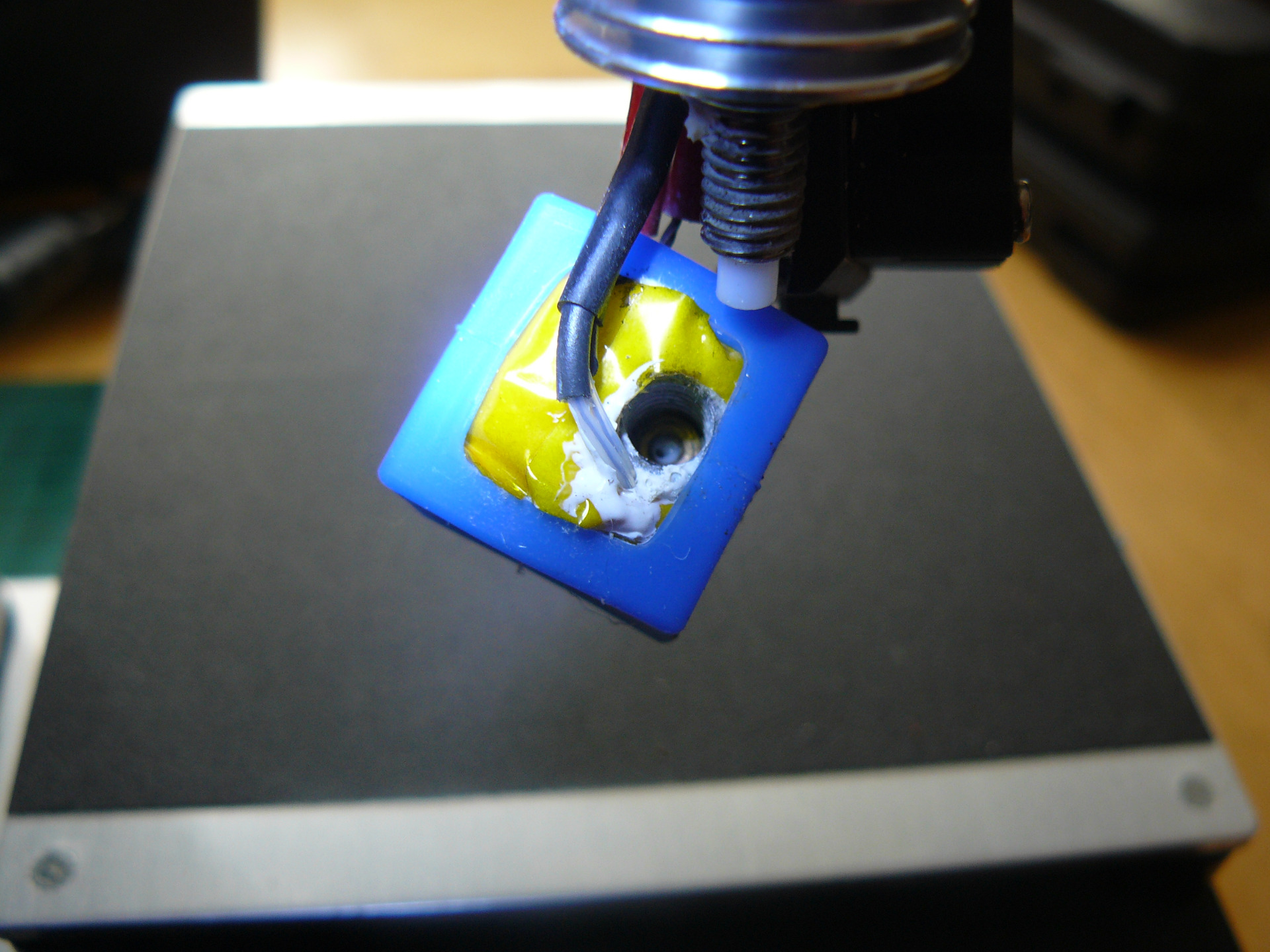
With the carriage block opened I pulled out the residual filament from the feed tube and using the technique in the video cleared most of it from the nozzle. You can see the top of the filament still in the nozzle.
I then pushed some filament into the top of the nozzle until it was extruded from the bottom.
So I understand the mechanics of the filament feed, its a shame the Monoprice still doesn't work properly.

I might get my son to have a look at it, he's into resurrecting old dead Game Boy machines he buys off Ebay.
On the Malyan machine which I returned I couldn't get the filament to feed past the brass fitting on the top of the carriage.
When I opened up the carriage block & took the heated nozzle block off I could see a white tube which I wrongly assumed to be a continuation of the feed tube. But it isn't.
Its a separate piece of tubing which goes from the top of the nozzle to the brass fitting.
So there are two gaps to bridge with the filament, one from the end of the feed tube to the top of the carriage block tube & another from the bottom of the carriage block tube to the nozzle.
It was at the former that I couldn't get the filament to feed past.
Normally the end of the carriage tube wouldn't be sticking out like this on the photo, it must have got pushed out when I was feeding filament though.
With the carriage block opened I pulled out the residual filament from the feed tube and using the technique in the video cleared most of it from the nozzle. You can see the top of the filament still in the nozzle.
I then pushed some filament into the top of the nozzle until it was extruded from the bottom.
So I understand the mechanics of the filament feed, its a shame the Monoprice still doesn't work properly.
I might get my son to have a look at it, he's into resurrecting old dead Game Boy machines he buys off Ebay.
Last edit: 26 Aug 2025 12:15 by Magpie.
Thanks: Klipkopwildlife, jon.in.swansea
Please Log in or Create an account to join the conversation.
Time to create page: 1.329 seconds