
- Posts: 587
- Thank you received: 1048
3D printing Widgets
- Magpie
-

- Offline
- Elite Member
-

Less
More
05 Sep 2025 18:18 #301
by Magpie
Replied by Magpie on topic 3D printing Widgets
I do re-home before every print. I got into the habit of that working on machine tools, they tend to make a loud noise if you don't get it right.
I must have lost the random seam change sometime so put it back plus the scarf movement.
Now I've got a surface finish problem. It looks like the old metal pinned drums on fairground organs. I've started it again without to see what happens.
I tweaked one corner of the table & it started lovely the past twice.
I must have lost the random seam change sometime so put it back plus the scarf movement.
Now I've got a surface finish problem. It looks like the old metal pinned drums on fairground organs. I've started it again without to see what happens.
I tweaked one corner of the table & it started lovely the past twice.
Thanks: Klipkopwildlife
Please Log in or Create an account to join the conversation.
- jon.in.swansea
-

- Offline
- Elite Member
-
Less
More
- Posts: 766
- Thank you received: 1192
06 Sep 2025 08:08 #302
by jon.in.swansea
Replied by jon.in.swansea on topic 3D printing Widgets
From experience - 200C is rather cool for quite a few brands of PLA. Overly cool forces the feed motor to work harder and can result in the roughness that catches the next layer.
With a small test cube try printing the first 10 layers or so it at 200C and retry at 205C and 210C etc and notice how it flows. Eventually you will find a sweet spot for that filament brand.
With a small test cube try printing the first 10 layers or so it at 200C and retry at 205C and 210C etc and notice how it flows. Eventually you will find a sweet spot for that filament brand.
Thanks: Klipkopwildlife
Please Log in or Create an account to join the conversation.
- Magpie
-
- Offline
- Elite Member
-
Less
More
- Posts: 587
- Thank you received: 1048
06 Sep 2025 12:55 - 06 Sep 2025 13:27 #303
by Magpie
Replied by Magpie on topic 3D printing Widgets
I've upped the nozzle temperature to 210 & the table to 65 for the first layer then down to 60. It's starting off well now.
The surface finish is now the main problem. I've taken off the Scarf movement which improved it by more than 50% & introduced some retraction.
This has improved it more but not as good as when the seam was just left at the end of each layer.
What numbers should I put in? Theres quite a few parameters under Travel.
(The manual that came with the printer doesn't say anything really, most of it is setting up Cura, obviously a copy & paste job.)
My son is now asking about making parts for his beloved Ford Capri.
Reading up on it, it seems ABS is the way to go but I don't know if my printer can reach the temperatures I've seen recommended. The controls on the printer allow to select 280 nozzle & 80 bed. The nozzle reached it, the bed struggled to get there under a blanket.
What would you alter to compensate for that? Speed?
The surface finish is now the main problem. I've taken off the Scarf movement which improved it by more than 50% & introduced some retraction.
This has improved it more but not as good as when the seam was just left at the end of each layer.
What numbers should I put in? Theres quite a few parameters under Travel.
(The manual that came with the printer doesn't say anything really, most of it is setting up Cura, obviously a copy & paste job.)
My son is now asking about making parts for his beloved Ford Capri.
Reading up on it, it seems ABS is the way to go but I don't know if my printer can reach the temperatures I've seen recommended. The controls on the printer allow to select 280 nozzle & 80 bed. The nozzle reached it, the bed struggled to get there under a blanket.
What would you alter to compensate for that? Speed?
Last edit: 06 Sep 2025 13:27 by Magpie.
Please Log in or Create an account to join the conversation.
- jon.in.swansea
-
- Offline
- Elite Member
-
Less
More
- Posts: 766
- Thank you received: 1192
07 Sep 2025 07:11 #304
by jon.in.swansea
Replied by jon.in.swansea on topic 3D printing Widgets
Good you found a better mix of temperatures. In terms of surface finish - a photo might help with diagnosis...
ABS on a small - open bed printer. Likely to be a frustrating experience. ABS is known for warping unless done in an enclosed printer that can maintain temperatures well above room temperature.
PLA normally will not survive in an automotive context, PETG might last a bit longer. There might be other alternatives to ABS that I don't know about.
ABS on a small - open bed printer. Likely to be a frustrating experience. ABS is known for warping unless done in an enclosed printer that can maintain temperatures well above room temperature.
PLA normally will not survive in an automotive context, PETG might last a bit longer. There might be other alternatives to ABS that I don't know about.
Please Log in or Create an account to join the conversation.
- Magpie
-
- Offline
- Elite Member
-
Less
More
- Posts: 587
- Thank you received: 1048
07 Sep 2025 08:02 - 07 Sep 2025 08:07 #305
by Magpie
Replied by Magpie on topic 3D printing Widgets
I'll attach a photo (as best as I can get), it is best described as a tightly wound bobbin of thread.
Without the Random Z-seam alignment and Retract the finish is perfect but there is an operation scar all up one side.
Scarf seam makes it worse, more pronounced threads & pins.
Layer thickness 0.17mm
Outer wall wipe distance 0.0mm
Z-seam alignment at Random
Scarf seam 0.0mm
Retract is on
Retract distance 1.0mm
I'll look at making an enclosure, I got a small seed tray heating pad I could use as well.
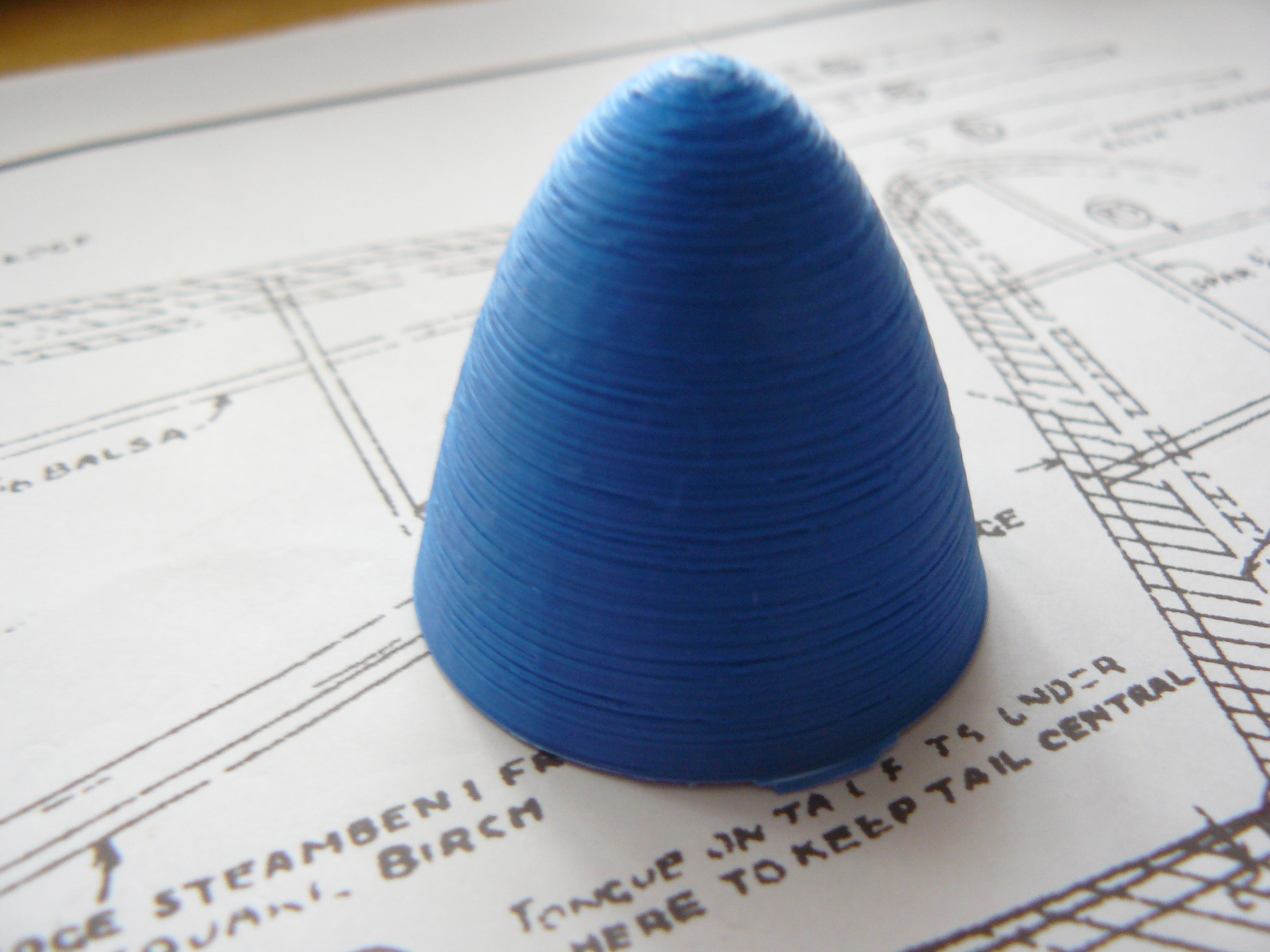
Without the Random Z-seam alignment and Retract the finish is perfect but there is an operation scar all up one side.
Scarf seam makes it worse, more pronounced threads & pins.
Layer thickness 0.17mm
Outer wall wipe distance 0.0mm
Z-seam alignment at Random
Scarf seam 0.0mm
Retract is on
Retract distance 1.0mm
I'll look at making an enclosure, I got a small seed tray heating pad I could use as well.
Last edit: 07 Sep 2025 08:07 by Magpie.
Please Log in or Create an account to join the conversation.
- Magpie
-
- Offline
- Elite Member
-
Less
More
- Posts: 587
- Thank you received: 1048
07 Sep 2025 08:20 - 07 Sep 2025 08:46 #306
by Magpie
Replied by Magpie on topic 3D printing Widgets
I've exported the Print Settings from Cura but this site won't allow that type of file so I'll email
I've looked at their sample CAT gcode file, they use 205deg for the nozzle & 60 deg for the table.
I can't gleam anything else.
I've looked at their sample CAT gcode file, they use 205deg for the nozzle & 60 deg for the table.
I can't gleam anything else.
Last edit: 07 Sep 2025 08:46 by Magpie.
Please Log in or Create an account to join the conversation.
- Magpie
-
- Offline
- Elite Member
-
Less
More
- Posts: 587
- Thank you received: 1048
07 Sep 2025 20:55 #307
by Magpie
Replied by Magpie on topic 3D printing Widgets
Still trying to improve the surface finish. Increasing the layer thickness made it worse so I reduced it to 0.13mm. Its probably now acceptable but not as good as before Random Layer Change but that had a big scar on the side.
Been trying other things on FreeCad such as putting a transverse hole on a cone. Watched a video on putting one across a cylinder which I can do but the technique wouldn't work on a cone. However I may have worked out a way to do it but ran out of time.
To make use of the printer I started another Spindel for the Schraubstock. After going about 10 minutes we got the National Alert & seconds later a power cut. Why that happened I don't know.
I restarted the Spindel & was using the yellow Geetech filament. I went downstairs while it was trundling on, Later when I came up to check it there was a strong smell of fish! Has anyone else had that?
Been trying other things on FreeCad such as putting a transverse hole on a cone. Watched a video on putting one across a cylinder which I can do but the technique wouldn't work on a cone. However I may have worked out a way to do it but ran out of time.
To make use of the printer I started another Spindel for the Schraubstock. After going about 10 minutes we got the National Alert & seconds later a power cut. Why that happened I don't know.
I restarted the Spindel & was using the yellow Geetech filament. I went downstairs while it was trundling on, Later when I came up to check it there was a strong smell of fish! Has anyone else had that?
Thanks: Klipkopwildlife
Please Log in or Create an account to join the conversation.
- Klipkopwildlife
-
 Topic Author
- Offline
- Administrator
-

- I'm supposed to be retired!
08 Sep 2025 10:01 - 08 Sep 2025 10:01 #308
by Klipkopwildlife
Do it now, you may never get another chance
Replied by Klipkopwildlife on topic 3D printing Widgets
The spool normally comes with a label quoting the recommended settings, low and high, I normally go halfway which almost always gives me decent results.
I only use Esun or Colorfab so can't comment on smell
I only use Esun or Colorfab so can't comment on smell
Do it now, you may never get another chance
Last edit: 08 Sep 2025 10:01 by Klipkopwildlife.
Please Log in or Create an account to join the conversation.
- Quorneng
-

- Offline
- Forum Master
-

Less
More
- Posts: 9436
- Thank you received: 19043
08 Sep 2025 11:58 #309
by Quorneng
Replied by Quorneng on topic 3D printing Widgets
ABS filaments releases hydrocarbons as it melts, which PLA does not, but it can be a ventilation issue if printing in an industrial environment.
Don't know about it smelling of fish.
I have found that ABS does not give the same smooth surface finish as PLA.
Don't know about it smelling of fish.
I have found that ABS does not give the same smooth surface finish as PLA.
Thanks: Klipkopwildlife
Please Log in or Create an account to join the conversation.
- Magpie
-
- Offline
- Elite Member
-
Less
More
- Posts: 587
- Thank you received: 1048
09 Sep 2025 12:17 - 09 Sep 2025 12:18 #310
by Magpie
Replied by Magpie on topic 3D printing Widgets
Wasted best part of this morning having a final go at the faulty Monoprice printer.
These are the screws I had to remove to access the Z-axis home switch.
It wasn't faulty & nobody had been at it as all the screws were all still loctited in so its got to be the main board & it won't reload the firmware

These are the screws I had to remove to access the Z-axis home switch.
It wasn't faulty & nobody had been at it as all the screws were all still loctited in so its got to be the main board & it won't reload the firmware
Last edit: 09 Sep 2025 12:18 by Magpie.
Thanks: Klipkopwildlife, jon.in.swansea
Please Log in or Create an account to join the conversation.
- Magpie
-
- Offline
- Elite Member
-
Less
More
- Posts: 587
- Thank you received: 1048
09 Sep 2025 17:42 #311
by Magpie
Replied by Magpie on topic 3D printing Widgets
Edited the moving jaw (an STL file) on the Table Vice to give it a step to match the fixed one.
Every step took some time, say 20 seconds which is long in computer time, plus the imported jaw was 111mm from the origin
Now waiting to see what it prints out like as its on the bottom.
Every step took some time, say 20 seconds which is long in computer time, plus the imported jaw was 111mm from the origin
Now waiting to see what it prints out like as its on the bottom.
This attachment is hidden for guests.
Please log in or register to see it.
Please log in or register to see it.
Thanks: Klipkopwildlife, Quorneng
Please Log in or Create an account to join the conversation.
- Magpie
-
- Offline
- Elite Member
-
Less
More
- Posts: 587
- Thank you received: 1048
09 Sep 2025 20:44 #312
by Magpie
Replied by Magpie on topic 3D printing Widgets
It printed out so shows the procedure works but as expected it didn't give a clean corner.
If a specially shaped jaw was wanted, say to hold a hexagon vertically, the way to do it would be to print out an add-on & maybe pin it to the sxisting one using a couple of holes.
If a specially shaped jaw was wanted, say to hold a hexagon vertically, the way to do it would be to print out an add-on & maybe pin it to the sxisting one using a couple of holes.
Thanks: Klipkopwildlife
Please Log in or Create an account to join the conversation.
- Quorneng
-
- Offline
- Forum Master
-
Less
More
- Posts: 9436
- Thank you received: 19043
10 Sep 2025 12:54 #313
by Quorneng
Replied by Quorneng on topic 3D printing Widgets
Magpie
As you have found printing ABS has its surface problems.
I printed a small cone in grey ABS at 240C.
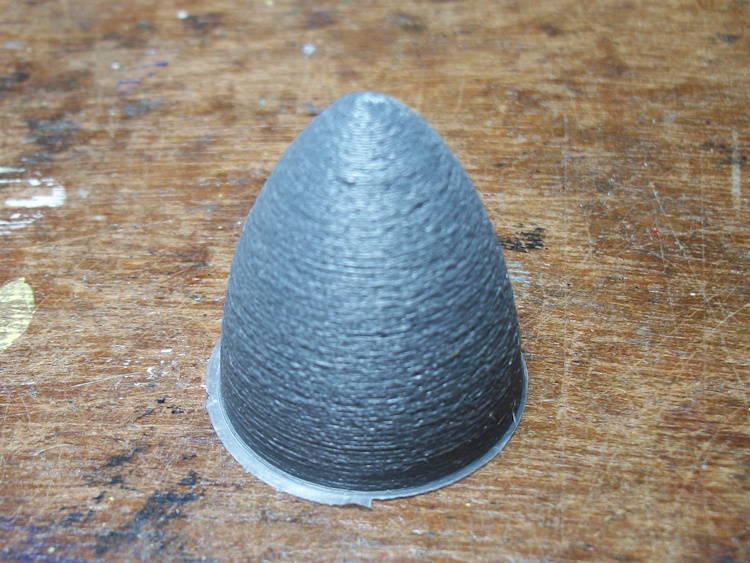
It is pretty rough!
As a comparison I printed the same thing but at 220C and one at 190C in PLA.
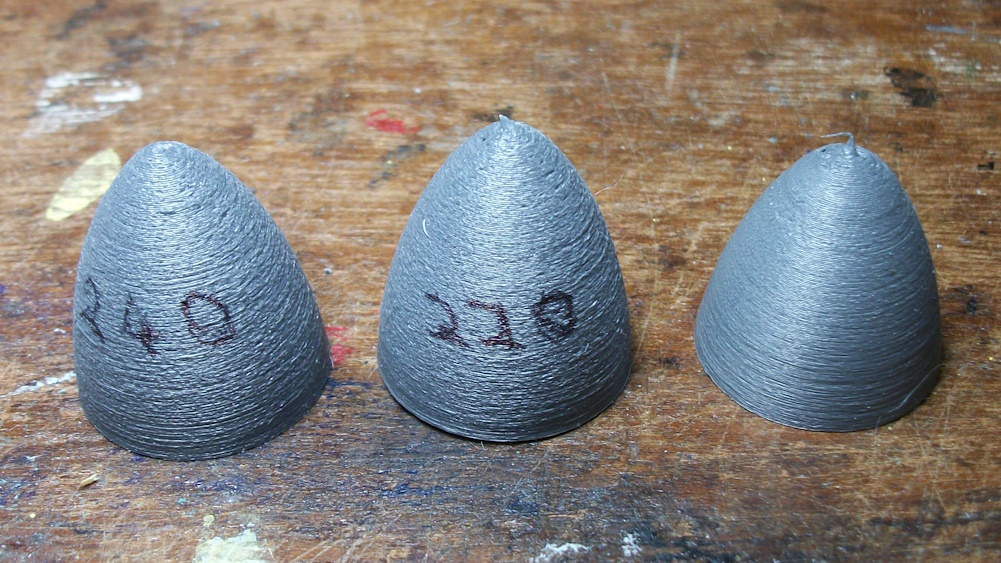
Maybe slightly better at 220C but nothing like as good as using PLA!
Then there are the issues of ABS lifting from the bed during printing.

It is up side down in this picture. That surface is supposed to be flat as it is a motor mount!
In PLA it sticks firmly to the bed so is flat!
As you have found printing ABS has its surface problems.
I printed a small cone in grey ABS at 240C.
It is pretty rough!
As a comparison I printed the same thing but at 220C and one at 190C in PLA.
Maybe slightly better at 220C but nothing like as good as using PLA!
Then there are the issues of ABS lifting from the bed during printing.
It is up side down in this picture. That surface is supposed to be flat as it is a motor mount!
In PLA it sticks firmly to the bed so is flat!
Thanks: Klipkopwildlife, jon.in.swansea
Please Log in or Create an account to join the conversation.
- Klipkopwildlife
-
Topic Author
- Offline
- Administrator
-
- I'm supposed to be retired!
10 Sep 2025 18:50 #314
by Klipkopwildlife
Do it now, you may never get another chance
Replied by Klipkopwildlife on topic 3D printing Widgets
ABS really needs to be in a heated chamber, with the electronics outside.
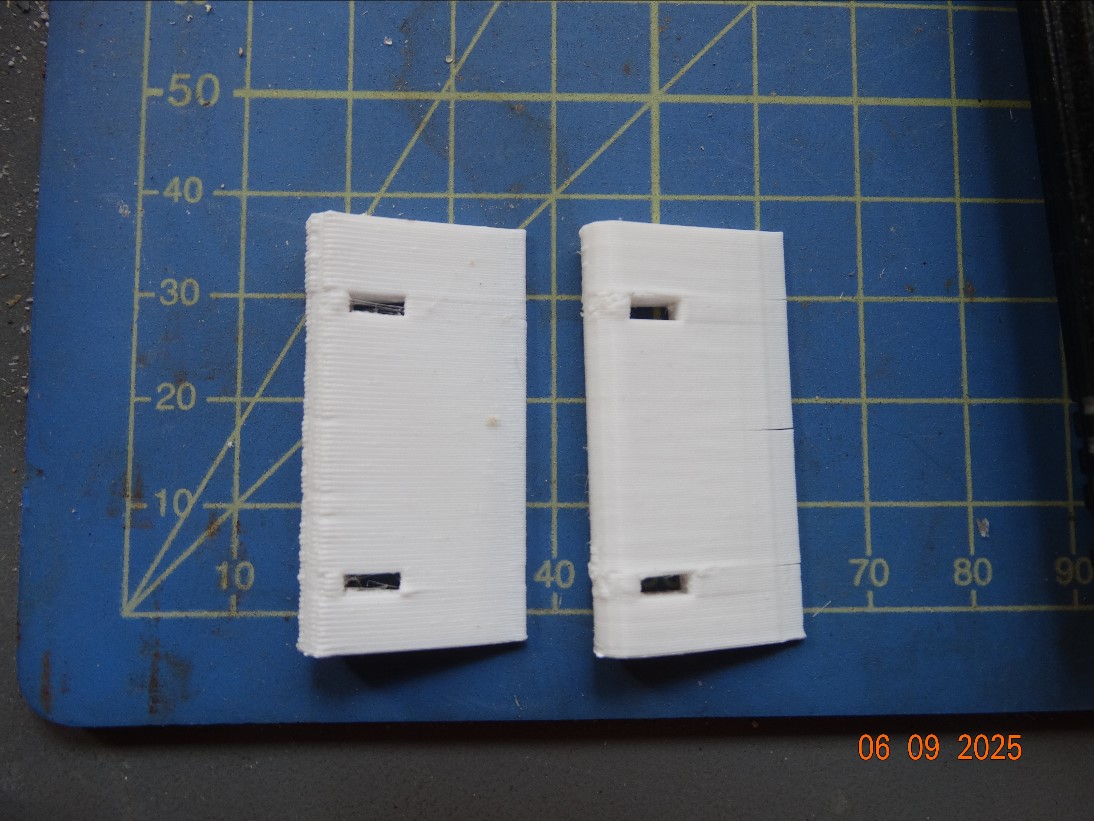
The ABS printed item is on the right, the splitting was caused by me not noticing that the fan was on at 20%
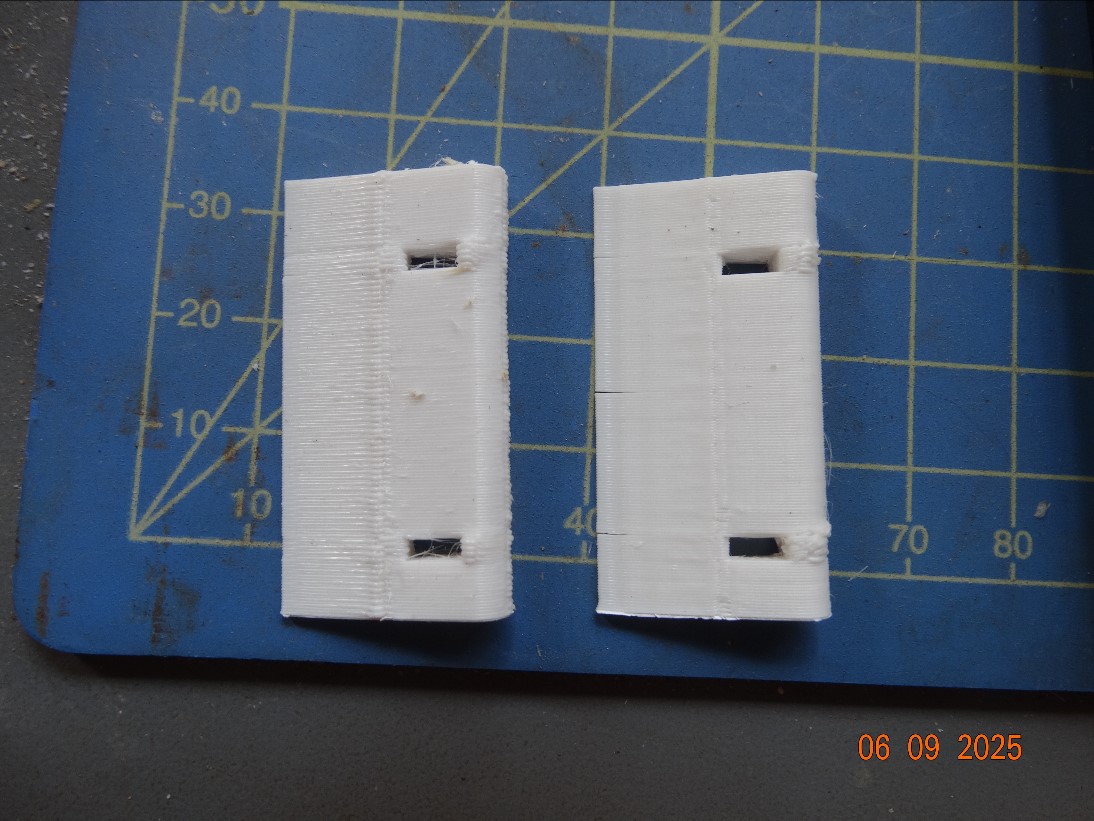
Ostensibly the settings were the same, the Prusa sliced item is on the left, obviously all things are not equal!
The ABS printed item is on the right, the splitting was caused by me not noticing that the fan was on at 20%
Ostensibly the settings were the same, the Prusa sliced item is on the left, obviously all things are not equal!
Do it now, you may never get another chance
Thanks: jon.in.swansea
Please Log in or Create an account to join the conversation.
- Magpie
-
- Offline
- Elite Member
-
Less
More
- Posts: 587
- Thank you received: 1048
10 Sep 2025 19:01 #315
by Magpie
Replied by Magpie on topic 3D printing Widgets
Using the Part Workbench I have called up some cones, They can be seen in FreeCad correctly positioned on a sketch & in the 3D representation but when I export them to an STL file they have disappeared when I call it up in Cura.
What have I missed?
What have I missed?
Thanks: Klipkopwildlife
Please Log in or Create an account to join the conversation.
Time to create page: 0.677 seconds